
Unlocking Scalable Ad & Promotion Management: Your Blueprint for a Flawless Database Design
Crafting a robust, flexible, and high-performance database schema to power your advertising and promotional activities effectively.
Key Insights for Your Ads & Promotions Database
- Modular Design for Scalability: Structuring your database with distinct, normalized tables for entities like campaigns, ads, and promotions ensures clarity and allows the system to grow efficiently without performance bottlenecks.
- Flexibility to Adapt: Incorporate mechanisms like JSON fields or Entity-Attribute-Value (EAV) patterns to accommodate diverse and evolving promotion types, rules, and targeting criteria without frequent schema alterations.
- Performance-Centric Architecture: Prioritize efficient data retrieval and processing through strategic indexing, partitioning of large datasets (especially performance metrics), and considering modern cloud-based data warehousing solutions for analytics.
Foundational Principles of Ad & Promotion Database Design
Designing a database for an ads and promotions module is a critical task that balances the need for data integrity, query performance, scalability, and flexibility. The goal is to create a system that can manage complex advertising campaigns, diverse promotional offers, and track their performance accurately, all while being able to adapt to new business requirements and growing data volumes. Several core principles guide this process:
- Normalization: Structuring data to minimize redundancy and improve data integrity by organizing it into well-defined tables with clear relationships. This typically involves breaking down complex entities into simpler ones.
- Modularity: Designing distinct tables for separate entities (e.g., Advertisers, Campaigns, Ads, Promotions) makes the schema easier to understand, maintain, and extend.
- Data Integrity: Enforcing rules through primary keys, foreign keys, constraints (e.g., NOT NULL, CHECK), and data types to ensure the accuracy and consistency of data.
- Query Efficiency: Optimizing for common query patterns through appropriate indexing, and sometimes strategic denormalization for read-heavy analytics workloads.
- Scalability: Building the schema with future growth in mind, considering techniques like partitioning for very large tables and choosing database technologies that can handle increasing loads.
- Extensibility: Allowing for the easy addition of new features, promotion types, or attributes without requiring major overhauls of the existing schema.
A well-thought-out database adhering to these principles will serve as a robust backbone for any ads and promotions module, enabling sophisticated marketing strategies and insightful analytics.
Core Table Structures for Your Ads & Promotions Module
The following table structures represent a comprehensive approach to managing ads and promotions. Each table is designed to hold specific information, ensuring data is organized logically and relationships are clearly defined.
Managing Advertisers and Clients
Advertisers / Clients Table
This table stores essential information about the entities (individuals or businesses) running or sponsoring the campaigns.
ClientID (PK): Unique identifier for the client or advertiser.ClientName: Name of the client/advertiser.ContactInformation: Email, phone number, etc.BillingDetails: Information relevant for invoicing.Industry: Industry the client belongs to.CreatedAt: Timestamp of record creation.UpdatedAt: Timestamp of last update.
Orchestrating Campaigns
Campaigns Table
Campaigns are overarching initiatives that group together various ads and promotions towards a common goal.
CampaignID (PK): Unique identifier for the campaign.ClientID (FK): Links to the Advertisers/Clients table.CampaignName: Descriptive name of the campaign.Objective: Goal of the campaign (e.g., brand awareness, lead generation, sales).StartDate: Date the campaign begins.EndDate: Date the campaign ends.Budget: Allocated budget for the campaign.Status: Current status (e.g., Planning, Active, Paused, Completed, Archived).CreatedAt: Timestamp of record creation.UpdatedAt: Timestamp of last update.
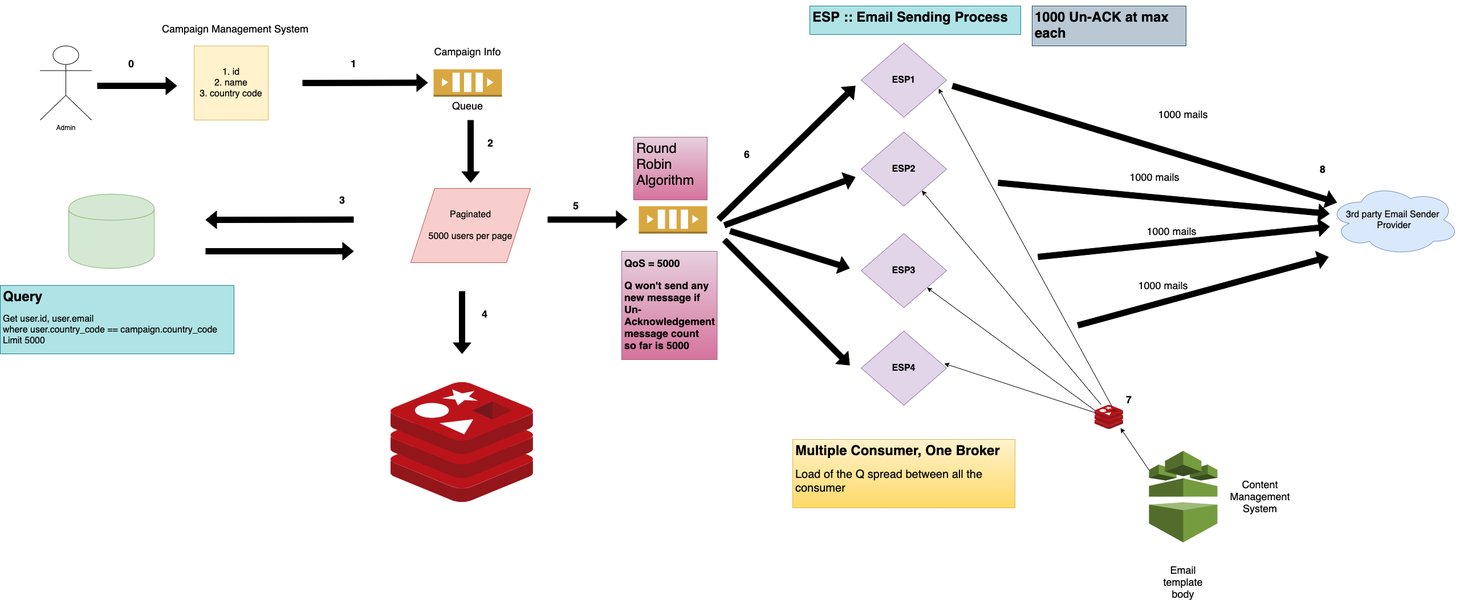
Visual representation of a campaign management system architecture.
Defining Promotions
Promotions Table
This table stores details about specific promotional offers, such as discounts, special deals, or bundles.
PromotionID (PK): Unique identifier for the promotion.CampaignID (FK, optional): Links to the Campaigns table if the promotion is part of a broader campaign.PromotionName: Name of the promotion (e.g., "Summer Sale 20% Off").PromotionType: Type of promotion (e.g., PercentageDiscount, FixedAmountDiscount, BuyOneGetOne, FreeShipping). Could be a foreign key to aPromotionTypeslookup table.Description: Detailed description of the promotion.DiscountValue: The monetary or percentage value of the discount.DiscountType: Specifies if value is 'Percentage' or 'FixedAmount'.StartDate: Date the promotion becomes active.EndDate: Date the promotion expires.EligibilityCriteria (JSON/TEXT): Stores complex rules for eligibility (e.g., minimum purchase, specific customer segments, applicable products). This allows for flexibility.RedemptionLimit: Maximum number of times the promotion can be redeemed in total.UsagePerCustomerLimit: Maximum times a single customer can use the promotion.Status: (e.g., Active, Inactive, Expired, Depleted).CreatedAt: Timestamp of record creation.UpdatedAt: Timestamp of last update.
PromotionAttributes Table (Optional EAV for Extreme Flexibility)
For highly variable promotion types, an Entity-Attribute-Value (EAV) model can be used. This offers maximum flexibility but can complicate queries.
PromotionAttributeID (PK): Unique identifier.PromotionID (FK): Links to the Promotions table.AttributeName: Name of the custom attribute (e.g., "RequiredProductCategory", "MinimumTierLevel").AttributeValue: Value of the custom attribute.
Managing Advertisements (Creatives)
Ads Table
This table holds information about individual ad creatives.
AdID (PK): Unique identifier for the advertisement.CampaignID (FK): Links to the Campaigns table.AdName: Name or title of the ad creative.AdType/AdFormat: Type of ad (e.g., Banner, Video, Text, SocialMediaPost). Could be FK to anAdFormatslookup table.CreativeAssetURL: Link or path to the ad's visual/media file.Headline: Primary text/headline of the ad.BodyText: Supporting text or description.CallToActionText: Text for the CTA button (e.g., "Learn More", "Shop Now").DestinationURL: Landing page URL when the ad is clicked.StartDate: When the ad starts running.EndDate: When the ad stops running.Status: (e.g., Active, Paused, Archived, PendingReview).CreatedAt: Timestamp of record creation.UpdatedAt: Timestamp of last update.
Tracking Ad Placements
Placements Table
Records where specific ads are displayed or promotional materials are distributed.
PlacementID (PK): Unique identifier for the placement.AdID (FK): Links to the Ads table.Channel: The platform or medium where the ad is placed (e.g., Facebook, Google Search, WebsiteBanner, Email).SpecificLocation: More detailed location within the channel (e.g., 'NewsFeed', 'RightSidebar', 'HomepageHeader').Cost: Cost associated with this specific placement (if applicable and tracked at this granularity).StartDate: Placement start date.EndDate: Placement end date.
Defining Target Audiences
TargetAudiences Table
Defines specific audience segments for targeted advertising or promotions.
TargetAudienceID (PK): Unique identifier for the audience segment.Name: Name of the audience segment (e.g., "Tech Enthusiasts NYC", "Returning Customers").Criteria (JSON/TEXT): Stores demographic, behavioral, or other criteria defining the audience (e.g., age range, location, interests, purchase history).CreatedAt: Timestamp of record creation.UpdatedAt: Timestamp of last update.
Ad_TargetAudience_Link Table (Junction Table)
Links ads to their target audiences, supporting a many-to-many relationship.
AdID (FK): Links to the Ads table.TargetAudienceID (FK): Links to the TargetAudiences table.- Primary Key: (
AdID,TargetAudienceID)
Monitoring Performance
PerformanceMetrics Table
Crucial for tracking the effectiveness of ads, promotions, and campaigns. This table can grow very large, so partitioning is often recommended.
MetricID (PK): Unique identifier for the metric record.EntityType: Type of entity this metric refers to (e.g., 'Ad', 'Promotion', 'Campaign', 'Placement').EntityID (FK): Identifier of the specific ad, promotion, or campaign.MetricDate: Date for which the metrics are recorded (granularity can be daily, hourly, etc.).Impressions: Number of times the ad/promotion was displayed.Clicks: Number of times the ad/promotion was clicked.Conversions: Number of desired actions (e.g., sales, sign-ups).Spend: Amount spent on the entity for the given period.Revenue: Revenue generated by the entity for the given period (if directly attributable).CTR (Calculated or Stored): Click-Through Rate.ConversionRate (Calculated or Stored): Conversion Rate.CostPerClick (CPC) (Calculated or Stored).CostPerAcquisition (CPA) (Calculated or Stored).RecordedAt: Timestamp of when the metric was logged.
Product-Specific Promotions
Products Table
If promotions apply to specific products (common in e-commerce).
ProductID (PK): Unique identifier for the product.ProductName: Name of the product.Description: Product description.Price: Standard price of the product.Category: Product category.SKU: Stock Keeping Unit.
Promotion_Product_Link Table (Junction Table)
Manages the many-to-many relationship between promotions and products (i.e., a promotion can apply to multiple products, and a product can be part of multiple promotions).
PromotionID (FK): Links to the Promotions table.ProductID (FK): Links to the Products table.- Primary Key: (
PromotionID,ProductID)
PromotionRedemptions Table
Tracks each instance a promotion is used or redeemed by a customer.
RedemptionID (PK): Unique identifier for the redemption event.PromotionID (FK): Links to the Promotions table.CustomerID (FK, if applicable): Links to a Customers table.OrderID (FK, if applicable): Links to an Orders table.RedemptionDate: Timestamp of when the promotion was redeemed.DiscountApplied: The actual discount amount applied in this instance.
Summary of Core Database Entities
The following table provides a high-level overview of the primary entities within the ads and promotions database and their core responsibilities:
| Entity Name | Primary Responsibility | Key Attributes |
|---|---|---|
| Advertisers/Clients | Manages information about who is running or funding the campaigns. | Client ID, Name, Contact Info, Billing Details |
| Campaigns | Organizes and groups ads and promotions under a common objective and budget. | Campaign ID, Name, Start/End Dates, Budget, Status, Objective |
| Promotions | Defines specific offers, discounts, or special deals. | Promotion ID, Type, Discount Details, Eligibility Criteria, Dates, Status |
| Ads (Creatives) | Stores information about individual advertisement assets. | Ad ID, Type, Creative Content, Headline, Destination URL, Dates |
| Placements | Tracks where ads or promotional materials are displayed. | Placement ID, Channel, Specific Location, Cost |
| Target Audiences | Defines specific user segments for targeting. | Audience ID, Name, Segmentation Criteria (JSON) |
| Performance Metrics | Records performance data (impressions, clicks, conversions, spend) for ads, promotions, and campaigns. | Metric ID, Entity ID, Date, Impressions, Clicks, Conversions, Spend |
| Products | Manages product information, relevant if promotions are product-specific. | Product ID, Name, Price, Category |
| Promotion Redemptions | Tracks individual uses of promotions by customers. | Redemption ID, Promotion ID, Customer ID, Date, Discount Applied |
Visualizing Design Priorities: A Comparative Look
When designing a database for ads and promotions, different aspects might be prioritized based on specific business needs or system scale. The radar chart below illustrates how different hypothetical design philosophies might weigh various factors such as scalability, flexibility, normalization, performance, extensibility, and maintainability. For instance, a rapidly evolving startup might prioritize flexibility and extensibility, while a large-scale enterprise system would heavily focus on scalability and performance. A well-rounded design aims for a good balance across all these critical areas.
Understanding Entity Relationships: A Mindmap View
The relationships between different entities in an ads and promotions database can be complex. A mindmap helps visualize these connections, showing how campaigns, ads, promotions, clients, products, and performance metrics interrelate. This visual overview aids in understanding the data flow and dependencies within the system. The central node represents the database itself, branching out to primary entities, which further detail their components and links.
(Name, Contact, Billing)"] id_campaigns["Campaigns"] id_camp_details["Campaign Details
(Name, Budget, Dates, Objective)"] id_camp_ads["(Links to) Ads"] id_camp_promos["(Links to) Promotions"] id_ads["Ads (Creatives)"] id_ad_details["Ad Details
(Name, Type, Content, URL)"] id_ad_placements["Placements
(Channel, Location)"] id_ad_targeting["Target Audiences
(Segments, Criteria)"] id_promotions["Promotions"] id_promo_details["Promotion Details
(Name, Type, Discount, Rules)"] id_promo_products["(Links to) Products (if applicable)"] id_promo_redemptions["Promotion Redemptions
(Usage Tracking)"] id_products["Products (Optional)"] id_prod_details["Product Information
(Name, Price, Category)"] id_performance["Performance Metrics"] id_perf_data["Data Points
(Impressions, Clicks, Conversions, Spend)"] id_perf_link_ad["(For) Ads"] id_perf_link_promo["(For) Promotions"] id_perf_link_camp["(For) Campaigns"]
Strategies for Scalability and Performance
Ensuring your ads and promotions database can scale and perform efficiently under load is paramount. This involves several key strategies:
Effective Indexing
Indexes are crucial for speeding up query performance. They should be strategically placed on:
- Primary Keys (PKs): Automatically indexed in most database systems.
- Foreign Keys (FKs): Essential for optimizing JOIN operations between tables.
- Frequently Queried Columns: Columns often used in
WHEREclauses,ORDER BYclauses, orGROUP BYclauses (e.g.,StartDate,EndDate,Status,EntityType,MetricDate). - Composite Indexes: Indexes on multiple columns can be beneficial for queries that filter on those specific combinations.
However, over-indexing can slow down write operations (INSERT, UPDATE, DELETE), so a balance must be struck.
Database Partitioning
For very large tables, especially time-series data like PerformanceMetrics or PromotionRedemptions, partitioning can significantly improve performance and manageability. Common partitioning strategies include:
- Range Partitioning: Often by date (e.g., monthly or quarterly partitions for
MetricDate). Queries filtering by date range can then scan only relevant partitions. - List Partitioning: By a categorical value (e.g.,
StatusorRegion, if applicable). - Hash Partitioning: Distributes data evenly across partitions based on a hash key, useful for distributing I/O.
Normalization vs. Denormalization
While normalization reduces data redundancy and improves integrity, highly normalized schemas can sometimes lead to complex queries with many JOINs. For read-heavy workloads, such as analytics and reporting dashboards, strategic denormalization might be considered:
- Pre-aggregated Data: Maintain summary tables with pre-calculated metrics (e.g., daily campaign performance summaries).
- Materialized Views: Store the results of complex queries for faster access.
This is a trade-off: denormalization can speed up reads but adds complexity to write operations and data consistency management.
Leveraging Cloud-Native Solutions
Modern cloud platforms offer powerful, scalable database and data warehousing solutions that are well-suited for demanding ad tech workloads:
- Managed Relational Databases: Services like Amazon RDS, Azure SQL Database, or Google Cloud SQL provide scalable relational databases with features like automated backups, patching, and read replicas.
- Data Warehouses: Solutions like Amazon Redshift, Google BigQuery, or Snowflake are designed for analytical queries on massive datasets. They are ideal for storing and analyzing
PerformanceMetrics. - Scalable Storage: Technologies like Amazon S3 Tables, especially when used with formats like Apache Iceberg or Apache Hudi, provide optimized storage for analytical workloads, allowing efficient querying of large tabular datasets and transactional consistency for data lakes.
Connection Pooling and Caching
- Connection Pooling: Reusing database connections reduces the overhead of establishing new connections for each request, improving application performance.
- Caching: Implementing caching layers (e.g., Redis, Memcached) for frequently accessed, relatively static data (like active campaign details, popular promotion rules) can significantly reduce database load and improve response times.
Understanding the Ad Tech Ecosystem
The database for ads and promotions is a critical component within a larger ad tech ecosystem. This ecosystem involves various processes, from ad creation and targeting to delivery, click tracking, and performance analysis. Understanding this broader context helps in designing a database that effectively supports all necessary functions. The video below provides an overview of the system design for an ad click ecosystem, which can offer valuable insights into the data flows and interactions your database will need to handle.
High-level design and data flow for an ad click ecosystem, illustrating the broader context for your database.
Frequently Asked Questions (FAQ)
How can the database design handle diverse types of promotions with varying attributes?
There are a few effective approaches:
- JSON Field: Include a flexible
EligibilityCriteriaorAttributesfield (using JSON or XML data type) in thePromotionstable. This allows storing varied structures of rules and attributes for each promotion type without altering the table schema. - Entity-Attribute-Value (EAV) Model: Create a separate
PromotionAttributestable (PromotionID,AttributeName,AttributeValue). This is highly flexible but can make querying more complex and less performant for some use cases. - Type-Specific Tables: If there are a few distinct promotion types with significantly different structures, you could have a base
Promotionstable and separate tables for attributes specific to each type, linked byPromotionID. This is less flexible than JSON/EAV but can be more performant.
Often, a combination is used, such as a main PromotionType field and a JSON field for custom attributes specific to that type.
What are the best practices for indexing in this ads and promotions database?
Effective indexing is key to performance:
- Index Foreign Keys: All foreign key columns (e.g.,
CampaignIDin theAdstable,AdIDinPerformanceMetrics) should be indexed to speed up JOIN operations. - Index Columns in WHERE Clauses: Columns frequently used for filtering (e.g.,
Status,StartDate,EndDate,PromotionType) are good candidates for indexes. - Index for Sorting/Grouping: Columns used in
ORDER BYorGROUP BYclauses can benefit from indexing. - Composite Indexes: For queries that filter on multiple columns simultaneously (e.g.,
WHERE CampaignID = X AND Status = 'Active'), a composite index on (CampaignID,Status) can be very effective. - Covering Indexes: If an index contains all the columns needed for a query, the database can answer the query using only the index, avoiding table access.
- Monitor and Analyze: Use database tools to monitor query performance and identify missing or unused indexes. Avoid over-indexing, as it can slow down write operations (INSERT, UPDATE, DELETE).
How can this database design support real-time or near real-time analytics?
Supporting real-time analytics often involves a hybrid approach:
- Streaming Data Ingestion: Use tools like Apache Kafka, Amazon Kinesis, or Redpanda to stream ad event data (impressions, clicks) into the system.
- Fast Ingestion Layer: This data can be initially written to a fast, scalable data store optimized for writes (which might be a NoSQL database or a staging area in a data lake).
- Batch and Stream Processing: Use stream processing engines (e.g., Apache Flink, Spark Streaming) to perform initial aggregations or transformations on the incoming data.
- Analytical Data Warehouse: Load processed and aggregated data into a scalable data warehouse (like Amazon Redshift, Google BigQuery, Snowflake) designed for complex analytical queries. The
PerformanceMetricstable would typically reside here or be fed into it. - Optimized Querying: Ensure the analytical database is well-indexed and partitioned. Materialized views or summary tables can provide quick access to frequently requested aggregations.
- Caching: Cache dashboard results or common query results to reduce load on the analytical database.
For true real-time dashboards, a portion of recent data might be queried from a stream processing system or a fast operational data store, while historical data comes from the data warehouse.
Should I use SQL or NoSQL for an ads/promotions module?
The choice between SQL and NoSQL often depends on the specific requirements and scale. Many ad/promotion systems use a hybrid approach:
- SQL Databases (Relational):
- Strengths: ACID properties (Atomicity, Consistency, Isolation, Durability) are crucial for transactional data like campaign budgets, promotion redemptions, and financial tracking. Strong for structured data and complex relationships (e.g., linking campaigns to ads, promotions to products). Well-suited for the core management aspects (defining campaigns, ads, promotions).
- Considerations: Can be challenging to scale horizontally for extremely high write throughput or very flexible schemas, though modern relational databases have improved significantly.
- NoSQL Databases:
- Strengths: Offer high scalability (especially horizontal), flexibility in schema (good for rapidly evolving ad formats or promotion attributes), and can handle high-volume, high-velocity data like ad impressions, clicks, or user profiles for targeting. Different types of NoSQL (document, key-value, column-family, graph) suit different needs.
- Considerations: Eventual consistency might be an issue for some transactional data. Complex joins and ad-hoc queries can be more challenging than in SQL.
Common Approach: Use a SQL database for the core, structured, and transactional data (campaign definitions, advertiser info, promotion rules). For high-volume event data (impressions, clicks, user activity logs) or highly flexible/unstructured data (user profiles, ad creative metadata), a NoSQL database or a data lake solution might be more appropriate. Performance metrics are often aggregated and stored in analytical SQL databases (data warehouses).
How do I manage relationships like "many products can have many promotions"?
Many-to-many relationships, such as one where multiple products can be eligible for multiple promotions (and vice-versa), are typically handled using a junction table (also known as an associative table, bridge table, or cross-reference table).
For the "products and promotions" scenario, you would create a table like Promotion_Product_Link with at least two columns:
PromotionID (FK): A foreign key referencing thePromotionIDin yourPromotionstable.ProductID (FK): A foreign key referencing theProductIDin yourProductstable.
The primary key of this junction table is usually a composite key made up of both PromotionID and ProductID. This ensures that each combination of a promotion and a product is unique.
Example:
If "Promotion A" applies to "Product X" and "Product Y", and "Promotion B" applies to "Product Y" and "Product Z", the Promotion_Product_Link table would have entries like:
- (Promotion_A_ID, Product_X_ID)
- (Promotion_A_ID, Product_Y_ID)
- (Promotion_B_ID, Product_Y_ID)
- (Promotion_B_ID, Product_Z_ID)
This structure allows you to efficiently query which products are part of a promotion, or which promotions apply to a specific product, by joining through this junction table. You can also add other attributes to the junction table if needed, such as a specific discount for that product within that promotion, if it varies.
Recommended Further Exploration
To delve deeper into specific aspects of managing and optimizing your ads and promotions system, consider exploring these related topics:
- How can I design a data model specifically for tracking real-time ad performance metrics effectively?
- What are the most effective strategies for database sharding in a high-traffic advertising platform?
- How can A/B testing capabilities be integrated into an ads and promotions database schema?
- What advanced techniques can be used for personalizing promotions based on user behavior data stored in the database?
References

Last updated May 9, 2025