
Building a Robust CLI Password Security Tool: From Entropy to Leak Detection
A guide to designing, implementing, and evaluating modern password security checks for your university project.
Designing secure authentication systems is crucial in today's digital landscape. This guide will walk you through the steps required for Task 1 of your CSCI262 project, focusing on creating a command-line interface (CLI) tool to assess password strength and check for potential leaks using entropy calculation, Bloom filters, and integration with Have I Been Pwned (HIBP).
Highlights: Key Aspects of Your Password Security Tool
- Password Strength Assessment: Learn to calculate password entropy to quantitatively measure its unpredictability and compare it against security thresholds.
- Efficient Leak Checking: Discover how to implement Bloom filters for space-efficient, probabilistic checking of passwords against large lists of known leaked credentials.
- Privacy-Preserving Online Checks: Understand how to leverage the Have I Been Pwned (HIBP) API using k-Anonymity to check for password compromises without exposing the full password.
Designing Your CLI Secure Authentication Tool
Core Functionality and User Interaction
Your command-line tool will serve as the primary interface for users to check the security of their chosen passwords. The design should prioritize secure input handling, clear feedback, and actionable advice.
Accepting Password Input Securely
It's vital that the password entered by the user is not displayed on the screen (echoed) or stored in logs. Most programming languages offer libraries for this:
- Python: The
getpassmodule provides thegetpass()function. - Other Languages: Look for equivalent functions that read from the standard input without echoing characters (e.g., using terminal control features).
The prompt should be clear, like: Enter your password:
Calculating Password Entropy
Entropy quantifies the randomness or unpredictability of a password, typically measured in bits. Higher entropy means a stronger password against brute-force attacks.
The Entropy Formula
A common way to estimate entropy is using the formula:
\[ E = L \times \log_2(N) \]Where:
- \( E \) = Entropy in bits
- \( L \) = Length of the password
- \( N \) = Size of the effective character pool (the number of possible characters used)
Determining the Character Pool (N)
The size \( N \) depends on the types of characters present in the password:
- Lowercase letters (a-z): 26
- Uppercase letters (A-Z): 26
- Digits (0-9): 10
- Special symbols (!@#$%^&*, etc.): ~32 (can vary)
If a password uses lowercase, uppercase, and digits, \( N = 26 + 26 + 10 = 62 \). If it also includes symbols, \( N \) could be \( 62 + 32 = 94 \) or more.
Example: A 10-character password using lowercase, uppercase, and digits has an entropy of \( 10 \times \log_2(62) \approx 10 \times 5.95 = 59.5 \) bits.
Advanced Considerations: More sophisticated tools (like zxcvbn) also penalize common patterns (sequences like "abc", repeats like "aaa", keyboard patterns like "qwerty", dictionary words) to provide a more realistic strength estimate.
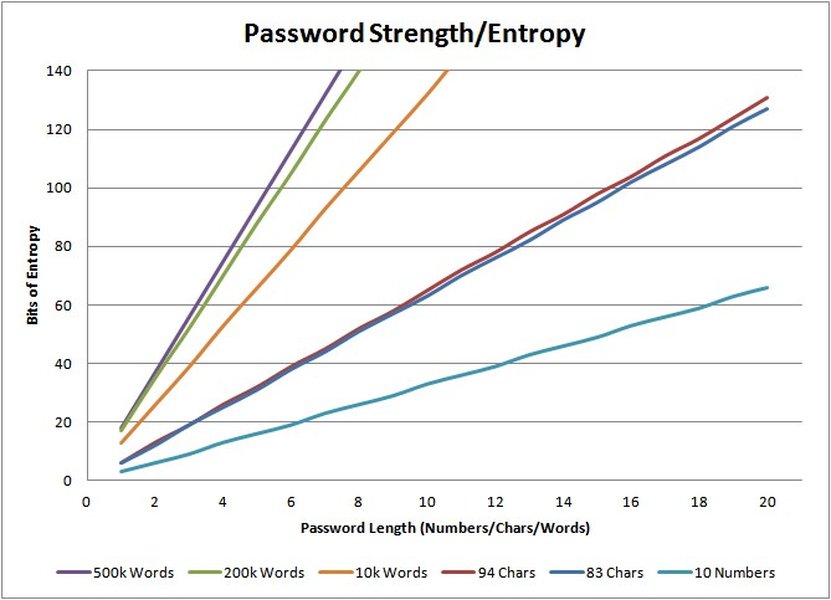
Visualizing how password length and character set complexity contribute to entropy.
Comparing Entropy to a Threshold
You need to compare the calculated entropy against a predefined threshold to classify the password's strength. Your project specifies a threshold of 30 bits. While this is a starting point, modern recommendations often suggest higher values (e.g., 60-80 bits or more for critical systems).
- If \( E \ge 30 \): The password meets the minimum threshold.
- If \( E < 30 \): The password is considered weak.
Providing Actionable Advice
If the password's entropy is below the threshold, the tool must provide clear, helpful advice. This guidance should direct the user on how to improve their password strength:
Password entropy: [Calculated Entropy] bits (Weak).
Advice:
- Increase password length (aim for 12+ characters).
- Include a mix of uppercase and lowercase letters.
- Add digits (0-9).
- Incorporate special symbols (e.g., !@#$%^&*).
- Avoid common words, names, dates, or predictable patterns.
Core CLI Program Pseudocode
# Import necessary modules (e.g., for secure input, math)
IMPORT getpass_module
IMPORT math_module

FUNCTION calculate_entropy(password):
    length = GET_LENGTH(password)
    IF length == 0:
        RETURN 0

    # Determine character set used
    has_lowercase = CONTAINS_LOWERCASE(password)
    has_uppercase = CONTAINS_UPPERCASE(password)
    has_digits = CONTAINS_DIGITS(password)
    has_symbols = CONTAINS_SYMBOLS(password)

    # Calculate pool size N
    pool_size = 0
    IF has_lowercase: pool_size = pool_size + 26
    IF has_uppercase: pool_size = pool_size + 26
    IF has_digits: pool_size = pool_size + 10
    IF has_symbols: pool_size = pool_size + 32 # Adjust as needed

    IF pool_size == 0: RETURN 0 # Should not happen with non-empty password

    # Calculate entropy
    entropy = length * math_module.LOG2(pool_size)

    # Optional: Add penalties for patterns (simplification)
    # IF CONTAINS_SEQUENCES(password): entropy = entropy - 10
    # IF CONTAINS_REPEATS(password): entropy = entropy - 5

    RETURN entropy

FUNCTION main():
    DISPLAY "Enter your password: "
    password = getpass_module.GET_PASSWORD_SECURELY()

    entropy = calculate_entropy(password)
    threshold = 30.0

    DISPLAY "Password entropy: " + FORMAT(entropy) + " bits"

    IF entropy < threshold:
        DISPLAY "(Status: Weak)"
        DISPLAY "Advice:"
        DISPLAY "- Increase password length (aim for 12+ characters)."
        DISPLAY "- Include a mix of uppercase and lowercase letters."
        DISPLAY "- Add digits (0-9)."
        DISPLAY "- Incorporate special symbols (e.g., !@#$%^&*)."
        DISPLAY "- Avoid common words, names, dates, or predictable patterns."
    ELSE:
        DISPLAY "(Status: Meets minimum threshold)"

    # --- Placeholder for Bloom Filter and HIBP checks ---
    # check_bloom_filter(password)
    # check_hibp(password)

    END # Do not store or log the password
Implementing a Bloom Filter for Leaked Password Checks
Efficiently Checking Against Known Breaches
A Bloom filter is a probabilistic data structure that's highly space-efficient for checking if an element is *possibly* in a set or *definitely not* in the set. It's ideal for checking if a user's password appears in a large list of leaked passwords (like your LeakedPwd.txt) without storing the entire list or the passwords themselves, thus enhancing privacy.
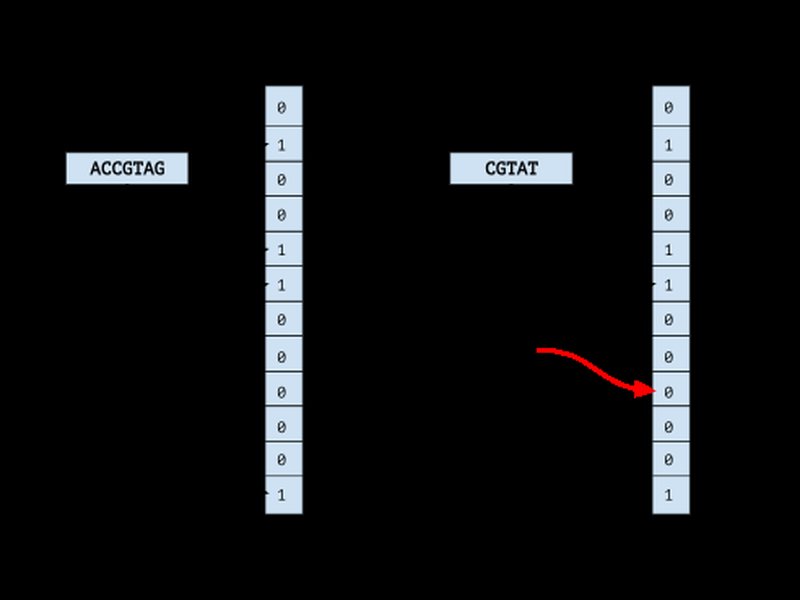
A Bloom filter uses multiple hash functions to map an element to several bits in an array.
How it Works
- Initialization: Create a bit array (e.g., of size
m) initialized to all zeros. Choosekdifferent hash functions. - Insertion (Adding Leaked Passwords): For each password in
LeakedPwd.txt:- Hash the password using each of the
khash functions. - Each hash function produces an index (modulo
m). - Set the bits at these
kindices in the bit array to 1.
- Hash the password using each of the
- Querying (Checking User Password): For the user's input password:
- Hash the password using the same
khash functions. - Check the bits at the resulting
kindices in the array. - If all corresponding bits are 1, the password is probably in the leaked set (could be a false positive).
- If any of the corresponding bits is 0, the password is definitely not in the leaked set (no false negatives).
- Hash the password using the same
Key Trade-offs: The size of the bit array (m) and the number of hash functions (k) determine the filter's space usage and the probability of false positives. Larger arrays and more hash functions reduce false positives but increase space and computation time.
Hashing Passwords: Before inserting into or querying the Bloom filter, it's crucial to hash the passwords (e.g., using SHA-1 or SHA-256). You insert/query the *hashes*, not the plain text passwords.
Pseudocode for Bloom Filter Operations
# --- Bloom Filter Parameters ---
CONSTANT m = 1000000  # Size of the bit array (example)
CONSTANT k = 3        # Number of hash functions (example)
GLOBAL bit_array = ARRAY[m] INITIALIZED WITH 0
GLOBAL hash_functions = [hash_func1, hash_func2, hash_func3] # List of k hash functions

# --- Function to Insert a Hashed Password ---
FUNCTION insert_into_bloom(password_hash):
    FOR i FROM 0 TO k-1:
        index = hash_functions[i](password_hash) MOD m
        bit_array[index] = 1

# --- Function to Query for a Hashed Password ---
FUNCTION query_bloom(password_hash):
    FOR i FROM 0 TO k-1:
        index = hash_functions[i](password_hash) MOD m
        IF bit_array[index] == 0:
            RETURN "Definitely NOT in set" # Found a 0 bit
    RETURN "Possibly in set" # All bits were 1

# --- Integration into your CLI tool ---

# Step 1: Pre-populate the filter (done once)
# READ passwords FROM "LeakedPwd.txt"
# FOR each leaked_password IN passwords:
#     hashed_leaked_pwd = HASH_FUNCTION(leaked_password) # e.g., SHA-256
#     insert_into_bloom(hashed_leaked_pwd)

# Step 2: Check user input (within the main function after entropy check)
FUNCTION check_bloom_filter(user_password):
    hashed_user_pwd = HASH_FUNCTION(user_password) # Use the same hash function
    result = query_bloom(hashed_user_pwd)
    IF result == "Possibly in set":
        DISPLAY "Warning: This password (or its hash) might be in a known list of leaked passwords. Choose a different one."
    ELSE:
        DISPLAY "Info: This password was not found in the local leaked password check."
Integrating with Have I Been Pwned (HIBP)
Leveraging Online Breach Data Securely
Have I Been Pwned (HIBP) is a reputable service created by security expert Troy Hunt that aggregates data from numerous breaches, allowing users and services to check if email addresses or passwords have been compromised.
The Pwned Passwords API
HIBP offers a specific "Pwned Passwords" API designed for checking passwords against its massive database (billions of entries) without requiring you to send the actual password.
k-Anonymity Model
The API uses a technique called k-Anonymity to protect user privacy:
- Hashing: Calculate the SHA-1 hash of the user's password. (Note: While SHA-1 is weak for general hashing, it's used here as part of the k-Anonymity protocol defined by HIBP).
- Prefix Extraction: Take only the first 5 characters of the hexadecimal SHA-1 hash.
- API Query: Send *only* this 5-character prefix to the HIBP API endpoint (
https://api.pwnedpasswords.com/range/{prefix}). - Response: The API returns a list of all SHA-1 hash *suffixes* (the remaining 35 characters) in its database that start with the provided 5-character prefix, along with the number of times each full hash appeared in breaches.
- Local Comparison: Your CLI tool compares the full SHA-1 hash of the user's password against the list of suffixes received from the API. If a match is found, the password has been pwned.
This process ensures that the full password or its complete hash is never transmitted to the HIBP service, significantly enhancing privacy.
Integration Steps in Your CLI Tool
- After the entropy and Bloom filter checks, calculate the SHA-1 hash of the input password.
- Extract the first 5 characters of the hash.
- Make an HTTPS GET request to the HIBP API endpoint using this prefix.
- Parse the response (a list of hash suffixes and counts).
- Compare the remaining 35 characters of your password's SHA-1 hash with the suffixes in the response.
- If a match occurs, inform the user: "Warning: This password has appeared in a data breach tracked by Have I Been Pwned. It is strongly recommended to choose a different password."
Remember to handle potential network errors and respect HIBP's API rate limits.
Visualizing Password Security Components
Mindmap Overview
This mindmap provides a visual summary of the core components involved in building your secure authentication tool, from initial design to advanced checks.
(e.g., getpass)"] id1_2["Entropy Calculation"] id1_2_1["Formula: L * log2(N)"] id1_2_2["Character Sets (L/U/D/S)"] id1_2_3["Pattern Penalties (Optional)"] id1_3["Threshold Comparison
(e.g., 30 bits)"] id1_4["Actionable User Advice"] id2["Leaked Password Check"] id2_1["Bloom Filter Implementation"] id2_1_1["Space-Efficient & Probabilistic"] id2_1_2["Bit Array & Hash Functions"] id2_1_3["Insertion (LeakedPwd.txt hashes)"] id2_1_4["Querying (User password hash)"] id2_1_5["Handles False Positives"] id2_2["Have I Been Pwned (HIBP) API"] id2_2_1["Online Breach Database"] id2_2_2["k-Anonymity Model"] id2_2_3["SHA-1 Hash Prefix Query"] id2_2_4["Local Suffix Comparison"] id2_2_5["Privacy-Preserving"] id3["Technical Report"] id3_1["Page 1: Intro & Entropy"] id3_2["Page 2: Bloom Filters & HIBP"] id3_3["Page 3: Conclusion & Evaluation"]
Comparing Security Check Methods
The radar chart below offers a comparative view of different password checking techniques based on several key factors. Note that these are qualitative assessments to illustrate trade-offs.
This chart highlights that different methods excel in different areas. For instance, entropy checks are fast and private but may not catch known leaked passwords. HIBP is highly accurate for known leaks but relies on an external service. Bloom filters offer a balance of local checking, speed, and space efficiency, albeit with the possibility of false positives.
Enhancing Understanding with Video
Building a Password Strength Checker
Visual learning can be very effective. The following video demonstrates building a password strength checker, touching upon concepts similar to the entropy calculation discussed earlier. While it might use different specific techniques or libraries (like machine learning as mentioned in one title, or specific JavaScript/Python implementations), watching how such a tool is constructed can provide valuable practical insights for your own CLI tool development.
This video provides a practical walkthrough of creating a password strength checker in Python, relevant to the CLI tool design aspect of your project.
Feature Comparison Table
This table summarizes the key characteristics of the different password security checks discussed:
| Feature | Entropy Calculation | Bloom Filter (Local Leak Check) | HIBP API Check |
|---|---|---|---|
| Check Type | Quantitative Strength Analysis | Probabilistic Set Membership | Deterministic Breach Check (via k-Anonymity) |
| Primary Goal | Measure password unpredictability against brute-force | Check if password hash is likely in a local leaked list | Check if password hash is definitively in a global breach database |
| Data Source | Password characteristics (length, character set) | Pre-compiled list of leaked password hashes (e.g., LeakedPwd.txt) |
HIBP online database |
| Privacy | High (local calculation) | High (local check on hashes, data obfuscated in filter) | High (k-Anonymity prevents full hash transmission) |
| Accuracy | Measures theoretical strength; doesn't know about leaks | No false negatives; potential for false positives | High accuracy for known breaches listed by HIBP |
| Dependency | None (self-contained logic) | Requires pre-built filter from a leaked list | Requires internet connectivity and HIBP API availability |
Drafting Your 3-Page Technical Report
Structure and Content Outline
Your technical report should clearly document the design, implementation details, and rationale behind your secure authentication tool. Here’s a suggested outline:
Page 1: Introduction and Password Strength Assessment
- Title Page Elements: Project Title, Your Name, Course (CSCI262), Date.
- Introduction (approx. 0.5 page):
- State the importance of robust password security in modern systems.
- Introduce the objective of the project: designing and evaluating a secure authentication tool.
- Briefly outline the components: CLI interface, entropy calculation, leaked password checking (Bloom filter, HIBP).
- Mention the scope of Task 1.
- Password Strength Assessment (approx. 0.5 page):
- Explain the concept of password entropy as a metric for strength.
- Detail the formula used: \( E = L \times \log_2(N) \). Explain \(L\) and \(N\).
- Discuss the character sets considered (lowercase, uppercase, digits, symbols).
- Describe the chosen entropy threshold (30 bits) and its significance.
- Explain the design of the CLI for input and output, including secure input handling (
getpass) and the advice mechanism for weak passwords. - Optionally include the core entropy calculation pseudocode.
Page 2: Leaked Password Checking Mechanisms
- Bloom Filters for Local Leak Checking (approx. 0.5 page):
- Introduce Bloom filters: purpose (space-efficient set membership testing), probabilistic nature.
- Explain the advantages (speed, space, privacy) and disadvantage (false positives).
- Describe the implementation process: initializing the bit array, choosing hash functions (
k), populating the filter with hashes fromLeakedPwd.txt. - Explain the querying process for a user's password hash.
- Include the pseudocode for
insert_into_bloomandquery_bloom. - Discuss the choice of parameters (
m,k) and their impact.
- Integration with Have I Been Pwned (HIBP) (approx. 0.5 page):
- Explain what HIBP and its Pwned Passwords database are.
- Describe the HIBP Pwned Passwords API and its function.
- Detail the k-Anonymity model: SHA-1 hashing, 5-character prefix query, local suffix comparison. Emphasize the privacy benefits.
- Outline the steps for integrating the HIBP check into the CLI tool.
- Mention the need for handling API responses and potential errors.
Page 3: Evaluation Considerations and Conclusion
- Evaluation Considerations (approx. 0.3 page):
- Briefly discuss how the tool could be evaluated (though evaluation might be a later project phase).
- Mention aspects like: testing with diverse passwords (strong, weak, leaked), measuring Bloom filter performance (false positive rate, speed), assessing HIBP integration reliability, evaluating the clarity of user advice.
- Synergy of Checks (approx. 0.2 page):
- Discuss how combining entropy, Bloom filter, and HIBP checks provides a more comprehensive assessment than any single method alone.
- Conclusion (approx. 0.3 page):
- Summarize the key features and design principles of the developed CLI tool.
- Reiterate the importance of multi-faceted password security checks.
- Briefly mention potential future enhancements (e.g., adding checks for dictionary words, improving pattern detection, GUI version).
- References (approx. 0.2 page):
- List any external libraries, APIs (HIBP), academic papers, or significant online resources consulted (using a standard citation format). Include key URLs provided in the context.
Frequently Asked Questions (FAQ)
What exactly is password entropy?
Password entropy is a measurement, typically in bits, of how unpredictable a password is. It quantifies the randomness based on the password's length and the variety of characters it uses (e.g., lowercase, uppercase, numbers, symbols). A higher entropy value indicates that it would take significantly more guesses, on average, for an attacker to crack the password using brute-force methods. It's a theoretical measure of strength against guessing.
Why use a Bloom filter instead of just storing leaked password hashes?
Bloom filters offer significant space savings compared to storing a raw list of hashes, especially when dealing with massive datasets (millions or billions of leaked passwords). While a hash list allows exact matching, a Bloom filter uses a much smaller bit array. The trade-off is the possibility of false positives (incorrectly indicating a password *might* be leaked when it isn't), but it guarantees no false negatives (if it says a password is *not* present, it's definitely not). This makes them very efficient for quick, preliminary checks.
Is checking passwords with Have I Been Pwned (HIBP) safe?
Yes, using the HIBP Pwned Passwords API is designed to be safe due to its use of the k-Anonymity model. You only send the first 5 characters of the password's SHA-1 hash to HIBP. HIBP returns all hash suffixes matching that prefix. The actual comparison happens locally on your machine. This means neither your full password nor its complete hash is ever transmitted over the internet to HIBP, protecting user privacy while still allowing checks against their extensive breach database.
What is a good entropy threshold? Is 30 bits enough?
While 30 bits might be a minimum baseline for a project requirement, it's generally considered quite low by modern standards. The feasibility of cracking passwords depends heavily on the attacker's resources. Many organizations and security experts recommend significantly higher entropy, often in the range of 60-80 bits or even higher (>100 bits) for sensitive accounts. A higher entropy value provides a much larger margin of safety against advancements in computing power and cracking techniques. Relying solely on entropy also isn't sufficient; checking against known leaks (via Bloom filters or HIBP) is equally important.
Recommended Reading & Next Steps
- Explore how to optimize Bloom filter parameters (size 'm' and hash count 'k') based on the expected number of items and desired false positive rate.
- Investigate the differences between various password hashing algorithms (e.g., SHA-256, bcrypt, Scrypt, Argon2) and why modern key derivation functions are preferred for password storage.
- Learn how to implement more sophisticated password strength estimation using libraries like zxcvbn, which incorporate pattern matching and dictionary checks beyond simple entropy.
- Review best practices for developing secure command-line applications, including secure input/output handling, dependency management, and error handling.
References
 detect-respond.blogspot.com
Last updated May 4, 2025