
Unlock the Power of T-SQL: Building Your Complete Database from Scratch
A comprehensive guide to creating SQL Server databases, tables, constraints, and advanced objects using T-SQL.
This guide provides a detailed T-SQL script designed to create a fully functional SQL Server database tailored to specific requirements. It demonstrates how to structure your database logically with schemas, build tables based on an Entity Relationship Diagram (ERD) model, and enforce data integrity through various constraints. Furthermore, it covers essential physical design elements like indexes, views, functions, stored procedures, and triggers, ensuring a robust and efficient database implementation.
Essential Insights
- Comprehensive Structure: Learn how to create a database, organize it with schemas, and define tables with relationships reflecting a logical model.
- Robust Data Integrity: Understand and implement various constraints (Primary Key, Composite Key, Foreign Key, CHECK, NOT NULL, UNIQUE) to ensure data accuracy and consistency.
- Advanced Objects: Explore the creation and use of indexes, views, functions, stored procedures, and triggers to enhance performance, security, and automation.
Step 1: Database and Schema Foundation
Laying the Groundwork
The first step is creating the database itself, named according to your requirement (using your student ID). Subsequently, we define schemas to logically group related database objects like tables and views. This organization enhances maintainability and clarity.
Database Creation
The CREATE DATABASE statement initializes the database. Remember to replace YourStudentID with your actual student ID. We switch context to the newly created database using the USE statement for subsequent operations.
-- Ensure execution context is the master database
USE master;
GO

-- Drop the database if it already exists (useful for testing)
-- IF DB_ID('YourStudentID') IS NOT NULL
--     DROP DATABASE YourStudentID;
-- GO

-- Create the database (Replace 'YourStudentID' with your actual student ID)
CREATE DATABASE YourStudentID;
GO

-- Switch to the newly created database
USE YourStudentID;
GO
Schema Definition
Schemas act like folders within your database. Here, we create schemas such as HumanResources and ProjectManagement to organize tables related to employees and projects, respectively.
-- Create schemas for logical organization
CREATE SCHEMA HumanResources;
GO
CREATE SCHEMA ProjectManagement;
GO
-- Add more schemas as needed based on your ERD
-- CREATE SCHEMA Sales;
-- GO
Step 2: Defining Tables and Enforcing Integrity with Constraints
Building the Core Structure
This section focuses on creating tables based on a hypothetical ERD, incorporating various constraints to enforce data rules and relationships. These constraints are crucial for maintaining data integrity.
Example Table: Employees
This table stores employee information, demonstrating several key constraints:
- Primary Key & Auto Number:
EmployeeIDuniquely identifies each employee and auto-increments (IDENTITY(1,1)). - Null Constraint:
FirstNameandLastNameare mandatory (NOT NULL). - Phone Number Format: A
CHECKconstraint ensuresPhoneNumberfollows a specific pattern (e.g., 'XXX-XXX-XXXX'). - Date Constraint:
HireDatecannot be a future date (CHECK (HireDate <= GETDATE())).GETDATE()retrieves the current system date and time. - Unique Constraint:
Emailmust be unique across all employees.
-- Create the Employees table within the HumanResources schema
CREATE TABLE HumanResources.Employees (
    EmployeeID INT IDENTITY(1,1) NOT NULL, -- Primary Key with Auto Number Generation
    FirstName NVARCHAR(50) NOT NULL,       -- Null Constraint: Required field
    LastName NVARCHAR(50) NOT NULL,        -- Null Constraint: Required field
    Email NVARCHAR(100) NOT NULL,          -- Required and will have a unique constraint added
    PhoneNumber VARCHAR(15) NULL,          -- Allows NULL but format checked if provided
    HireDate DATE NOT NULL,                -- Null Constraint and Date Constraint

    CONSTRAINT PK_Employees PRIMARY KEY (EmployeeID), -- Define Primary Key
    CONSTRAINT UQ_Employees_Email UNIQUE (Email),     -- Unique Constraint for Email
    CONSTRAINT CHK_Employees_HireDate CHECK (HireDate <= GETDATE()), -- Date Constraint: Hire date cannot be in the future
    CONSTRAINT CHK_Employees_PhoneNumber CHECK (PhoneNumber IS NULL OR PhoneNumber LIKE '[0-9][0-9][0-9]-[0-9][0-9][0-9]-[0-9][0-9][0-9][0-9]') -- Phone Format Check
);
GO
Example Table: Projects
This table stores project details, including a date constraint based on the specified effective date.
- Primary Key:
ProjectIDuniquely identifies each project. - Null Constraint:
ProjectNameis mandatory. - Date Constraint:
StartDatemust be on or after the specified effective date (2025-06-03). - Check Constraint:
Statusmust be one of the predefined values.
-- Create the Projects table within the ProjectManagement schema
CREATE TABLE ProjectManagement.Projects (
    ProjectID INT IDENTITY(1,1) NOT NULL,  -- Primary Key with Auto Number Generation
    ProjectName NVARCHAR(100) NOT NULL,    -- Null Constraint: Required field
    StartDate DATE NOT NULL,               -- Required Start Date
    EndDate DATE NULL,                     -- Optional End Date
    Status VARCHAR(20) NOT NULL DEFAULT 'Pending', -- Default value and Check Constraint

    CONSTRAINT PK_Projects PRIMARY KEY (ProjectID), -- Define Primary Key
    CONSTRAINT CHK_Projects_StartDate CHECK (StartDate >= '2025-06-03'), -- DATE-constraint based on requirement
    CONSTRAINT CHK_Projects_Status CHECK (Status IN ('Pending', 'Active', 'Completed', 'Cancelled')), -- Check Constraint
    CONSTRAINT CHK_Projects_Dates CHECK (EndDate IS NULL OR EndDate >= StartDate) -- Ensure EndDate is after StartDate if provided
);
GO
Example Table: Assignments (Composite Key & Foreign Keys)
This table links employees to projects, demonstrating a many-to-many relationship.
- Composite Primary Key: The combination of
EmployeeIDandProjectIDuniquely identifies each assignment. - Foreign Keys:
EmployeeIDreferencesHumanResources.Employees, andProjectIDreferencesProjectManagement.Projects, enforcing referential integrity. - Using Current System Date:
AssignmentDatedefaults to the current system date (GETDATE()).
-- Create the Assignments table to link Employees and Projects
CREATE TABLE ProjectManagement.Assignments (
    EmployeeID INT NOT NULL,               -- Part of Composite Key and Foreign Key
    ProjectID INT NOT NULL,                -- Part of Composite Key and Foreign Key
    AssignmentDate DATE NOT NULL DEFAULT GETDATE(), -- Uses Current System Date as default
    Role NVARCHAR(50) NULL,

    CONSTRAINT PK_Assignments PRIMARY KEY (EmployeeID, ProjectID), -- Composite Primary Key
    CONSTRAINT FK_Assignments_Employees FOREIGN KEY (EmployeeID)
        REFERENCES HumanResources.Employees(EmployeeID) -- Foreign Key relationship to Employees
        ON DELETE CASCADE, -- Example: If an employee is deleted, their assignments are removed
    CONSTRAINT FK_Assignments_Projects FOREIGN KEY (ProjectID)
        REFERENCES ProjectManagement.Projects(ProjectID) -- Foreign Key relationship to Projects
        ON DELETE NO ACTION -- Example: Prevent deleting a project if assignments exist
);
GO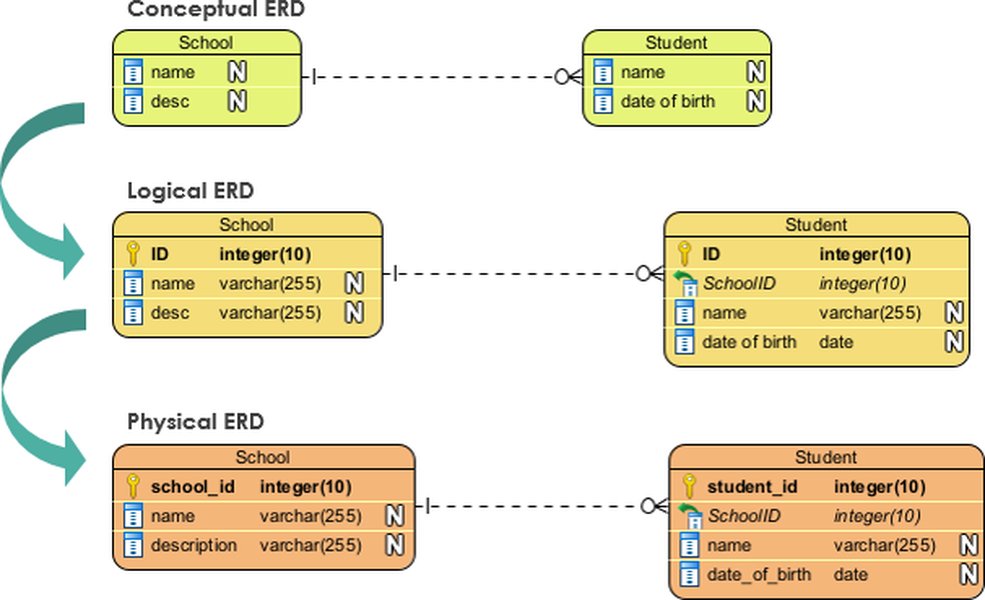
Conceptual view of how logical database models (like ERDs) translate into physical database structures.
Constraint Summary Table
The following table summarizes the types of constraints used in this example and their primary purpose in enforcing data integrity:
| Constraint Type | Purpose | Example Table(s) | Example Column(s) |
|---|---|---|---|
| PRIMARY KEY | Uniquely identifies each row in a table. | Employees, Projects, Assignments | EmployeeID, ProjectID, (EmployeeID, ProjectID) |
| FOREIGN KEY | Ensures referential integrity between tables by linking rows based on key values. | Assignments | EmployeeID, ProjectID |
| COMPOSITE KEY | A primary key composed of two or more columns. | Assignments | (EmployeeID, ProjectID) |
| NOT NULL | Ensures a column cannot have a NULL value. | Employees, Projects, Assignments | FirstName, LastName, ProjectName, EmployeeID, ProjectID, HireDate, StartDate, etc. |
| UNIQUE | Ensures all values in a column (or set of columns) are unique. | Employees | |
| CHECK | Validates data based on a specific condition or format. | Employees, Projects | PhoneNumber, HireDate, StartDate, Status, EndDate |
| DEFAULT | Provides a default value for a column when no value is specified during an INSERT. | Projects, Assignments | Status, AssignmentDate |
Database Structure Overview
Visualizing the Design
The mind map below provides a visual representation of the database structure, illustrating the relationships between the database, schemas, tables, and key components like columns and constraints.
Step 3: Physical Design - Enhancing Performance and Functionality
Optimizing and Automating
Beyond tables and constraints, physical design elements like indexes, views, functions, procedures, and triggers are essential for performance, simplifying data access, encapsulating logic, and automating tasks.
Indexes
Indexes speed up data retrieval operations by providing quick lookup paths for data. Non-clustered indexes are created on columns frequently used in search conditions (WHERE clauses) or joins.
-- Create a non-clustered index on the LastName column for faster searches
CREATE NONCLUSTERED INDEX IX_Employees_LastName ON HumanResources.Employees (LastName);
GO

-- Create a non-clustered index on the ProjectID column in Assignments for faster joins/lookups by project
CREATE NONCLUSTERED INDEX IX_Assignments_ProjectID ON ProjectManagement.Assignments (ProjectID);
GO
Views
Views are saved T-SQL queries that act like virtual tables. They simplify complex queries, abstract underlying table structures, and can be used for security by restricting access to specific columns or rows.
-- Create a view to show employee details along with the projects they are assigned to
CREATE VIEW HumanResources.vw_EmployeeProjectDetails AS
SELECT
    e.EmployeeID,
    e.FirstName,
    e.LastName,
    e.Email,
    p.ProjectID,
    p.ProjectName,
    a.AssignmentDate,
    a.Role
FROM HumanResources.Employees AS e
JOIN ProjectManagement.Assignments AS a ON e.EmployeeID = a.EmployeeID
JOIN ProjectManagement.Projects AS p ON a.ProjectID = p.ProjectID;
GO

-- Example: Querying the view
-- SELECT * FROM HumanResources.vw_EmployeeProjectDetails WHERE ProjectName = 'Database Upgrade';
Functions
Functions encapsulate reusable logic. Scalar functions return a single value, useful for calculations or data transformations.
-- Create a scalar function to calculate the duration of a project in days
CREATE FUNCTION ProjectManagement.fn_GetProjectDuration (@ProjectID INT)
RETURNS INT
AS
BEGIN
    DECLARE @Duration INT;
    SELECT @Duration = DATEDIFF(day, StartDate, ISNULL(EndDate, GETDATE()))
    FROM ProjectManagement.Projects
    WHERE ProjectID = @ProjectID;

    -- If duration is negative (e.g., EndDate before StartDate, which shouldn't happen due to CHECK), return 0
    IF @Duration < 0 SET @Duration = 0;

    RETURN @Duration;
END;
GO

-- Example: Using the function
-- SELECT ProjectName, ProjectManagement.fn_GetProjectDuration(ProjectID) AS DurationInDays
-- FROM ProjectManagement.Projects;
Stored Procedures
Stored procedures are pre-compiled blocks of T-SQL code stored in the database. They enhance security (by granting EXECUTE permissions instead of direct table access), improve performance, and encapsulate business logic for common operations like inserting or updating data (DML).
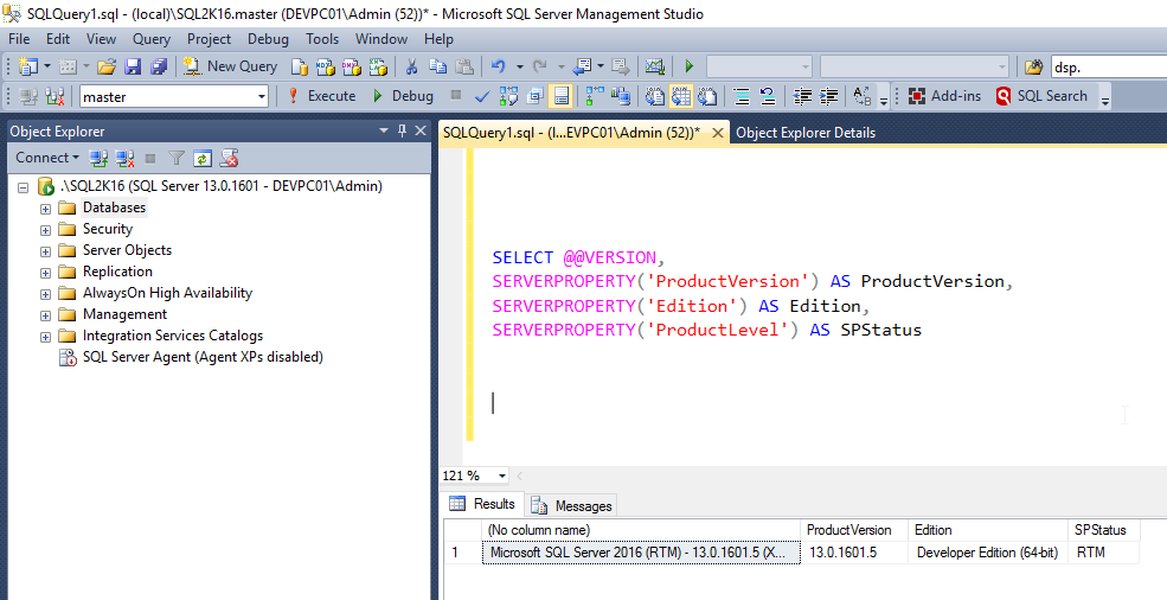
Example of using code snippets in SQL Server Management Studio (SSMS) to accelerate stored procedure creation.
-- Create a stored procedure to add a new employee
CREATE PROCEDURE HumanResources.sp_AddEmployee
    @FirstName NVARCHAR(50),
    @LastName NVARCHAR(50),
    @Email NVARCHAR(100),
    @PhoneNumber VARCHAR(15),
    @HireDate DATE
AS
BEGIN
    -- Basic validation can be added here (e.g., check if email already exists)
    IF EXISTS (SELECT 1 FROM HumanResources.Employees WHERE Email = @Email)
    BEGIN
        RAISERROR('Email address already exists.', 16, 1);
        RETURN; -- Exit procedure
    END

    -- Check Hire Date validity (redundant due to CHECK constraint but good practice in SP)
    IF @HireDate > GETDATE()
    BEGIN
        RAISERROR('Hire date cannot be in the future.', 16, 1);
        RETURN;
    END

    -- Perform the INSERT operation (DML)
    INSERT INTO HumanResources.Employees (FirstName, LastName, Email, PhoneNumber, HireDate)
    VALUES (@FirstName, @LastName, @Email, @PhoneNumber, @HireDate);
END;
GO

-- Example: Executing the stored procedure
-- EXEC HumanResources.sp_AddEmployee
--     @FirstName = 'Jane',
--     @LastName = 'Doe',
--     @Email = 'jane.doe@example.com',
--     @PhoneNumber = '555-123-4567',
--     @HireDate = '2025-05-01';
Triggers
Triggers are special stored procedures automatically executed in response to certain database events (e.g., INSERT, UPDATE, DELETE on a table). They are often used for complex auditing, enforcing intricate business rules, or maintaining data consistency across related tables.
-- Create an Audit table first (example)
CREATE TABLE dbo.AuditLog (
    LogID INT IDENTITY(1,1) PRIMARY KEY,
    EventType VARCHAR(50),
    TableName VARCHAR(100),
    RecordID INT,
    ChangeInfo XML,
    ChangedBy SYSNAME DEFAULT SUSER_SNAME(),
    ChangedDate DATETIME DEFAULT GETDATE()
);
GO

-- Create an AFTER UPDATE trigger on the Employees table for auditing changes
CREATE TRIGGER HumanResources.trg_AuditEmployeeChanges
ON HumanResources.Employees
AFTER UPDATE
AS
BEGIN
    SET NOCOUNT ON; -- Prevents sending 'rows affected' messages

    -- Check if the email or phone number was updated
    IF UPDATE(Email) OR UPDATE(PhoneNumber)
    BEGIN
        DECLARE @ChangeData XML;
        -- Construct XML detailing the changes (Old vs New)
        SET @ChangeData = (
            SELECT
                d.EmployeeID AS '@RecordID',
                d.Email AS 'OldValues/Email',
                i.Email AS 'NewValues/Email',
                d.PhoneNumber AS 'OldValues/PhoneNumber',
                i.PhoneNumber AS 'NewValues/PhoneNumber'
            FROM deleted d -- Contains old row values
            INNER JOIN inserted i ON d.EmployeeID = i.EmployeeID -- Contains new row values
            FOR XML PATH('Change'), ROOT('AuditData')
        );

        -- Insert audit record
        INSERT INTO dbo.AuditLog (EventType, TableName, RecordID, ChangeInfo)
        SELECT 'UPDATE', 'HumanResources.Employees', i.EmployeeID, @ChangeData
        FROM inserted i;
    END
END;
GO

-- Example: Updating an employee's email would trigger the audit
-- UPDATE HumanResources.Employees SET Email = 'jane.d.updated@example.com' WHERE EmployeeID = 1;
-- Check dbo.AuditLog table afterwards.
Implementation Completeness Assessment
Evaluating Feature Coverage
The radar chart below provides a visual assessment of how comprehensively this T-SQL script addresses the key database components requested in the user query. It highlights the implementation level across different areas, from basic table structures to advanced programmability objects.
Learn More: Creating Databases with T-SQL
Video Tutorial
For a visual walkthrough on creating SQL databases using SQL Server Management Studio (SSMS), T-SQL scripts, and other methods, the following video provides a helpful guide. It covers the essential steps involved in setting up your database structure.
Video guide on creating SQL databases using SSMS, T-SQL, and scripts.
Step 4: Controlling Access (DCL Example)
Managing Permissions
Data Control Language (DCL) statements like GRANT and REVOKE are used to manage permissions on database objects. This is crucial for security, ensuring users and applications only have the access they need. Replace YourDatabaseUser with an actual user or role name.
-- Example DCL: Grant SELECT permission on the view to a specific user or role
GRANT SELECT ON HumanResources.vw_EmployeeProjectDetails TO [YourDatabaseUser];
GO

-- Example DCL: Grant EXECUTE permission on the stored procedure
GRANT EXECUTE ON HumanResources.sp_AddEmployee TO [YourDatabaseUser];
GO

-- Example DCL: Deny DELETE permission on the main Employees table to a role (more restrictive)
-- DENY DELETE ON HumanResources.Employees TO [YourDatabaseRole];
-- GO
Frequently Asked Questions (FAQ)
Common Queries About T-SQL Scripting
What is T-SQL and why is it used?
T-SQL (Transact-SQL) is Microsoft's and Sybase's proprietary extension to the SQL (Structured Query Language) standard. It's used primarily with Microsoft SQL Server. T-SQL adds features like procedural programming (variables, loops, conditional logic), error handling, transaction control, and support for declared variables, which are not part of standard SQL. It allows developers and database administrators to create complex applications, manage the database, define security, and perform administrative tasks beyond simple data querying and manipulation.
How do constraints enforce data integrity?
Constraints are rules defined on table columns to limit the type of data that can go into a table, ensuring accuracy and reliability. They enforce data integrity in several ways:
- PRIMARY KEY: Ensures each row is unique and identifiable.
- FOREIGN KEY: Maintains relationships between tables, preventing orphaned records.
- UNIQUE: Ensures all values in a column (or set of columns) are distinct.
- NOT NULL: Prevents NULL values in a column, ensuring required data is present.
- CHECK: Validates data against specific conditions (e.g., range checks, format validation like phone numbers or email patterns, date logic).
By preventing invalid data entries, constraints are fundamental to maintaining the quality and consistency of the database.
What is the difference between a function and a stored procedure?
While both are reusable blocks of T-SQL code, they have key differences:
- Return Value: Functions are primarily designed to return a value (either a single scalar value or a table) and are often used within SQL statements (like SELECT or WHERE). Stored procedures do not have to return a value (though they can use output parameters) and are primarily used to perform actions or operations (like inserting data, modifying schema, complex business logic).
- Usage in Queries: Functions can typically be called directly within DML statements (e.g., `SELECT dbo.MyFunction(Column) FROM Table`). Stored procedures must be executed using the `EXECUTE` or `EXEC` command.
- Transaction Control: Stored procedures can manage transactions (BEGIN TRAN, COMMIT, ROLLBACK), while functions generally cannot perform actions that modify the database state permanently or manage transactions directly within them (especially scalar functions used in queries).
- Side Effects: Functions used in queries are expected to have minimal side effects (not modify database state), whereas procedures are often explicitly designed to modify data or perform administrative tasks.
When should I use triggers?
Triggers should be used cautiously as they can introduce complex dependencies and make debugging difficult. They are best suited for scenarios where standard constraints or procedures cannot easily enforce a rule or automate an action. Common use cases include:
- Auditing: Logging changes made to sensitive data (tracking who changed what and when).
- Complex Business Rules: Enforcing rules that involve multiple tables or require logic beyond simple CHECK constraints (e.g., ensuring a student's age meets a requirement before enrollment, checking inventory levels across multiple warehouses when an order is placed).
- Maintaining Denormalized Data: Automatically updating summary or aggregate values in one table when data changes in another (though this can sometimes be handled better through other means like indexed views).
- Preventing Invalid Operations: Implementing complex conditions under which certain DML operations (like DELETE or UPDATE) should be disallowed.
Consider alternatives like stored procedures or application-level logic before resorting to triggers, especially for complex workflows.
Recommended Further Exploration
- How can advanced T-SQL indexing strategies improve database performance?
- What are the best practices for implementing row-level security in SQL Server using T-SQL?
- When should I use T-SQL triggers versus stored procedures for enforcing complex business logic?
- Explore methods for comprehensive database auditing and change tracking with T-SQL.
References
Last updated May 2, 2025