
Unraveling Ubuntu’s Bootstrapping & Trace Process
A comprehensive look at Ubuntu’s sequential boot process and tracing techniques
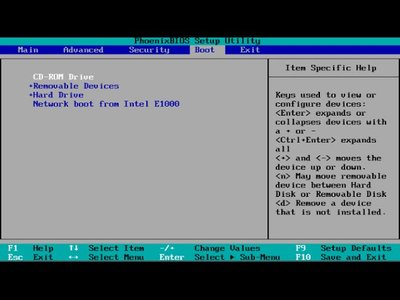
Key Highlights
- Detailed Boot Sequence: From powering on the system to systemd initialization.
- Tracing Tools: Utilize systemd-analyze and ftrace for in-depth boot analysis.
- Bootloader & Kernel Interaction: Insights into how GRUB, BIOS/UEFI, and kernel handoffs work.
Understanding Ubuntu’s Boot Process
Overview of Bootstrapping
Bootstrapping in Ubuntu refers to the sequence initiated from powering on the computer until the operating system is completely loaded and ready for user interaction. This process is structured into clearly defined stages, each of which ensures that hardware and software resources are properly initialized, configured, and traced for performance or debugging purposes.
Stage-by-Stage Breakdown
1. BIOS/UEFI Initialization
The boot process commences as soon as the system is powered on. Modern systems either use Legacy BIOS or UEFI firmware to run a POST (Power-On Self-Test) that checks for hardware issues. In UEFI-based systems, additional security and advanced configuration options are available. Once hardware validation is complete, the firmware identifies the bootable device, enabling the next phase in bootstrapping.
2. Bootloader: GRUB Loading
After the firmware completes its initialization, it searches for a proper bootloader. Ubuntu typically employs GRUB (Grand Unified Bootloader) either from the Master Boot Record (MBR) on BIOS systems or as an EFI application on UEFI systems. GRUB’s role includes:
- Presenting a menu interface if multiple operating systems or kernel versions are available.
- Loading the Linux kernel and the initial RAM disk (initrd or initramfs) into memory.
3. Kernel Initialization and Initramfs
Following bootloader execution, the Linux kernel is loaded into memory, marking the start of the kernel initialization phase. During this phase:
- The kernel takes over system control and initializes the core components.
- It mounts the root filesystem specified in GRUB’s configuration, often via an initrd that contains necessary drivers and modules.
- Hardware peripherals and low-level drivers are initialized to prepare the system for high-level operations.
4. The Init Process and Systemd
With the kernel fully operational, the system transfers control to the init process. In modern Ubuntu releases, systemd is employed as the primary init system. During this phase:
- The init process starts essential services and daemons.
- System configurations are applied (e.g., network setup, mounting filesystems).
- The graphical or text-based login prompt is eventually provided, concluding the process.
5. Transition to User Space
After systemd initiates all necessary services and targets, the system is fully operational. The boot process culminates in presenting a login screen for user interaction. Each service and process is now running in user space, and the system is ready for daily operations.
Tracing the Boot Process
Systemd-Analyze
One of the most accessible ways to trace the boot sequence after the kernel has started is through the use of systemd-analyze. This tool provides different facets of boot performance:
- Basic Analysis: Running
systemd-analyzereturns the total boot time from firmware initiation to user space readiness. - Service Breakdown: The
systemd-analyze blamecommand lists individual services sorted by their startup time, which helps identify potential bottlenecks. - Visualization: By executing
systemd-analyze plot > boot.svg, you can generate a graphical representation of the boot sequence, illustrating the dependency tree and startup timelines of various services.
Kernel Tracing with ftrace
For a more detailed analysis of the kernel’s behavior during boot, Ubuntu users can utilize ftrace. This kernel-based tracing framework captures data about function calls and events during early boot stages. Benefits include:
- Early Boot Insights: ftrace can capture details from before the systemd phase, providing a view into the hardware initialization and early driver loading sequences.
- Configurable Event Tracing: You can specify certain events or functions to track, aiding in pinpointing issues or optimizing boot times.
- Continuous Monitoring: ftrace can be configured to record events from boot time continuously for later analysis, which is particularly useful for debugging intermittent problems.
Specialized Tracing in Embedded Systems: U-Boot Tracing
In some Ubuntu-based embedded systems, U-Boot acts as the bootloader. U-Boot also supports a form of tracing, offering insights into function entry and exit points during the boot sequence. Key features include:
- Function-Level Tracing: U-Boot can record detailed data about the bootloader’s execution, which is crucial in systems where boot speed is critical.
- Integration with Kernel Tools: Trace data recorded in U-Boot can be subsequently analyzed with tools like kernelshark, allowing developers to correlate events across the boot phase.
Integrated View: Boot Process and Tracing Overview Table
| Stage | Description | Tracing/Tools |
|---|---|---|
| BIOS/UEFI Initialization | Firmware initiates POST, hardware validation, and identifies boot devices. | Basic firmware logs (often available via UEFI logs). |
| Bootloader (GRUB/U-Boot) | Loads the Linux kernel and initrd; may offer a boot selection menu. | U-Boot tracing (embedded systems), GRUB debug modes. |
| Kernel Initialization | Kernel loads into memory, mounts root filesystems, and begins hardware initialization. | ftrace for detailed function tracing within the kernel. |
| Init Process (systemd) | Launches essential services and system daemons; prepares user environment. | systemd-analyze (basic boot time, blame, and plot tools). |
| User Space & Login | Final phase with the login prompt and user session initiation. | User-level logs; further customization via boot tracing scripts. |
Best Practices and Advanced Insights
Optimizing Boot Time
For system administrators and developers, understanding the boot sequence is key to optimizing performance. Techniques involve:
-
Reviewing service times with
systemd-analyze blameto identify services that could be delayed, parallelized, or disabled if unnecessary. - Adjusting kernel boot parameters to streamline the initialization phase. Fine-tuning initramfs and hardware driver loading sequences can reduce overall boot delay.
- Exploring lightweight alternatives for certain services if they are not critical to your specific use-case.
Debugging Boot Issues
When there are boot issues or unexpected delays, tracing becomes indispensable:
- Start by checking firmware logs to validate the proper execution of POST and boot device selections.
-
Use GRUB’s verbose mode or enable kernel debugging options (e.g.,
debugkernel parameter) to capture insights on loading issues. -
Leverage
ftraceto record kernel-level events. Analyzing these traces can reveal hardware driver delays, misconfigurations in the initialization routines, or peripheral failures. - For issues beyond the kernel (i.e., with running services), systemd’s tools provide a granular breakdown of service initialization and potential dependency conflicts.
Security Considerations During Boot
Modern boot processes integrate security enhancements, especially in UEFI systems:
- Secure Boot ensures that tools like GRUB load a trusted Linux kernel, adding an extra layer of protection against low-level attacks.
- Tools and tracing mechanisms are designed with security in mind. Always ensure that boot trace data, which may include sensitive configuration details, is secured and only accessible to authorized personnel.
- Regular updates to the firmware and bootloader, as well as implementing policies that audit boot trace logs, are recommended best practices.
References
- Booting - Ubuntu Wiki
- The Linux Booting Process - freeCodeCamp
- Linux Bootstrapping Deep Dive - Medium
- Boot Time Trace Documentation - kernel.org
- Boottrace Presentation PDF - Linux Foundation
Recommended Further Exploration
Last updated March 26, 2025