
Discover the Factors Behind Enabling Windows 2012 R2 Deduplication
Unlock efficiency and space savings on your HPE DL380 Gen9 RAID setup
Key Highlights
- Storage Efficiency: Deduplication significantly reduces redundant data on your volume.
- Performance and Resource Considerations: Assess the load and hardware capabilities for optimal sizing.
- Operational Impact: Understand backup enhancements alongside potential CPU and memory overhead.
Understanding Deduplication on Windows Server 2012 R2
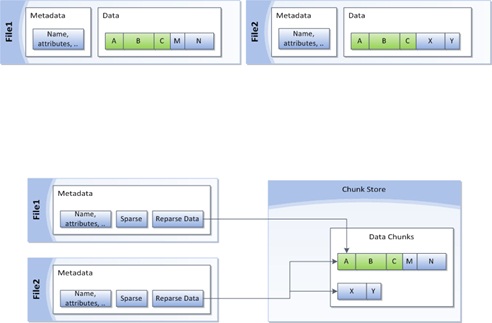
Windows Server 2012 R2 provides a data deduplication feature that is designed to optimize storage by identifying duplicate chunks of data stored on a local HDD RAID. The HPE DL380 Gen9, known for its performance and reliability, can benefit from this feature by reducing storage overhead – replacing actual copies of duplicate data with references to a single instance. This not only conserves disk space but can enhance backup speed and improve overall management of storage resources.
How Deduplication Works
Deduplication in Windows Server 2012 R2 works by splitting data into smaller chunks, comparing these chunks to identify duplicates, and then storing one copy of the identical chunks while replacing the rest of the copies with references. This system is particularly beneficial in scenarios where duplicate data—such as in backup files or repetitive document storage—dominates the storage volume.
Benefits of Enabling Deduplication
The key advantages of employing deduplication include:
- Reduced Storage Space: By eliminating redundant copies, deduplication conserves valuable storage space, which can directly translate to cost savings and the ability to store more data within the same physical capacity.
- Faster Backup and Restore Operations: With reduced physical data, backup operations can complete more quickly, and restore times may be shortened, optimizing overall performance in data retrieval tasks.
- Enhanced Data Management: With deduplication, administrators can achieve greater efficiency in managing large volumes of data, especially when dealing with continuous data churn and high redundancy scenarios.
Critical Considerations Before Enabling Deduplication
Although the advantages can be enticing, enabling deduplication on a local HDD RAID, especially on an HPE DL380 Gen9, requires a careful evaluation of several factors:
- Volume Sizing: Microsoft’s guidelines suggest that deduplicated volumes should ideally be sized between 1-2 TB for environments with high data churn. Although volumes can scale up to 10 TB, larger sizes can increase the overhead and slow down processing times.
- System Resource Usage: Data deduplication is a process that consumes CPU cycles and memory, especially since the Windows Server 2012 R2 implementation is single-threaded per volume. Distributing data across multiple volumes can help leverage multi-core systems effectively, but administrators need to verify that the HPE DL380 Gen9’s resources are not overly taxed.
- Data Characteristics: The performance gains of deduplication are closely tied to the type of data stored. If your data is highly compressible or contains many duplicate copies (e.g., file shares, backups), deduplication will be markedly efficient. Conversely, if data is already compressed or not redundant, the benefits will be marginal and might not justify the additional processing overhead.
- Backup and Restore Implications: One of the touted benefits of deduplication is improved efficiency in backups; however, administrators need to consider potential complications, such as increased complexity in snapshot or backup processes. Instances have been reported where snapshots become larger than expected due to the deduplication process.
- Testing in Non-production Environments: Before full-scale deployment, it is highly recommended to test the deduplication configuration under typical load conditions. This ensures that performance impacts are manageable and that data recovery remains efficient.
Practical Steps to Enable Deduplication
Before proceeding with enabling deduplication, ensure you have a robust backup strategy in place. A successful implementation will typically follow these steps:
Pre-deployment Checklist
- Backup Existing Data: Always create a complete backup of the volume to avoid data loss or issues during the deduplication process.
- Assess Workload Characteristics: Evaluate data patterns, including the rate of change and the volume of duplicate files.
- Resource Review: Check that the server’s CPU and memory are capable of handling the extra overhead introduced by deduplication tasks.
- Testing: Run a small-scale test in a non-production environment to gauge the impact on performance and verify space savings before deploying on critical systems.
Enabling the Feature on Windows Server 2012 R2
Once the preliminary assessments are complete, you can proceed to enable the feature using Server Manager. The typical steps are:
- Open Server Manager: Launch the Server Manager on your Windows Server 2012 R2.
- Access File and Storage Services: Navigate to the "File and Storage Services" section.
- Right-click the Target Volume: Find the volume where deduplication is to be applied, right-click, and select "Configure Data Deduplication."
- Configure Settings: Follow the on-screen prompts to configure the deduplication settings. You can customize the schedule, filter files, and specify the retention or cleanup policies as necessary.
Performance Impact and Optimization Strategies
After enabling deduplication, monitoring your server's performance is essential. Here are strategies to optimize and balance deduplication:
Distributing Loads Across Volumes
Since deduplication in Windows Server 2012 R2 operates on a per-volume basis with single-threaded performance, one effective strategy is to distribute your workload across multiple volumes. This allows the server's multiple cores to be utilized concurrently, minimizing potential bottlenecks and ensuring that the deduplication process does not disrupt critical applications.
Monitoring Tools and Metrics
Use Windows Server performance monitors and built-in deduplication health reports to continually assess the resource consumption and effectiveness of the deduplication process. Monitoring tools can offer insights into:
| Parameter | Description | Recommended Action |
|---|---|---|
| CPU Utilization | Measures the processing power used by the deduplication process. | If consistently high, consider distributing workloads across more volumes. |
| Memory Usage | Monitors RAM consumption during deduplication tasks. | Ensure ample memory is available or adjust deduplication schedules during off-peak hours. |
| Volume Size | Effective size of the deduplicated volume. | Keep volumes ideally around 1-2 TB for high churn workloads; avoid exceeding 10 TB unless necessary. |
| Backup Performance | Evaluates the speed and efficiency improvements in backup operations. | Track improvements and ensure that backup systems can handle deduplicated data efficiently. |
When to Enable and When to Hold Off
Enable deduplication if:
- Your environment deals with a significant amount of duplicate data (common in backup repositories or file-sharing situations).
- The reduction in storage usage directly results in cost savings or better utilization of resources.
- You have a robust testing process in place to monitor any performance degradations or resource contention issues.
Consider holding off or evaluating alternative strategies if:
- Your workload is highly dynamic with constant modifications, as heavy churn may reduce deduplication benefits while increasing CPU and memory overhead.
- Performance and latency are critical factors and any additional processing overhead might impact mission-critical operations.
- Your server already experiences significant resource constraints, making it hard to accommodate extra processing tasks without affecting overall system performance.
Additional Considerations for HPE DL380 Gen9
The HPE ProLiant DL380 Gen9 server is a robust and versatile platform, commonly deployed in enterprise environments where performance and reliability are paramount. When applying deduplication to local HDD RAID arrays on such hardware, it is important to:
Evaluate Hardware Resources
Even though the HPE DL380 Gen9 is designed for intensive workloads, ensure that your configurations for HDD RAID and deduplication do not strain your server. Carefully consider the load distribution across available CPUs and memory modules so that deduplication processes run efficiently alongside other server tasks.
Plan for Future Scalability
In a dynamic data environment, planning ahead is crucial. Ensure that the deduplication strategy you implement today is scalable. Test by gradually increasing the load and monitoring deduplication efficiency and system performance. This will help you make incremental adjustments and prepare for future data growth.
Deployment Best Practices
To leverage deduplication successfully on your HPE DL380 Gen9 running Windows Server 2012 R2:
- Perform a complete assessment of data redundancy to determine potential space savings.
- Implement the feature in a controlled, small-scale environment before rolling it out production-wide.
- Distribute data sets across multiple volumes to mitigate performance impacts.
- Regularly review performance and storage efficiency metrics to ensure the deduplication process remains beneficial over time.
References
- Installing and Enabling Data Deduplication - Microsoft Learn
-
Sizing Volumes for Data Deduplication in Windows Server - Tech Community
- Backup and Restore Considerations - Microsoft Docs
- HPE Documentation on DL380 Gen9 - HPE Support
- How to Install Data Deduplication in Windows Server 2012 R2 - 4sysops
Recommended Related Queries
 docs.media.bitpipe.com
 kallesplayground.wordpress.com
Last updated March 25, 2025