
Fortifying Your Digital Fortress: A Comprehensive Guide to WordPress Security in 2025
Safeguard Your WordPress Website from Evolving Cyber Threats with Proactive Strategies and Essential Tools
Key Security Insights for WordPress
- Proactive Updates are Paramount: Regularly updating your WordPress core, themes, and plugins is the single most critical step to prevent vulnerabilities, as many attacks exploit outdated software.
- Layered Defense is Essential: A combination of strong credentials, robust security plugins, secure hosting, and regular backups creates a multi-layered defense against sophisticated cyber threats.
- Awareness and Vigilance are Continuous: WordPress's popularity makes it a prime target. Continuous monitoring, understanding common vulnerabilities, and adopting best practices are vital for long-term security.
WordPress, powering over 43% of all websites, has become an attractive target for cybercriminals. While the WordPress core software is remarkably secure and regularly audited by a vast community of developers, its open-source nature and extensive ecosystem of themes and plugins introduce potential vulnerabilities. The financial cost of cybercrime is projected to reach an staggering $10.5 trillion annually by 2025, highlighting the critical importance of robust WordPress security. A compromised website can lead to data loss, damaged reputation, jeopardized customer data, and significant financial repercussions. Therefore, understanding and implementing comprehensive security measures is no longer optional but a fundamental necessity for any WordPress site owner.
Understanding WordPress Vulnerabilities and Attack Vectors
Identifying Common Threats to Your Digital Presence
To effectively protect your WordPress site, it's crucial to understand the common ways hackers exploit weaknesses. These vulnerabilities often stem from a combination of outdated software, weak configurations, and human error.
Outdated Software: A Gateway for Attackers
One of the most prevalent causes of security breaches is outdated software. This includes your WordPress core, themes, and plugins. Developers frequently release updates that include security patches to address newly discovered vulnerabilities. Failing to install these updates leaves your site exposed to known exploits. Nulled or pirated themes and plugins are particularly dangerous as they often contain backdoors or malicious code, offering hackers direct access to your site.
Weak Credentials: The Easiest Entry Point
Weak or easily guessable passwords and default usernames like "admin" are an open invitation for brute-force attacks. Attackers use automated scripts to try thousands of username and password combinations until they gain unauthorized access. Similarly, lack of two-factor authentication (2FA) makes it easier for compromised credentials to be exploited.
Plugin and Theme Vulnerabilities: The Soft Underbelly
The vast ecosystem of WordPress plugins and themes, while providing immense functionality, can also be a significant source of vulnerabilities. A poorly coded or unmaintained plugin can introduce security flaws. Even reputable plugins can have vulnerabilities that are discovered and patched, emphasizing the need for timely updates.
Insecure Hosting Environment: The Foundation of Your Security
Your web hosting provider plays a crucial role in your site's security. A shared hosting environment, where one compromised website can affect others on the same server, can pose risks. A secure host should offer robust server-level firewalls, regular backups, and active monitoring for suspicious activity. While many website owners focus on locking down WordPress itself, overlooking the hosting environment can negate other security efforts.
SQL Injection and Cross-Site Scripting (XSS)
These are common web application vulnerabilities. SQL injection allows attackers to manipulate your database, potentially stealing sensitive information or gaining control over your site. XSS attacks inject malicious scripts into your website, which can then be executed in a user's browser, leading to session hijacking, data theft, or defacement.
Implementing a Multi-Layered WordPress Security Strategy
Essential Steps to Protect Your WordPress Site
Effective WordPress security requires a comprehensive, multi-layered approach. No single solution guarantees complete protection, but combining several strategies significantly reduces your site's attack surface.
A comprehensive checklist for securing your WordPress site.
Foundational Security Measures
- Keep Everything Updated: This is the most crucial step. Regularly update WordPress core, themes, and plugins to their latest versions. Enable auto-updates for plugins where appropriate, but always backup your site before major updates.
- Strong Passwords and Two-Factor Authentication (2FA): Use unique, complex passwords for all user accounts, especially administrators. Employ a password manager to generate and store them securely. Enable 2FA for all users, particularly those with elevated privileges, to add an extra layer of security beyond just a password.
- Secure Hosting Provider: Choose a reputable web host with robust security measures, including firewalls, DDoS protection, and regular backups. Managed WordPress hosting providers often handle many security aspects on your behalf, providing enterprise-level security.
- Regular Backups: Implement a reliable backup strategy. Store backups off-site and test them regularly to ensure they can be restored successfully. In the event of a breach, a recent backup can be your lifeline.
- SSL Certificate (HTTPS): Ensure your site uses an SSL certificate (HTTPS). This encrypts communication between your website and visitors, protecting sensitive data. Search engines also prioritize secure websites, which can enhance your SEO. WordPress.com automatically provides SSL for all sites.
User Management and Access Control
- Change Default Usernames: Never use "admin" or "administrator" as a username. Create a new administrator account with a unique username and strong password, then delete the default "admin" account.
- Limit Login Attempts: Install a plugin that limits the number of failed login attempts, which helps prevent brute-force attacks.
- Enforce User Roles: Assign the lowest possible user role necessary for each user. For instance, a content writer only needs "Author" or "Editor" access, not "Administrator."
Hardening WordPress Configuration
Beyond the basics, you can implement several "hardening" measures to further secure your WordPress installation:
- Change the Default Database Prefix: The default database prefix is
wp_. Changing this to something unique makes it harder for attackers to launch SQL injection attacks. - Disable File Editing: Prevent direct editing of theme and plugin files from the WordPress admin dashboard by adding a line of code to your
wp-config.phpfile. This prevents malicious code injection if an attacker gains admin access. - Protect
wp-config.phpand.htaccessFiles: These files contain critical configuration information. Use.htaccessrules to restrict access to them. - Disable XML-RPC: If not actively using features that rely on XML-RPC (like the WordPress mobile app or Jetpack), consider disabling it to close a common attack vector.
- Hide Your WordPress Version: Remove your WordPress version number from your site's source code to prevent attackers from easily identifying known vulnerabilities for your specific version.
- Disable PHP File Execution in Untrusted Folders: Prevent malicious PHP files from executing in directories like
/wp-content/uploads/by adding.htaccessrules.
The Role of WordPress Security Plugins
Enhancing Your Defenses with Specialized Tools
While manual hardening is effective, security plugins provide an automated and comprehensive layer of protection, often including features that are difficult to implement manually. They act as firewalls, malware scanners, and vulnerability monitors.
Key Features of Security Plugins
- Web Application Firewall (WAF): A WAF filters malicious traffic before it reaches your website, blocking known attack patterns, suspicious IP addresses, and bots.
- Malware Scanning and Remediation: These plugins scan your WordPress files, themes, and plugins for malicious code and offer tools to clean infections.
- Brute-Force Protection: Beyond limiting login attempts, many plugins can block IP addresses that attempt too many failed logins.
- Vulnerability Monitoring: They alert you to known vulnerabilities in your installed themes and plugins.
- Security Hardening Options: Many plugins provide easy-to-use interfaces to implement the hardening measures discussed earlier, such as changing database prefixes or disabling file editing.
- Audit Logs: They track user activity and changes on your site, helping you identify suspicious behavior.
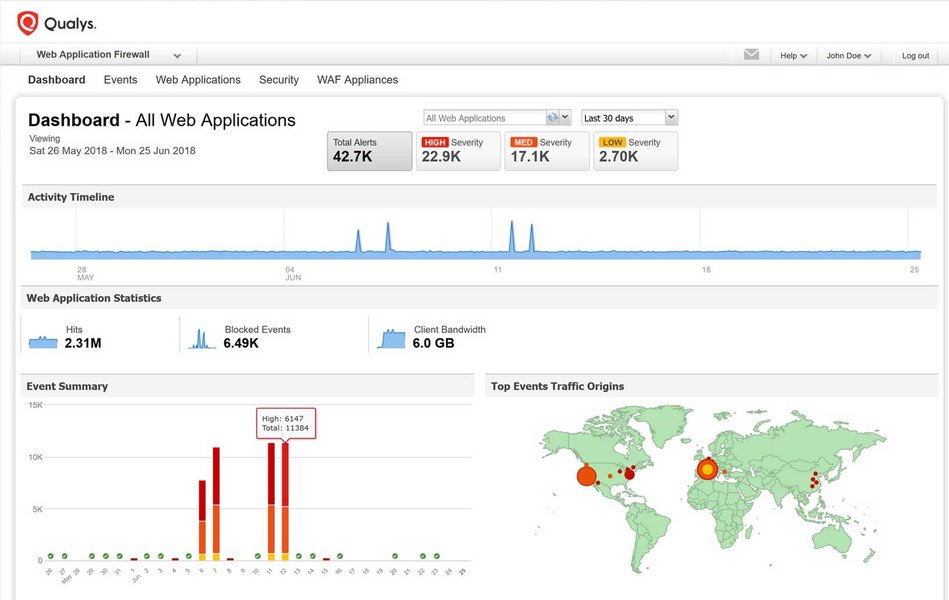
A WAF dashboard demonstrating real-time threat monitoring.
Recommended WordPress Security Plugins
Several reputable security plugins stand out for their effectiveness and feature sets:
| Plugin Name | Key Features (Free) | Key Features (Premium) | Best For |
|---|---|---|---|
| Wordfence Security | Firewall, Malware Scanner, Brute-Force Protection, Login Security, Comment Spam Filter | Real-time Threat Defense Feed, Country Blocking, Premium Support, Scheduled Scans | Comprehensive all-in-one security, ideal for most users seeking strong protection. |
| Sucuri Security | Malware Scanning, Security Hardening, File Integrity Monitoring, Blacklist Monitoring, Post-Hack Security Actions | Cloud-based WAF, DDoS Protection, Malware Removal by Experts, CDN, Performance Optimization | Robust firewall and expert malware cleanup, excellent for critical business sites. |
| MalCare | Daily Malware Scan, One-Click Malware Removal, Firewall, Login Protection | Real-time Malware Removal, Cloud Scan, Unlimited Malware Cleanups, Performance Optimization | Automated malware detection and removal, focusing on ease of use. |
| All-In-One Security (AIOS) | User Account Security, Login Security, Database Security, File System Security, Firewall, Blacklist Functionality | Premium support, additional firewall rules, advanced hardening features | Feature-rich free option for users seeking extensive hardening and monitoring. |
| iThemes Security (SolidWP) | Brute Force Protection, File Change Detection, Strong Password Enforcement, Database Backups | Scheduled Malware Scans, 2FA, Site Scanner, User Security Check, reCAPTCHA | Comprehensive security features, good for users who want granular control. |
| Cloudflare (with WordPress Plugin) | DNS Management, Free CDN, Basic WAF, SSL Certificate | Advanced WAF rules, Bot Management, Argo Smart Routing, Load Balancing | Performance and security combined, ideal for sites needing global CDN and basic WAF. |
While many free versions offer substantial protection, premium versions often provide advanced features like real-time threat feeds, expert malware removal, and enhanced WAF capabilities. The best choice depends on your specific needs, budget, and technical expertise.
Proactive Monitoring and Ongoing Vigilance
Maintaining a Secure WordPress Environment
Security is not a one-time setup; it's an ongoing process. Continuous monitoring and proactive measures are essential to stay ahead of evolving cyber threats.
Regular Security Audits and Scans
Periodically run security scans using your chosen plugin or an external scanner like Qualys, SiteLock, or VirusTotal. These tools can identify malware, vulnerabilities, and other security issues that might have slipped through the cracks. Review your security plugin's audit logs regularly to track unusual activity.
Monitoring User Activity
Keep an eye on user logins, changes to user roles, and any unexpected file modifications. An audit log can highlight if a plugin or theme has been added, removed, or updated without your knowledge.
Choosing Reputable Themes and Plugins
Only download themes and plugins from trusted sources like the official WordPress.org directory or reputable commercial developers. Always check reviews, update frequency, and compatibility with the latest WordPress version before installing. Avoid "nulled" or cracked versions at all costs.
Education and Awareness
Educate yourself and any other users with access to your WordPress backend about security best practices. Understanding common phishing attempts, social engineering tactics, and the importance of strong passwords can prevent many security incidents.
Assessing WordPress Security Posture
A Radar Chart Analysis of Security Measures
To better visualize the impact of various security measures, I've created a radar chart comparing the effectiveness of different security approaches. This chart provides an opinionated analysis, highlighting where different strategies excel and where they might fall short when used in isolation versus a comprehensive approach.
This radar chart illustrates how different levels of security implementation impact key security attributes. As you can see, relying solely on basic measures (core updates and strong passwords) leaves significant gaps in areas like malware detection and traffic filtering. A free security plugin provides a substantial uplift, especially in vulnerability patching and access control. However, a truly comprehensive multi-layered approach, combining all best practices, secure hosting, and premium security tools, offers the highest level of protection across all critical security dimensions, reflecting a robust defense against modern cyber threats.
Deep Dive: Web Application Firewalls (WAF)
An Essential Layer of Defense
A Web Application Firewall (WAF) is a crucial component of modern web security, acting as a shield between your WordPress website and the internet. It inspects all incoming HTTP traffic to your site and filters out malicious requests, preventing attacks before they can reach your server or exploit vulnerabilities in your applications. This proactive filtering is vital because it can block a wide range of common cyber threats, including SQL injection, cross-site scripting (XSS), and brute-force attacks, that might bypass other security measures.
A WAF operates based on a set of rules, often updated in real-time, that define what constitutes malicious traffic. These rules can identify suspicious patterns, block known bad IP addresses, and detect attempts to exploit application vulnerabilities. Many leading security plugins, such as Wordfence and Sucuri, integrate WAF capabilities directly into WordPress, providing an immediate layer of protection. Cloudflare also offers a powerful cloud-based WAF that can protect your site at the network edge, even before traffic reaches your hosting server, significantly reducing the load on your site during an attack.
This video provides an excellent overview of the best WordPress security plugins for 2025, many of which feature integrated WAF functionalities. Understanding how these tools work can empower you to make informed decisions about your site's security.
Discovering the best WordPress security plugins for 2025, including insights into WAF capabilities.
Frequently Asked Questions (FAQ) About WordPress Security
Why is WordPress security so important?
Do I really need a security plugin if my host offers security?
How often should I update my WordPress site?
What are "nulled" themes or plugins, and why should I avoid them?
What is a Web Application Firewall (WAF) and how does it help?
Conclusion: A Secure WordPress Future
Securing your WordPress website is an ongoing journey that demands continuous attention and a proactive mindset. By diligently applying the fundamental security practices—such as keeping software updated, using strong credentials, and implementing regular backups—you lay a solid foundation. Supplementing these basics with robust security plugins, which provide a critical web application firewall, malware scanning, and advanced hardening features, further fortifies your site against sophisticated attacks. Remember, WordPress's popularity makes it a constant target, but with vigilance, smart choices in hosting and plugins, and a commitment to ongoing security audits, you can significantly reduce your risk and ensure your digital presence remains safe, reliable, and trustworthy for both you and your visitors. Stay one step ahead of cybercriminals by embracing security as an integral part of your website management.
Recommended Further Reading
- Explore the best WordPress hosting providers known for robust security features.
- Dive deeper into advanced WordPress hardening techniques beyond basic configurations.
- Learn the steps for effectively recovering a WordPress site after a security breach.
- Understand the most common vulnerabilities found in WordPress plugins and how to avoid them.
Referenced Search Results
 wordpress.com
wordpress.com
wordpress.com