
Azure AD Automated Secret Management Configuration
A comprehensive guide to setting up secure and automated secret management for Azure AD
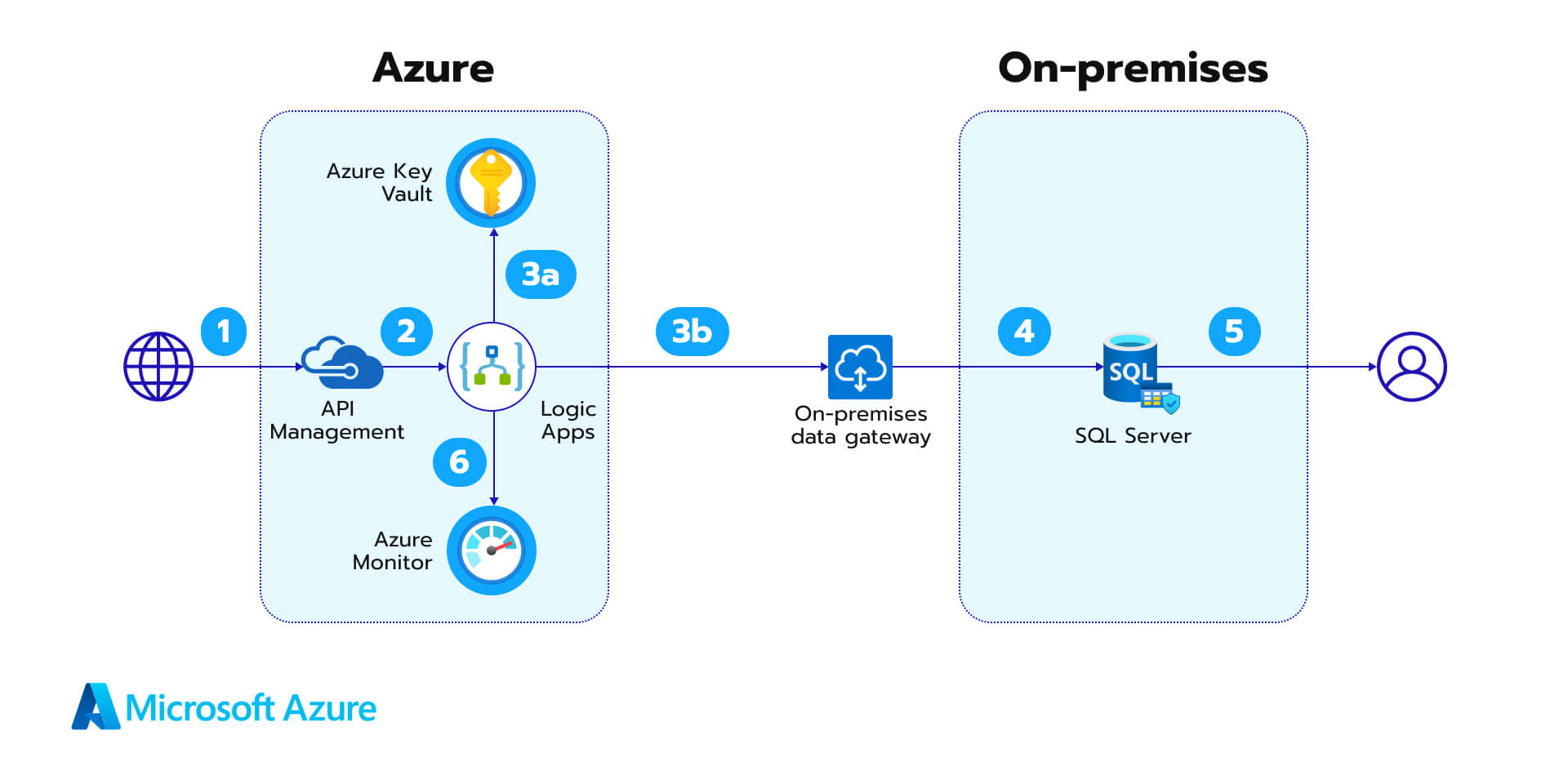
Key Highlights
- Centralized Secret Storage: Use Azure Key Vault to secure all sensitive keys, passwords, and certificates.
- Automated Rotation: Implement automation through Azure Automation, Azure Functions, or Logic Apps to rotate secrets before expiration.
- Robust Security Practices: Leverage Managed Identities and detailed audit logging to enhance overall security and compliance.
Introduction to Azure AD Automated Secret Management
Configuring Azure AD for automated secret management is an important process to ensure the security, reliability, and compliance of your applications within the Azure ecosystem. This guide outlines the necessary steps and best practices for setting up a robust and automated system for managing secrets, such as client secrets, API keys, and certificates. Utilizing Azure Key Vault as your centralized repository for secrets, along with automation tools like Azure Functions, Azure Automation Runbooks, or Azure Logic Apps, this process minimizes the risk associated with manual secret management and reduces operational overhead.
Setting Up Azure Key Vault for Secret Storage
Azure Key Vault plays a central role in secure secret management. It is a cloud service that safeguards encryption keys and secrets like passwords, certificates, and connection strings. To configure Azure AD for automated secret management, the first fundamental step is to set up your Azure Key Vault.
Creating and Configuring the Key Vault
To begin, log in to the Azure portal and create a new Key Vault. During the creation process, you can specify important settings such as the Key Vault name, resource group, and geographic location. Once the Key Vault is created, you should configure access policies carefully.
Access Policies
Access policies determine which users or applications (using Managed Identities) have permissions to read or update the secrets stored in the vault. You can assign permissions for operations such as Get, List, Set, and Delete. For automated secret management workflows, ensure that the automation components like Azure Functions or Azure Automation have the necessary access.
Storing Secrets in Azure Key Vault
Once your vault is configured, you can store sensitive information securely. For instance, if you have an application registered in Azure AD, you may store the corresponding client secret, certificates, or API keys in the Key Vault. Referencing these secrets directly in your applications removes the need for hardcoding sensitive data in application code.
Azure AD App Registration and Client Secret Setup
After establishing a secure secret storage environment with Azure Key Vault, you need to register your application within Azure AD. This step involves creating an App Registration and generating the necessary client secrets that will later be managed and rotated automatically.
Registering the Application
To register an application in Azure AD, navigate to the Azure AD section of the portal and create a new App Registration. Here, specify the application's name, supported account types, and optionally a redirect URI (if required). The application registration creates an identity that will be used to authenticate requests to Azure resources.
Configuring Client Secrets
Within your App Registration, switch to the "Certificates & secrets" section to create new client secrets. These secrets act as credentials for your application, allowing it to securely access Azure resources and Key Vault. However, remember that these secrets are temporary, with an expiry date that must be managed. This is where automated secret management becomes critical.
Storing Client Secrets in Key Vault
Instead of storing client secrets in application code or configuration files, it is highly recommended to store them in Azure Key Vault. Doing so centralizes secret management and allows for seamless automation, where the secrets can be rotated without the need for manual intervention.
Automating Secret Rotation and Management
Automated secret rotation is the process where your system proactively renews secrets before they expire, reducing the risk of outages due to expired credentials and improving overall security. This can be achieved using various Azure automation tools.
Leveraging Azure Functions and Azure Logic Apps
Azure Functions and Logic Apps can help automate secret rotation by triggering workflows when a secret is approaching expiration. Usually, these services monitor the expiry dates stored in the Key Vault and kick off a predefined routine to generate a new secret. The new secret is then updated both in Azure AD and in the Key Vault, ensuring that applications retrieve the current credentials seamlessly.
Using Azure Event Grid
Integrating Azure Event Grid into your workflow provides the capability to trigger an Azure Function automatically when a secret nears its expiry date. This event-driven architecture ensures timely rotation without the need for manual checks.
Azure Automation Runbooks
Azure Automation Runbooks offer another approach to automate secret management. Through scheduled runbooks, you can script the process of renewing secrets. With the proper permissions configured for your Automation account’s Managed Identity, these runbooks can securely retrieve the current secret from Key Vault, generate a new as-needed secret, and update it in your Azure AD App Registration.
Deploying PowerShell Scripts
Many organizations choose PowerShell scripts within Automation Runbooks to handle secret rotation. The scripts first authenticate using Managed Identity, then interact with Azure Key Vault to retrieve and update secrets. Below is an example:
  # Authenticate using Managed Identity
  Connect-AzAccount -Identity

  # Function to retrieve the current client secret from Key Vault
  Function Get-ClientSecretFromKeyVault {
      param (
          [Parameter(Mandatory = $true)]
          [string]$VaultName,
          [Parameter(Mandatory = $true)]
          [string]$SecretName
      )
      try {
          $secret = Get-AzKeyVaultSecret -VaultName $VaultName -Name $SecretName -AsPlainText -WarningAction SilentlyContinue
          return $secret
      }
      catch {
          Write-Error "Failed to retrieve the client secret from Key Vault. Details: $_"
          return $null
      }
  }

  # Retrieve and update the secret
  $vaultName = "your-key-vault-name"
  $secretName = "your-secret-name"
  $clientSecretOld = Get-ClientSecretFromKeyVault -VaultName $vaultName -SecretName $secretName

  # Replace this section with your secret rotation logic
  $clientSecretNew = "new-generated-secret"

  # Update the secret in Key Vault
  Set-AzKeyVaultSecret -VaultName $vaultName -Name $secretName -SecretValue (ConvertTo-SecureString $clientSecretNew -AsPlainText -Force)
  Write-Host "Secret has been successfully rotated!"
Managed Identities for Enhanced Security
When running these automated tasks, consider employing Managed Identities for your Azure resources. Managed Identities remove the need to handle credentials in your code, as they allow your applications to authenticate to Azure services securely. They are pivotal when configuring your Automation or Function App to interact with Azure AD and Key Vault.
Monitoring and Alerting
Beyond automated rotation, tracking and logging events associated with secret usage and changes are important. Monitoring provides forensic insights and real-time alerts, essential for ensuring compliance and security.
Setting Up Logging
Enable detailed logging in both Azure Key Vault and Azure AD. Logs should capture events such as secret access, updates, and errors. Azure Monitor or Azure Security Center can be integrated to provide a centralized view and help in diagnosing issues quickly.
Implementing Alerts
Setting up real-time alerts ensures prompt notifications if any anomalies occur or if a secret is about to expire. Notifications can be integrated with communication tools like Microsoft Teams, enabling IT administrators to take immediate corrective actions if necessary.
Best Practices and Security Recommendations
Implementing automated secret management is not solely about technology but also about adopting best practices for robust security operations. Here are some recommendations that combine industry standards with Azure-specific guidelines:
Minimize Manual Interventions
Automate all aspects of secret management to reduce the risk of human error. Manual handling of secrets can result in misconfigurations or delayed rotations that compromise security. With automation, you ensure seamless and regular updates.
Establish Expiry Dates and Rotation Cycles
Assign well-defined expiry dates to all secrets and design your automation workflows around these cycles. Implement policies where secrets are rotated within a predefined window to minimize security risks.
Leverage Multi-Factor Authentication (MFA)
For administrative access to sensitive resources such as the Azure portal and key management interfaces, ensure that multi-factor authentication is enabled. MFA provides an extra layer of security to help safeguard critical credentials.
Document and Audit the Process
Maintaining up-to-date documentation is vital for ongoing support and compliance. Regularly audit your secret rotation process, access controls, and logs to ensure that everything adheres to security standards.
Integration and Reference Table
The following table summarizes the key components and steps involved in setting up automated secret management in Azure AD:
| Component | Key Steps | Best Practices |
|---|---|---|
| Azure Key Vault |
|
|
| Azure AD App Registration |
|
|
| Automation Tools |
|
|
| Monitoring & Alerts |
|
|
References
- Secrets Best Practices - Microsoft Learn
-
Automatic Secret Rotation via Azure Functions - Tech Community
- Azure AD App Secret Manager - GitHub
- Automate Azure App Registration Client Secret Rotation - Microsoft Answers
- Automating Entra ID App Registration Secret Renewal - Microsoft Answers
Recommended Queries for Deeper Insights
 myazurediary.wordpress.com
Last updated March 6, 2025