
Unlock Your Potential: Master Coding and Automation from Scratch
Your step-by-step guide to programming fundamentals and leveraging powerful automation tools like Zapier, Make, n8n, and more.
Coursebook Highlights
- Foundation First: Build a solid understanding of core programming concepts using Python, a beginner-friendly and powerful language.
- Practical Automation Skills: Learn to design and implement automated workflows using popular no-code/low-code platforms like Zapier, Make (Integromat), and n8n.
- Tool Integration: Discover how coding knowledge enhances your ability to use advanced tools like the AI-powered editor Cursor and understand the potential of specialized platforms like Windsurf.
Coursebook Structure: A Detailed Table of Contents
This coursebook is designed as a progressive journey, starting with the absolute basics and building towards practical application. Each module builds upon the last, ensuring a smooth learning curve for complete beginners.
Module 1: Setting the Stage - Why Code and How Computers Think
Chapter 1: Welcome to the World of Code and Automation
This chapter demystifies coding and programming, explaining what they are in simple terms using analogies (like following a recipe). We'll explore why learning these skills is valuable even if you don't aim to be a full-time developer, highlighting benefits like increased efficiency, problem-solving abilities, and career opportunities. We'll dispel common myths and showcase real-world examples of how code and automation tools power everyday technology.
- Defining code, programming, and automation.
- Benefits of learning: efficiency, creativity, career potential.
- Dispelling myths: "Coding is only for geniuses," "It's too late to start."
- Setting the right mindset for learning.
Chapter 2: Understanding the Basics: How Computers Follow Instructions
Before writing code, it's helpful to understand how computers "think." This chapter introduces fundamental concepts like algorithms (step-by-step instructions), basic logic, and the input-process-output cycle. We'll touch upon hardware vs. software and how operating systems manage tasks. Understanding these concepts provides a crucial foundation for grasping programming logic.
- Introduction to algorithmic thinking.
- Hardware, software, and operating systems basics.
- Input, Processing, Output (IPO) model.
- Introduction to file systems and navigation.
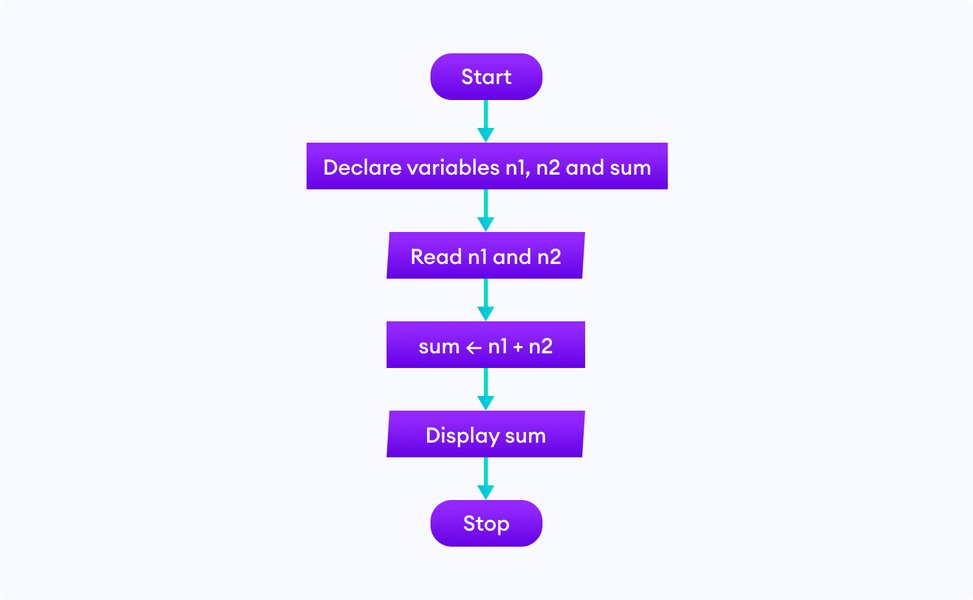
A flowchart visually represents the step-by-step logic of an algorithm.
Module 2: Diving into Code - Programming Fundamentals with Python
Chapter 3: Setting Up Your Coding Playground
Getting started requires the right tools. This chapter guides you through setting up a beginner-friendly coding environment. We'll focus on Python due to its readability and widespread use in automation. You'll learn how to install Python and choose a code editor (like VS Code or an online editor) or IDE. We'll walk through writing and running your very first program: the classic "Hello, World!".
- Why Python? Readability, versatility, community support.
- Installing Python on different operating systems (Windows, macOS, Linux).
- Choosing and setting up a code editor/IDE (e.g., VS Code, PyCharm Community, Replit).
- Writing and executing your first Python script ("Hello, World!").
- Introduction to using an AI-assisted editor like Cursor for code suggestions and learning.
Chapter 4: The Building Blocks: Variables, Data Types, and Operators
Code works by manipulating data. This chapter introduces the fundamental concepts of variables (containers for storing information) and common data types (like numbers, text/strings, and true/false values). You'll learn how to use operators to perform calculations and comparisons, forming the basis of programming logic.
- What are variables? Naming conventions and assignment.
- Common data types: Integers, Floats, Strings, Booleans.
- Basic operators: Arithmetic (+, -, *, /), Comparison (==, !=, <, >), Logical (and, or, not).
- Hands-on exercises: Storing user input, performing simple calculations.
Chapter 5: Controlling the Flow: Decisions and Repetition
Programs often need to make decisions or repeat actions. This chapter covers control flow structures. You'll learn if, elif, and else statements to execute code conditionally, and for and while loops to repeat blocks of code efficiently. Mastering control flow is key to writing dynamic and useful programs.
- Conditional statements:
if,elif,else. - Loops for repetition:
forloops (iterating over sequences) andwhileloops (repeating based on a condition). - Combining loops and conditionals for complex logic.
- Practical examples: Simple validation, iterating through lists.
Chapter 6: Organizing Code: Functions and Modules
As programs grow, organization becomes crucial. This chapter introduces functions – reusable blocks of code that perform specific tasks. You'll learn how to define your own functions, pass data into them (arguments), and get results back (return values). We'll also touch upon using pre-written code through modules and libraries, a cornerstone of efficient programming.
- What are functions? Why use them? (Reusability, organization).
- Defining and calling functions.
- Function arguments and return values.
- Scope: Understanding local and global variables.
- Introduction to Python's built-in modules and the concept of importing libraries.
Chapter 7: Working with Collections: Lists and Dictionaries
Often, you need to work with groups of data. This chapter introduces fundamental data structures: lists (ordered collections) and dictionaries (key-value pairs). You'll learn how to create, access, modify, and iterate over these structures, which are essential for managing data in your programs.
- Lists: Creating, indexing, slicing, appending, removing items.
- Dictionaries: Creating, accessing values via keys, adding/updating pairs.
- Looping through lists and dictionaries.
- Choosing the right data structure for the task.
This video provides a comprehensive beginner's tutorial for Python, covering many fundamental concepts discussed in this module.
Module 3: Connecting the Digital World - APIs and Web Basics
Chapter 8: Understanding the Web: HTTP and APIs
Automation often involves connecting different web applications. This chapter explains the basics of how the web works, focusing on the HyperText Transfer Protocol (HTTP) and Application Programming Interfaces (APIs). Think of an API as a menu that allows different software applications to talk to each other. Understanding APIs is crucial for using tools like Zapier and Make effectively.
- How the web works: Client-server model, URLs.
- Introduction to HTTP: Request methods (GET, POST), status codes.
- What is an API? How applications use APIs to share data.
- Common data formats for APIs: JSON.
- Simple API requests using Python (e.g., using the
requestslibrary).
Chapter 9: Introduction to Webhooks
Webhooks are a key mechanism for real-time automation. This chapter explains what webhooks are (automated messages sent from apps when something happens) and how they differ from traditional API polling. You'll learn how they enable instant triggers for automation workflows.
- What are webhooks? Event-driven communication.
- Webhooks vs. API Polling.
- How automation tools use webhooks as triggers.
- Setting up a simple webhook receiver (conceptual).
Module 4: Automation in Action - No-Code & Low-Code Tools
Chapter 10: Introduction to Workflow Automation
This chapter introduces the concept of workflow automation – using software to automate sequences of tasks or processes. We'll discuss the benefits (saving time, reducing errors, increasing efficiency) and identify common tasks suitable for automation. We'll provide an overview of the no-code/low-code landscape.
- What is workflow automation? Why is it important?
- Identifying tasks suitable for automation.
- Overview of No-Code vs. Low-Code platforms.
- The "Automation Mindset": Thinking in terms of triggers and actions.
Chapter 11: Getting Started with Zapier
Zapier is one of the most popular automation platforms. This chapter provides a hands-on introduction to Zapier's interface and core concepts: Zaps (workflows), Triggers (events that start a Zap), and Actions (tasks performed by a Zap). You'll create your first simple Zap connecting two common applications.
- Zapier dashboard and terminology.
- Setting up Triggers (e.g., new email, form submission).
- Configuring Actions (e.g., add row to spreadsheet, send notification).
- Building your first multi-step Zap.
- Exploring popular Zapier integrations.
Chapter 12: Exploring Make (formerly Integromat)
Make offers a more visual and potentially complex approach to automation. This chapter introduces Make's visual scenario builder, modules, operations, routers, and iterators. You'll learn how to build more intricate workflows involving multiple pathways and data transformations.
- Make's visual interface and core concepts (Scenarios, Modules, Connections).
- Building linear and branching workflows (Routers).
- Working with data structures and mapping fields.
- Error handling and scheduling scenarios.
Chapter 13: Harnessing the Power of n8n
n8n is a powerful, open-source, and often self-hostable workflow automation tool. This chapter covers n8n's node-based interface, explaining how to connect different nodes (representing applications or functions) to create workflows. We'll explore its flexibility, including the ability to write custom code snippets.
- Introduction to n8n: Nodes, Connections, Workflows, Credentials.
- Building workflows using various nodes (triggers, actions, logic).
- Using the Function node for custom JavaScript code.
- Exploring built-in nodes and community nodes.
- Self-hosting vs. Cloud options.
Module 5: Enhancing Automation - Advanced Tools and Techniques
Chapter 14: Leveraging Code in Automation Platforms
While no-code tools are powerful, sometimes you need custom logic. This chapter explores how to use your Python or JavaScript skills within platforms like Zapier (Code by Zapier), Make (Tools module), and n8n (Function/Function Item nodes) to handle more complex data manipulation, API interactions, or logic not covered by standard blocks.
- Using built-in code execution modules in Zapier, Make, n8n.
- Writing simple Python/JavaScript snippets for custom tasks.
- Passing data into and out of code blocks.
- When to use code vs. standard modules.
Chapter 15: Introduction to Cursor and AI-Assisted Development
Modern code editors can significantly speed up development. This chapter introduces Cursor, an AI-powered code editor. We'll explore how its features (like code generation, explanation, and debugging assistance) can help you write code faster, understand existing code better, and integrate AI into your development workflow, especially when creating custom scripts for automation.
- Overview of Cursor's features.
- Using AI for code generation and autocompletion.
- AI-powered debugging and code explanation.
- Integrating Cursor with your coding and automation projects.
Chapter 16: Exploring Windsurf and Specialized Tools (Conceptual)
Beyond the major platforms, specialized tools exist. This chapter conceptually introduces tools like "Windsurf" (representing potentially niche or industry-specific automation platforms). The focus is on understanding that the automation landscape is vast and that core principles learned apply broadly. We'll discuss how to evaluate and learn new tools based on specific needs.
- The broader automation ecosystem.
- Evaluating tools based on features, pricing, and integrations.
- Concept of specialized vs. general-purpose automation.
- Applying learned principles to new platforms.
Visualizing the Learning Path
The journey from novice to automation implementer involves several interconnected stages. This mindmap illustrates the key areas covered in the coursebook and how they relate to each other, starting from foundational concepts and branching out to specific tools and applications.
Comparing Key Automation Platforms
Choosing the right automation tool depends on your needs, technical skills, and budget. This table provides a comparative overview of the main platforms discussed in this coursebook.
| Feature | Zapier | Make (Integromat) | n8n |
|---|---|---|---|
| Ease of Use | Very High (Linear interface) | High (Visual, non-linear interface) | Medium-High (Node-based, more technical) |
| Flexibility | Good | Very High (Complex branching, data handling) | Extremely High (Code nodes, open-source, self-hostable) |
| Number of Apps | Largest (6000+) | Large (1000+) | Growing (Hundreds, plus community nodes & HTTP requests) |
| Pricing Model | Task-based, tiered plans | Operation-based, tiered plans | Free (self-hosted) or tiered cloud plans (often more generous) |
| Coding Integration | Yes (Code by Zapier - Python/JS) | Yes (Tools module, custom apps) | Yes (Function/Function Item nodes - JS, expression language) |
| Target User | Beginners, non-technical users, quick integrations | Users needing complex workflows, visual builders | Technical users, developers, those needing self-hosting or high customization |
Automation Tool Attributes Radar
This chart provides a visual comparison of Zapier, Make, and n8n across several key attributes relevant to beginners and those scaling their automation efforts. Scores are subjective estimations (out of 10) based on typical user experiences.
Module 6: Bringing It All Together - Projects and Best Practices
Chapter 17: Hands-On Automation Projects
Theory is best learned through practice. This chapter provides step-by-step guidance for building several practical automation projects combining the skills learned. Examples might include:
- Automating social media posting from a spreadsheet or RSS feed.
- Creating an automated email follow-up sequence based on form submissions.
- Syncing data between two different applications (e.g., CRM and project management tool).
- Building a simple notification system for specific events (e.g., website monitoring).
Each project will include objectives, required tools, step-by-step instructions, and potential extensions.
Chapter 18: Debugging and Troubleshooting Your Automations
Workflows don't always work perfectly on the first try. This chapter equips you with strategies for debugging common issues in automation platforms and code. You'll learn how to interpret error messages, use logging features, test individual steps, and systematically isolate problems.
- Common errors in automation (API connection issues, data formatting problems, logic errors).
- Using built-in testing and debugging tools in Zapier, Make, n8n.
- Reading logs and understanding error messages.
- Strategies for systematic troubleshooting.
Chapter 19: Best Practices for Sustainable Automation
Building automations is one thing; maintaining them is another. This chapter covers best practices for creating robust, reliable, and manageable workflows. Topics include naming conventions, documentation, error handling strategies, security considerations (managing API keys), and version control concepts.
- Documenting your workflows.
- Implementing robust error handling.
- Securely managing credentials and API keys.
- Planning for scalability and maintenance.
- Version control concepts (even for no-code workflows).
Module 7: Continuing Your Journey
Chapter 20: Where to Go Next: Expanding Your Skills
This coursebook provides a strong foundation, but the learning journey doesn't end here. This chapter offers guidance on next steps, including resources for diving deeper into Python, exploring more advanced automation techniques, learning other programming languages, and discovering specialized tools.
- Resources for further learning (online courses, books, communities).
- Exploring advanced programming concepts.
- Introduction to other automation areas (e.g., RPA, testing automation).
- Potential career paths in automation and development.
- Tips for staying updated with new tools and trends.
Appendix: Glossary and Cheat Sheets
A quick reference section including:
- Glossary of key programming and automation terms.
- Python syntax cheat sheet.
- Comparison reminders for Zapier, Make, n8n.
- Links to useful documentation and resources.
Frequently Asked Questions (FAQ)
Is learning to code really necessary to use tools like Zapier or Make?
While you can achieve a lot with Zapier, Make, and n8n without writing any code, understanding basic programming concepts significantly enhances what you can do. It helps you:
- Troubleshoot issues more effectively by understanding the underlying logic.
- Utilize built-in code steps (like 'Code by Zapier' or n8n's Function node) for custom logic, data transformation, or API calls not covered by standard integrations.
- Better understand how APIs work, which is fundamental to connecting different apps.
- Design more robust and efficient workflows.
So, while not strictly necessary for basic use, coding knowledge unlocks the full potential of these powerful tools.
Which programming language is best for automation beginners?
Python is widely recommended for beginners interested in automation for several reasons:
- Readability: Its syntax is relatively clean and close to plain English, making it easier to learn and understand.
- Versatility: Python is used in web development, data science, scripting, and automation, making it a valuable skill across domains.
- Extensive Libraries: It has a vast collection of pre-built libraries for tasks like web scraping, interacting with APIs, file manipulation, and more (e.g., `requests`, `pandas`, `BeautifulSoup`).
- Community Support: A large and active community means plenty of tutorials, forums, and resources are available.
- Integration: Many automation tools support Python for custom code steps.
JavaScript is another strong contender, especially given its prevalence in web development and n8n's use of it in Function nodes, but Python's gentle learning curve often makes it the preferred starting point for general automation.
How long will it take to learn coding and automation basics?
Learning time varies greatly depending on individual aptitude, time commitment, learning resources, and goals. However, here's a rough estimate:
- Basic Programming Concepts (Python): With consistent practice (e.g., 5-10 hours/week), you could grasp fundamental concepts (variables, loops, functions, data structures) within 1-3 months.
- Understanding APIs & Web Basics: This might take another few weeks of focused learning.
- Proficiency with one No-Code Tool (e.g., Zapier): You can start building simple automations within days or weeks, but becoming proficient might take 1-2 months of regular use.
- Combining Code & Automation: Reaching a level where you confidently use code within automation tools could take 3-6 months or more, depending on the complexity of tasks.
The key is consistent practice and building projects. This coursebook aims to accelerate that process by providing a structured path.
What are Windsurf and Cursor mentioned in the outline?
Cursor is a real tool: it's an AI-first code editor designed to help developers write, understand, and debug code faster using artificial intelligence features integrated directly into the editor.
Windsurf is used conceptually in this outline to represent the broader category of more specialized, advanced, or perhaps niche automation platforms that exist beyond the well-known ones like Zapier, Make, and n8n. While not a widely known specific tool in the general automation space like the others, the chapter aims to teach the principle of evaluating and adapting to new tools as the automation landscape evolves.
Recommended Further Exploration
- Discover how to integrate custom Python scripts into your Zapier or Make automations for advanced logic.
- Explore practical beginner projects to solidify your automation skills with tools like n8n or Zapier.
- Understand the pros and cons of self-hosting n8n versus using their cloud service for business automation needs.
- Learn about the differences and similarities between the Cursor editor and using VS Code with AI assistants like GitHub Copilot.
References

Last updated April 27, 2025