
Local Area Network (LAN)
Exploring LAN fundamentals, technologies, and applications
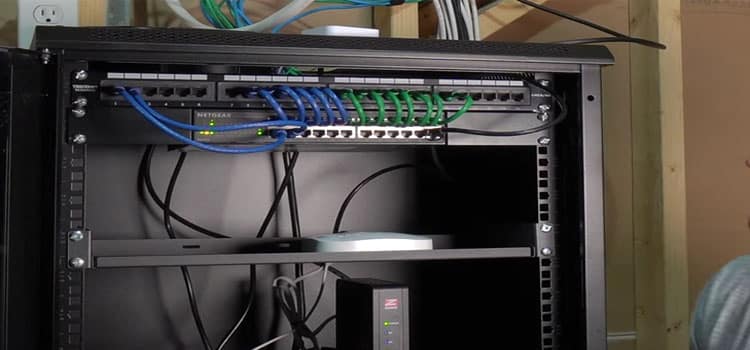
Highlights
- Connectivity and Communication: LANs provide high-speed data transfer among devices in a confined area.
- Resource Sharing: Efficient sharing of files, printers, and internet connections among computers.
- Technology and Security: Utilizing Ethernet and Wi-Fi, LANs ensure secure, reliable, and cost-effective networking.
Understanding Local Area Networks
A Local Area Network (LAN) is a form of computer network that interconnects devices within a limited geographical domain. Commonly found in settings such as homes, offices, campuses, and small businesses, LANs allow for the rapid transfer of data, resource sharing, and communication among devices. Utilizing technologies like Ethernet for wired connections and Wi-Fi for wireless connections, LANs create an environment where computers, printers, servers, and other peripherals can seamlessly interact.
Definition and Core Concept
The essence of a LAN is to enable devices within a confined area—typically within a building or a group of buildings—to communicate and share resources efficiently. The network is designed to operate over short distances, leading to high data transfer speeds and reduced latency compared to broader network architectures like Wide Area Networks (WANs). This environment fosters collaborative work, reduction in redundancy, and cost savings by centralizing resource management.
Key Terminology Associated with LANs
When discussing LANs, several significant terms often come into play:
- Nodes: The individual devices (computers, printers, servers) connected within the network.
- Switches and Routers: Devices that manage network traffic within and outside the LAN, ensuring smooth data transmission.
- Ethernet: A widely used wired networking technology for building LANs that facilitates high-speed data exchange.
- Wi-Fi: A wireless technology that permits devices to connect without cables, offering flexibility in network designs.
Technologies Behind LANs
LANs rely primarily on two types of connectivity technologies: wired (Ethernet) and wireless (Wi-Fi). Each presents distinct advantages and considerations, making them suitable for different environments and applications.
Wired LANs
Wired LANs are often built using Ethernet cables that physically connect devices to a central network hub, switch, or router. This arrangement is known for its:
- High Data Transfer Speeds: Ethernet connections are reliable and ensure minimal delays in data packets.
- Stable Connection: Physical cabling minimizes interference and signal loss compared to wireless methods.
- Security: Wired connections are more secure since intercepting data requires physical access to the cabling infrastructure.
Wireless LANs (WLANs)
In contrast to wired LANs, wireless LANs use radio frequencies to connect devices, providing flexibility and ease of expansion. The benefits include:
- Mobility: Devices can move freely within the network without being tethered by cables.
- Ease of Installation: WLANs can be installed with minimal infrastructure changes, making them ideal for dynamic environments.
- Scalability: With Wi-Fi, networks can easily expand to include more users and devices without extensive rewiring.
Emerging Technologies in LANs
The evolution of LANs has been driven by continuous advancements in technology. Some emerging trends include the integration of:
- Virtual LANs (VLANs): Allow network administrators to partition a single physical network into multiple logical networks, enhancing security and efficiency.
- High-Speed Standards: Newer Ethernet standards (e.g., Gigabit and 10 Gigabit Ethernet) ensure that data transfer rates remain competitive and sufficient for modern applications.
- Enhanced Wireless Protocols: The development of Wi-Fi 6 and upcoming Wi-Fi 7 standards improves the capacity, efficiency, and performance of wireless connections.
Applications and Importance of LANs in Everyday Settings
LANs are integral to the operational structure of many organizations, from small businesses to large enterprises. Their primary role lies in connecting essential devices, facilitating communication, and enhancing resource utilization.
Home Networks
In the domestic sphere, LANs enable households to connect personal computers, gaming consoles, smart TVs, and other IoT (Internet of Things) devices. This connectivity allows for:
- Centralized network storage and backup of digital content.
- The sharing of multimedia resources like movies, music, and photos.
- Joint utilization of internet connections among multiple devices without degradation in service.
Office and Enterprise Networks
In business environments, LANs are the backbone of day-to-day operations. They foster seamless collaboration between remote and on-site workers by enabling:
- File Sharing and Collaboration: Employees can access centralized databases, share documents, and work collaboratively in real time.
- Access to Networked Printers and Scanners: Streamlining office operations by centralizing peripherals.
- Secure Communication: Internally managed networks allow effective implementation of security protocols, ensuring sensitive data remains protected.
- Efficient Resource Management: Centralized servers manage everything from email services to customer relationship management (CRM) systems.
Academic and Institutional Use
Many educational institutions rely on LANs to support administrative functions and enhance the learning experience. Classroom technologies, digital libraries, and research databases are often connected via a local network, promoting:
- The rapid exchange of educational resources.
- Online assessments and interactive learning modules.
- Real-time communication between educators and students.
Healthcare Applications
Another critical application of LAN technology is in the healthcare sector. Secure LANs are essential in hospitals and clinics for:
- Patient Data Management: Fast access to medical histories and real-time patient monitoring systems.
- Diagnostic Services: Efficient transmission of imaging data and diagnostic reports among departments.
- Telemedicine: Supporting remote consultations and continuous patient care through secure networks.
Design Considerations and Network Topologies
When setting up a LAN, several design aspects must be considered to ensure efficiency, scalability, and security. These include the network’s topology, hardware components, and overall architecture.
Network Topologies
The topology of a LAN refers to the physical and logical layout of the network. Common LAN topologies include:
| Topology | Description | Advantages | Disadvantages |
|---|---|---|---|
| Star | Devices are connected to a central hub or switch. | Easy to manage and expand; failure of one device does not affect the rest. | If the central hub fails, the entire network is compromised. |
| Bus | All devices share a single communication line. | Simple and cost-effective for small networks. | Limited by distance and can suffer from network congestion. |
| Ring | Devices are connected in a closed loop, each one having two neighbors. | Data flows in one direction, reducing collisions. | A break in the ring can disrupt communication across the network. |
| Mesh | Each device is connected to every other device. | Highly reliable; robust against failures. | Complex and expensive due to the large number of connections. |
Choosing the right topology depends on the size of the network, the required reliability, cost considerations, and performance needs. A star topology is generally preferred for its simplicity in management and troubleshooting, while mesh topologies are often reserved for environments where high availability is critical.
Essential Network Hardware Components
Hardware is the foundation of any LAN. The key components include:
- Network Interface Cards (NICs): Installed in individual devices to connect them to the network.
- Switches: Facilitate the connection between multiple devices by managing data traffic.
- Routers: Serve as gateways that connect LANs to larger networks such as the internet.
- Cables: In wired LANs, high-quality Ethernet cables (Cat 5/5e/6) ensure efficient data transmission.
Security and Maintenance in LANs
Security is paramount in any LAN environment. With a centralized network, the potential for data breaches and unauthorized access must be addressed through robust security measures and regular maintenance.
Implementing Network Security
Several strategies can be implemented to ensure LAN security:
- Encryption: Encrypting data transmissions over the network to secure sensitive information.
- Access Controls: Using firewalls and authentication protocols to limit access to authorized users only.
- Regular Updates: Keeping network devices and software updated with the latest security patches.
- Monitoring and Auditing: Continuous monitoring of network activity to detect and respond to anomalies promptly.
Maintenance Best Practices
To maintain optimal performance and security, network administrators should employ a systematic maintenance routine:
- Periodic Hardware Checks: Assess and replace outdated or malfunctioning equipment.
- Software and Firmware Updates: Regularly update all associated software to protect against vulnerabilities.
- Network Audits: Frequently review network configurations to improve performance and security standards.
- Backup Strategies: Implement robust data backup and recovery plans to mitigate potential data loss.
Cost-Effectiveness and Scalability Outlook
LANs are not only efficient but also offer economic benefits for organizations by reducing expenses related to resource duplication and support. With minimal setup costs, especially for small-scale networks, LAN technology has become the preferred solution globally.
Cost Advantages
The concentrated nature of LANs generally translates into lower operational expenses:
- Minimal Cabling and Hardware Costs: With advancements in wireless technology, initial setup and maintenance costs are decreasing.
- Reduced Operational Overheads: Centralized management minimizes the need for extensive technical support.
- Resource Optimization: Shared devices and servers reduce the need for duplicate investments in hardware and services.
Scalability Potential
LANs are highly scalable, meaning they can grow alongside an organization’s needs without necessitating a complete infrastructure overhaul. This scalability is achieved through:
- Modular Design: Incremental additions to the network can be integrated easily into the existing framework.
- VLANs: Deploying Virtual LANs allows for partitioning the network logically to accommodate new departments or functions without physical reconfiguration.
- Wireless Expansion: The flexibility of wireless LANs enables dynamic expansion as more devices require connectivity.
Practical Implementation Steps for a LAN
Implementing a LAN involves several careful planning and execution steps to ensure the setup meets both current requirements and future demands. Below are strategic steps commonly followed during the implementation phase.
Step-by-Step LAN Implementation
- Requirement Analysis: Begin by assessing the network requirements, including the number of devices, expected data load, and desired speed. This step is crucial for determining the network design and selecting appropriate technologies.
- Planning the Topology: Decide on the network topology by considering factors such as ease of maintenance, cost, and performance. An effective plan should accommodate the intended layout of the building and potential future expansions.
- Procurement of Hardware: Gather all necessary hardware components, including switches, routers, cables, and network interface cards. Ensure compatibility among all devices and that they meet the required performance standards.
- Installation and Configuration: Install the hardware in accordance with the designed topology. Configure network devices by setting IP addresses, configuring routing protocols, and establishing security measures that align with organizational policies.
- Testing and Troubleshooting: Once the LAN is set up, conduct tests to verify data transfer speeds and overall network performance. Troubleshoot any issues and ensure that all devices are communicating effectively.
- User Training and Documentation: Educate users on the LAN’s functionalities and best practices. Maintain comprehensive documentation detailing network setup, hardware configuration, and security protocols for future reference.
Case Studies and Real-World Applications
Numerous organizations have successfully implemented LANs to optimize their operations. These real-world examples demonstrate the versatility and efficiency of LAN solutions in diverse scenarios.
Corporate Environment
In a typical corporate setting, LANs are used to centralize data storage, streamline communication, and secure business-critical operations. Companies leverage LAN segmentation through VLANs to create secure sub-networks for different departments such as HR, finance, and IT support. This segmentation improves security, ensures compliance with data protection regulations, and increases operational efficiency.
Educational Institutions
Universities and schools integrate LANs to support digital classrooms, online testing, and research collaboration. By connecting classrooms, administrative buildings, and research labs, these institutions facilitate the rapid exchange of scholarly resources and support innovative teaching methodologies.
Healthcare Facilities
Hospitals rely heavily on LANs to manage patient records, diagnostics, and lab data. Secure and robust LAN infrastructures ensure that healthcare providers have immediate access to critical patient data while maintaining compliance with health information privacy standards.
Advanced Aspects and Future Trends
Looking ahead, the evolution of LANs is intertwined with advancements in network technologies. Innovations such as software-defined networking (SDN) and network function virtualization (NFV) are influencing how LANs are designed and maintained. These trends point toward increased flexibility and enhanced security.
Software-Defined Networking (SDN)
SDN represents a paradigm shift where network management is decoupled from the underlying hardware. This approach allows network administrators to manage traffic dynamically and customize policies without physical alterations to the network infrastructure, thereby enhancing the scalability and agility of LANs.
Network Function Virtualization (NFV)
NFV promotes the virtualization of network services traditionally performed by dedicated hardware appliances. By running these functions on standard servers, organizations can reduce costs and adapt more quickly to changing network demands.
Future of LANs
The next generation of LANs is expected to integrate advanced security features, improved data handling, and greater flexibility. With increasing reliance on IoT devices and collaborative cloud-based applications, LANs will continue to be refined for optimal performance.
References
- What is LAN? - GeeksforGeeks
- What is LAN? - Cisco
- What is LAN? - Cloudflare
- Local Area Network Definition - TechTarget
- Local Area Network - Wikipedia
Recommended Related Queries
 aws.amazon.com
Last updated March 21, 2025