
Unlocking Electrical Design: Your Guide to User-Friendly Wiring Software
Navigating the Best Tools for Effortless Electrical Diagrams and Schematics
Designing electrical wiring diagrams, schematics, and plans can often seem like a daunting task, especially for those new to the field or seeking to streamline their workflow. The good news is that numerous software solutions are available today, specifically designed to simplify this process. These tools cater to a wide range of users, from DIY enthusiasts and students to professional engineers and electricians, offering intuitive interfaces, pre-built symbol libraries, and automation features that make complex tasks more manageable. The "easiest" software often boils down to a combination of user-friendliness, a comprehensive symbol library, automation capabilities, and collaborative features.
Key Highlights of User-Friendly Electrical Wiring Software
- Intuitive Interfaces and Extensive Symbol Libraries: Software like SmartDraw and EdrawMax stand out for their drag-and-drop functionality and vast collections of industry-standard electrical symbols, significantly simplifying diagram creation.
- Automation and Error Detection: Advanced features in tools such as AutoCAD Electrical and E3.series automate repetitive tasks like wire numbering and component tagging, while also offering real-time error checking to improve accuracy and efficiency.
- Accessibility and Collaboration: Many modern solutions, including cloud-based platforms, facilitate easy sharing, co-editing, and cross-platform access, enhancing team collaboration and project management.
Understanding Electrical Wiring Software
Electrical wiring software encompasses a broad category of tools designed to assist in the creation, documentation, and analysis of electrical systems. These programs range from simple drawing tools for basic schematics to sophisticated CAD (Computer-Aided Design) solutions for complex industrial projects. The primary goal of these applications is to translate complex electrical concepts into clear, accurate, and easily understandable visual representations, such as wiring diagrams, circuit schematics, and panel layouts.
Beyond mere drawing capabilities, many modern electrical design software solutions integrate advanced functionalities. These include:
- Automated Documentation: Generating bills of materials (BOM), wire lists, and terminal lists automatically.
- Real-time Validation: Checking for errors, inconsistencies, and design rule violations as the diagram is being created.
- Simulation Capabilities: Allowing users to test circuit behavior and identify potential issues before physical implementation.
- Integration with other CAD/CAE tools: Enabling seamless workflow between electrical, mechanical, and other engineering disciplines.
- Cloud-based Collaboration: Facilitating teamwork and remote access to projects.
The choice of software often depends on the specific project requirements, the user's experience level, and the budget. While some free options are excellent for beginners or simple tasks, professional-grade software offers more robust features and support for complex, large-scale projects.
Top Contenders for Ease of Use
When it comes to ease of use, several software options consistently receive high marks. These tools prioritize intuitive interfaces, drag-and-drop functionality, and extensive libraries of pre-built symbols, making them accessible to a wide range of users.
SmartDraw: Simplicity Meets Comprehensive Functionality
SmartDraw is widely recognized for its user-friendliness and extensive template library. It allows users to create a variety of diagrams, including wiring diagrams, circuit panels, and electrical plans, with thousands of ready-made symbols that can be easily dragged and dropped onto the canvas. This eliminates the need for extensive drawing skills, making it an excellent choice for beginners and those who need to quickly produce professional-looking diagrams. SmartDraw also supports collaboration and offers integrations with other popular tools like Microsoft Office and Google Workspace.
An example of SmartDraw's intuitive interface for creating wiring diagrams with pre-built symbols.
EdrawMax: Versatility and Rich Symbol Libraries
EdrawMax is another powerful yet easy-to-use drawing tool that excels in creating various diagrams, including detailed electrical wiring diagrams. It boasts a vast collection of electrical symbols, from basic components like switches and resistors to complex outlets and amplifiers. EdrawMax offers ready-made templates, allowing users to quickly start their designs. Its precision tools enable accurate adjustments of component dimensions and line plotting. Furthermore, EdrawMax supports cross-platform functionality and real-time co-editing, making it suitable for collaborative projects.
ProfiCAD: Specialized for Electrical Schematics
ProfiCAD is specifically designed for drawing electrical and electronic diagrams, schematics, and control circuit diagrams. It's often recommended for beginners and students due to its straightforward interface where users simply add symbols and connect them with wires. ProfiCAD also supports pneumatic and hydraulic diagrams and can automatically generate project documentation such as bills of materials and wire lists, adding to its ease of use for technical professionals.
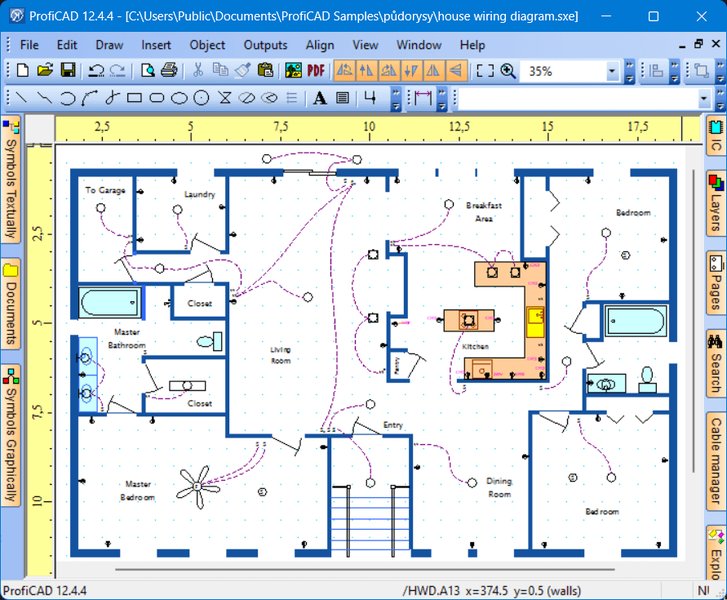
A typical house wiring diagram created using ProfiCAD, showcasing its clean layout.
Circuit Diagram: Free and Browser-Based
For those looking for a free and accessible option, "Circuit Diagram" is a web-based application that allows users to create electronic circuit diagrams directly in their browser. Its visual component placement and simple connection tools make it very user-friendly. It can export circuits as scalable vector images and even offers a beta circuit simulator, making it a good starting point for basic circuit design.
Features that Define "Easiest" Electrical Wiring Software
The "easiest" electrical wiring software isn't just about a simple interface; it also incorporates features that reduce manual effort, minimize errors, and accelerate the design process. Here are some key attributes:
- Drag-and-Drop Functionality: The ability to simply drag components and symbols onto the drawing canvas and connect them with ease.
- Extensive Symbol Libraries: A comprehensive collection of pre-drawn, industry-standard electrical and electronic symbols (e.g., resistors, capacitors, switches, motors, PLC components) that users can readily access and deploy without having to draw them from scratch.
- Automated Wire Numbering and Component Tagging: Features that automatically assign unique numbers to wires and tags to components, ensuring consistency and saving significant time.
- Real-time Error Checking: The software identifies potential wiring mistakes, unconnected components, or design rule violations as they occur, preventing costly errors later in the project.
- Templates and Examples: Pre-designed templates for common electrical diagrams (e.g., house wiring, control circuits) that users can customize, providing a quick starting point.
- Intuitive User Interface: A clean, uncluttered layout with logical menus and easy-to-understand tools, minimizing the learning curve.
- Automatic Report Generation: The capability to automatically generate bills of materials (BOM), wire lists, terminal lists, and other project documentation from the design, reducing manual data entry.
- Cloud-Based Collaboration: For teams, the ability to co-edit diagrams in real-time, share designs easily, and access projects from anywhere.
- Cross-Referencing: Automatic updates and links between related components (e.g., coils and contacts), maintaining design integrity.
Advanced Features for Enhanced Workflow
While ease of use is paramount, some software solutions offer advanced features that, while requiring a slightly steeper learning curve, ultimately simplify complex tasks and boost productivity for professional use cases. These include:
AutoCAD Electrical: The Industry Standard for Automation
As part of Autodesk's suite, AutoCAD Electrical is a top choice for professionals, custom-made for electrical drafting and design. It is praised for its automation features, including automated wire numbering, circuit building, and real-time error detection. While it might have a steeper learning curve than simpler tools, its extensive capabilities, pre-built libraries, and integration with other CAD tools make it highly efficient for complex projects. AutoCAD Electrical simplifies tasks like creating electrical drawings, schematics, and wiring diagrams by automating many repetitive processes.
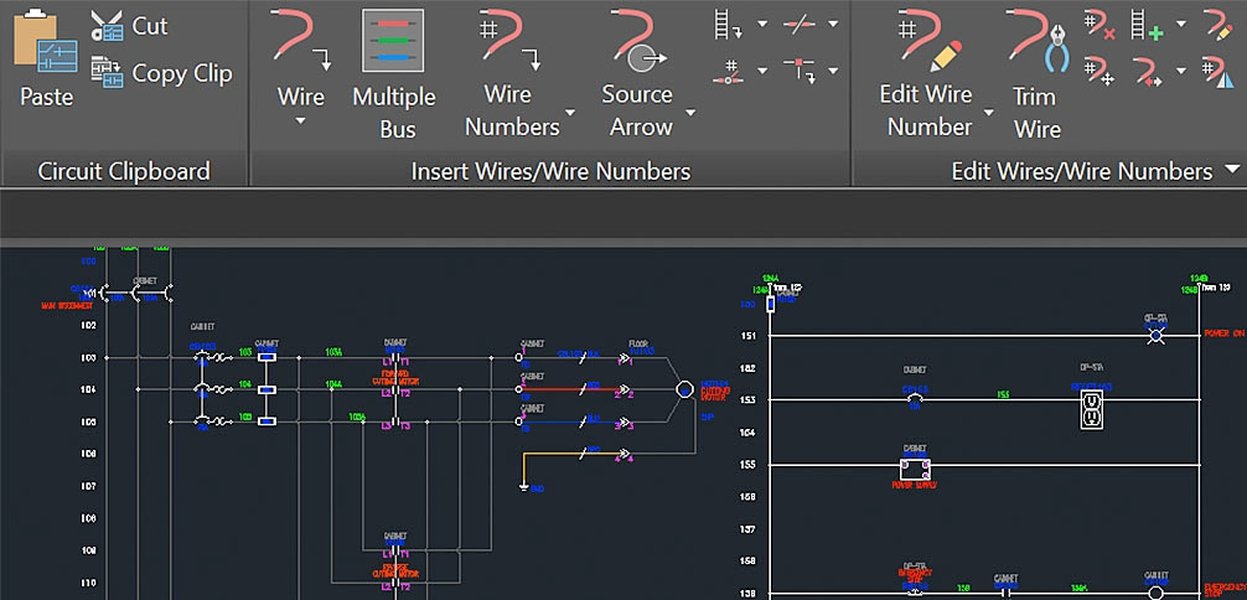
A glimpse into the detailed electrical drawing capabilities of AutoCAD Electrical.
E3.series: Comprehensive and Integrated Design
E3.series by Zuken is a powerful electrical engineering environment that supports advanced requirements for electrical documentation, cabinet, and wire harness design. Its object-oriented architecture ensures consistency across all design phases, helping eliminate errors and reduce design time. E3.series stands out for its real-time design validation, automatic wire and cable naming, and comprehensive libraries of industry-standard symbols (ANSI, IEC, JIS). It's a preferred choice for large-scale electrical modeling projects that demand high accuracy and integration.
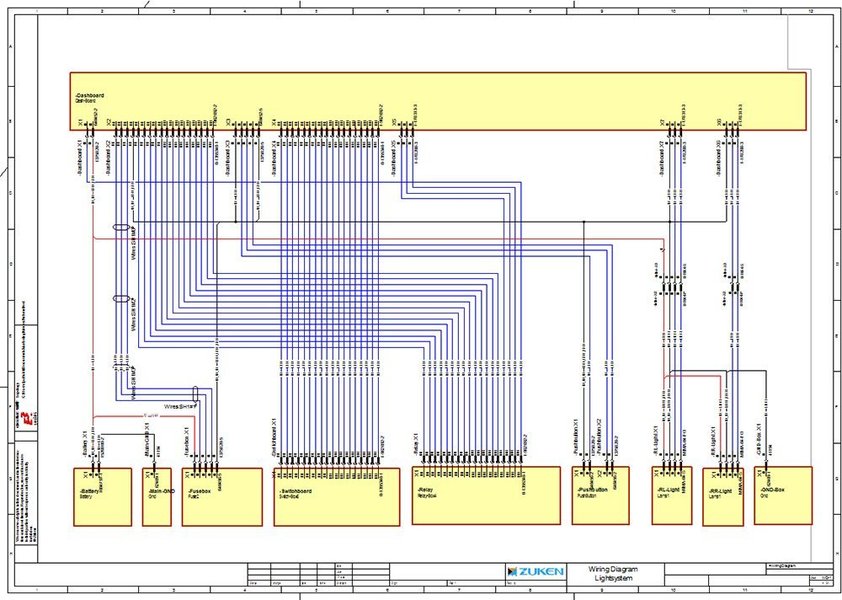
An example of wiring harness design in E3.series, illustrating its advanced capabilities.
ETAP: Power Systems Analysis and Simulation
ETAP (Electrical Transient Analyzer Program) is renowned for its capabilities in power systems analysis and simulation. Unlike tools focused solely on drafting, ETAP excels in electrical modeling by offering complete analysis features. It helps engineers assemble tasks like electrical drafting, wiring diagrams, and component modeling. While more specialized, its analytical prowess makes it an essential tool for those dealing with complex power distribution and fault analysis.
WSCAD ELECTRIX: Cloud-Based 3D CAD with AR
WSCAD ELECTRIX is a cloud-based 3D CAD solution that supports electrical engineers in managing circuits and systems, even incorporating augmented reality (AR) features. It simplifies wire labeling and data import/export, offering a modern approach to electrical design with capabilities for 3D modeling and graphical processors. This makes it a forward-thinking choice for those interested in integrated and visualized design processes.
Choosing the Right Software: A Radar Chart Comparison
To help visualize the strengths of various electrical wiring software options, here's a radar chart comparing several popular tools across key attributes related to ease of use and functionality. This chart is based on an opinionated analysis of user feedback and described features from the provided sources.
This radar chart illustrates that tools like SmartDraw and EdrawMax excel in "Ease of Learning" and "Symbol Library Size," making them highly accessible. AutoCAD Electrical and ETAP, while perhaps less "easy" to learn initially, score high in "Automation Features" and "Simulation & Analysis," reflecting their professional-grade capabilities. "Price/Accessibility" generally correlates with free or lower-cost options scoring higher, while specialized professional software might score lower in this aspect due to higher licensing costs.
Key Considerations When Selecting Software
Beyond ease of use, several factors should influence your decision when selecting electrical wiring software:
| Factor | Description | Impact on Ease of Use |
|---|---|---|
| Project Complexity | Are you designing simple home wiring, or complex industrial control systems? | Simpler projects benefit from basic, intuitive tools; complex ones may require advanced CAD features, increasing initial learning but simplifying detailed work. |
| User Experience Level | Are you a beginner, student, or experienced engineer? | Beginners will find drag-and-drop interfaces with extensive templates easiest. Professionals might prioritize automation and integration features. |
| Budget | Are you looking for free, open-source, or paid enterprise solutions? | Free options like Circuit Diagram or KiCAD offer great value for basic needs. Paid software (e.g., AutoCAD Electrical, E3.series) provides more comprehensive features and support. |
| Collaboration Needs | Do you need to share and co-edit designs with a team? | Cloud-based software (e.g., EdrawMax, SmartDraw) with real-time collaboration features will be easiest for team projects. |
| Specific Features Required | Do you need simulation, BOM generation, 3D modeling, or specific industry symbol libraries? | Identifying specific needs helps narrow down options; some software specializes in certain aspects (e.g., ETAP for power analysis, Solid Edge for 3D routing). |
| Integration with Other Tools | Will the software need to work seamlessly with mechanical CAD, PLM, or ERP systems? | Software that offers strong interoperability (e.g., Autodesk products, E3.series) will streamline integrated design workflows. |
The easiest software for one person might not be for another, as it largely depends on individual needs and the complexity of the tasks at hand.
Visualizing Electrical Plans with SmartDraw
SmartDraw provides an accessible platform for creating various electrical diagrams. The following video demonstrates how easy it is to draw circuit and electrical diagrams using SmartDraw's intuitive tools and symbols:
A tutorial on creating circuit and electrical diagrams using SmartDraw, highlighting its user-friendly interface and symbol libraries.
This video clearly shows how SmartDraw's drag-and-drop functionality and rich set of electrical symbols simplify the diagramming process. It illustrates how even complex electrical layouts can be created quickly and accurately, making it an excellent choice for users prioritizing ease of use without sacrificing professional output.
Future Trends in Electrical Wiring Software
The landscape of electrical wiring software is continuously evolving, with new technologies enhancing capabilities and ease of use. Key trends include:
- AI-Powered Automation: Artificial intelligence is increasingly being integrated to automate design tasks, suggest optimal component placements, and provide smarter error detection. This can significantly reduce design time and improve accuracy.
- Cloud-Based Platforms: The shift towards cloud solutions offers enhanced collaboration, accessibility from any device, and automatic updates. This facilitates remote work and real-time co-editing among dispersed teams.
- 3D Modeling and Augmented Reality (AR): Integration of 3D modeling allows for better visualization of physical layouts and wire routing, while AR can overlay virtual designs onto real-world environments for planning and maintenance.
- IoT Integration: Software is adapting to design and manage electrical systems for Internet of Things (IoT) devices, accounting for wireless communication and advanced sensing components.
- Digital Twins: The creation of digital replicas of physical electrical systems allows for advanced simulations, predictive maintenance, and real-time monitoring.
These trends point towards a future where electrical design software will become even more intuitive, intelligent, and integrated, further streamlining the workflow for all users.
FAQ about Electrical Wiring Software
What is the main purpose of electrical wiring software?
Can I use free software for professional electrical designs?
What features make electrical wiring software easy to use?
How does electrical wiring software improve accuracy?
Is simulation a common feature in electrical wiring software?
Conclusion
The "easiest" electrical wiring software depends heavily on your specific needs, experience level, and project complexity. For beginners and those needing quick, clean diagrams, intuitive tools like SmartDraw, EdrawMax, and ProfiCAD stand out with their drag-and-drop interfaces and rich symbol libraries. For professionals tackling larger, more intricate projects, solutions such as AutoCAD Electrical and E3.series, while requiring a greater initial investment in learning, offer unparalleled automation, error detection, and integration capabilities that ultimately streamline the entire design process. Modern software continues to evolve with AI, cloud collaboration, and 3D visualization, making electrical design more accessible and efficient than ever before. By carefully considering the features that matter most to your workflow, you can select the tool that best empowers you to create accurate and professional electrical designs with maximum ease.
Recommended Further Queries
- How does CAD software simplify electrical design workflow?
- What are the best free and open-source electrical design tools?
- Comparison of electrical simulation software for power systems
- Key features for electrical harness design software
References
Last updated May 21, 2025