
Unlock Smarter Logging: Why Your Reviewer Wants Environment-Aware Debugging
Moving beyond module flags to robust, environment-specific logging for safer and more efficient applications.
It's great that you've created a reusable logging utility! Your reviewer's feedback points towards a standard best practice in software development: tailoring application behavior, especially logging, based on the deployment environment (like development, staging, or production). Let's break down why this is crucial and how you can adapt your utility effectively, even though it's part of a shared package.
Essential Insights
- Environment is Key: The most critical factor for logging behavior should be the environment (dev, staging, prod), not just module flags.
- Production Safety: Disabling verbose debug logs in production is vital for performance, security, and avoiding log noise.
- Runtime Control: Even if the utility code is in the production bundle, its *execution* can be controlled at runtime using environment variables.
Understanding Your Current Setup vs. The Reviewer's Suggestion
Your Current Approach: Module-Based Debugging
Your createLogger utility currently relies solely on the VITE_DEBUG_MODULES environment variable. This variable is typically processed by Vite during the build process (import.meta.env).
// Your current code snippet
const debugModules = import.meta.env.VITE_DEBUG_MODULES
  ? import.meta.env.VITE_DEBUG_MODULES.split(',')
  : [];

const createLogger = (moduleName) => {
  const isModuleDebug =
    debugModules.includes(moduleName.trim()) ||
    debugModules.includes('*');

  return (...args) => {
    // Logs ONLY if the module name matches VITE_DEBUG_MODULES
    if (isModuleDebug) {
      console.log(<code>[${moduleName}], ...args);
    }
  };
};

export default createLogger;
Strengths:
- Allows fine-grained control over which specific parts of your application produce debug logs during development.
Weaknesses:
- Build-Time Dependency:
import.meta.envvariables are usually replaced with their actual values at build time. This means the list of debug modules is fixed in the generated code and cannot be easily changed at runtime based on the deployment environment (dev vs. prod). - Potential Production Risk: If
VITE_DEBUG_MODULESis accidentally set or includes*in a production build configuration, verbose logs could be generated in the live environment, impacting performance and potentially exposing sensitive data.
The Reviewer's Suggestion: Environment-Aware Logging
The reviewer is advocating for a standard practice: making the logging behavior primarily dependent on the application's current operating environment.
"Hier muss die Idee sein, dass der Mode aus externeren Quellen kommt: createLogger = (environment) dev,staging,production. Falls dev, testing, oder staging, dann logs ausgeben."
This translates to:
- The "Mode" (environment: dev, staging, prod) should come from an external source (like an environment variable).
- Logging should be active (or more verbose) only in non-production environments (dev, testing, staging).
- In production, logging (especially debug level) should typically be suppressed or significantly reduced.
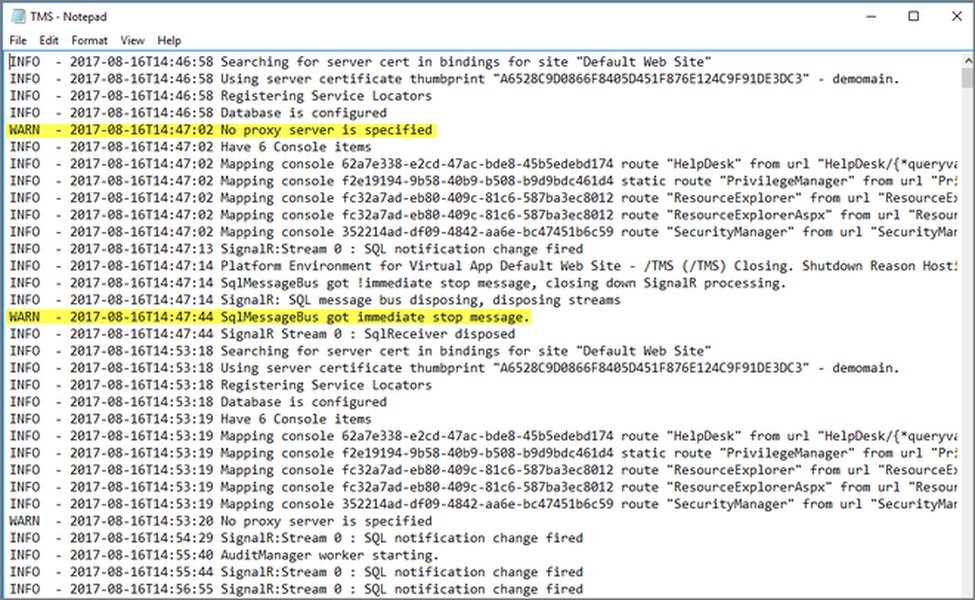
Server logs are crucial but need careful management across different environments.
Why is this important?
- Security: Prevents accidental exposure of internal application details or sensitive data in production logs.
- Performance: Excessive logging, especially synchronous
console.logcalls, can introduce performance bottlenecks in a high-traffic production environment. - Clarity & Noise Reduction: Keeps production logs focused on essential information (errors, critical warnings) rather than being flooded with debug messages.
- Standard Practice: Aligning logging with deployment environments is a widely accepted best practice, supported by numerous logging libraries and frameworks.
Addressing Your Concern: "It's already in production..."
You are correct that the code for your createLogger utility, being part of your utils package, will be included in the final application bundle (dist) deployed to production. However, the reviewer's point isn't about removing the code physically, but about **controlling its execution behavior at runtime**.
Think of it like having a light switch. The wiring (the code) is always there, but the switch (an environment check) determines whether the light (the console.log statement) turns on. By reading an environment variable that indicates production, your code can decide *not* to execute the logging part, even though the code itself is present in the bundle.

Debugging is essential, but its output needs environment-specific control.
Recommended Implementation: Combining Environment Awareness and Module Filtering
You can enhance your utility to respect both the environment and your existing module filtering. The key is to access an environment variable that indicates the current deployment mode *at runtime*. While Vite's import.meta.env is primarily for build-time substitution, applications often use other mechanisms:
- Standard
process.env.NODE_ENV:** Very common in Node.js contexts and often supported or shimmed in frontend build tools. - Custom Environment Variables:** Set during the build process (e.g.,
VITE_APP_ENV) or injected at runtime. - Runtime Configuration:** Variables injected into the
windowobject or detected based on the hostname (window.location.host).
Refactored Code Example
This example assumes you have a way to determine the environment at runtime, often via an environment variable set during your build/deployment process (like VITE_APP_ENV or relying on NODE_ENV if configured).
// In your utility file

// 1. Determine the environment (prioritize runtime variables if possible)
//    This example uses a Vite-specific variable, assuming it's set correctly for each environment build.
//    Alternatively, use process.env.NODE_ENV or a window variable if available/injected.
const environment = import.meta.env.VITE_APP_ENV || import.meta.env.MODE || 'production'; // Default to 'production' for safety

// 2. Get debug modules (could also come from runtime config if needed)
const debugModulesRaw = import.meta.env.VITE_DEBUG_MODULES || ''; // Read the raw string
const debugModules = debugModulesRaw ? debugModulesRaw.split(',').map(m => m.trim()) : [];

// 3. Define which environments should allow debug logs
const isDebugEnvironment = ['development', 'staging', 'testing'].includes(environment.toLowerCase());

const createLogger = (moduleName) => {
  // Trim the module name once
  const trimmedModuleName = moduleName.trim();

  // 4. Check if this specific module is targeted for debugging
  const isModuleDebugEnabled =
    debugModules.includes(trimmedModuleName) ||
    debugModules.includes('*');

  return (...args) => {
    // 5. Log ONLY if in a debug environment AND this module is enabled
    if (isDebugEnvironment && isModuleDebugEnabled) {
      console.log(<code>[${trimmedModuleName}], ...args);
      // Consider using console.debug() for semantic clarity
    }
    // Optional: Add handling for other log levels (info, warn, error)
    // that might log even in production, perhaps using a different mechanism.
  };
};

export default createLogger;
How to Set the Environment Variable (VITE_APP_ENV or NODE_ENV)
The crucial part is ensuring the environment variable (VITE_APP_ENV in the example) has the correct value (development, staging, or production) when your application runs.
- Development: Your Vite development server (
vite dev) usually setsMODEtodevelopmentautomatically. You might defineVITE_APP_ENVin a.env.developmentfile. - Build Process: Use different build commands or environment files for staging and production.
vite build --mode staging(uses.env.staging)vite build --mode production(uses.env.production, often the default)
VITE_APP_ENV=staging vite build. - Deployment: Ensure your hosting environment (like Vercel, Netlify, Docker container, server) serves the correct build for the environment. Some platforms allow setting runtime environment variables.
Visualizing Logging Strategies
Logging Approach Comparison
This radar chart compares different logging approaches based on key factors. The "Combined Approach" represents the recommended solution incorporating both environment checks and module filtering.
Key Logging Concepts Mindmap
This mindmap illustrates the relationships between different aspects of a robust logging strategy, including environment control, filtering, levels, and key considerations.
(Verbose Logging)"] id1_2["Staging / Testing
(Detailed Logging)"] id1_3["Production
(Minimal Logging - Errors/Warn)"] id1_4["Source: Env Variables
(NODE_ENV, APP_ENV)"] id2["Filtering Mechanisms"] id2_1["Module-Based
(e.g., VITE_DEBUG_MODULES)"] id2_2["Log Levels
(Debug, Info, Warn, Error)"] id2_3["Contextual Filtering"] id3["Key Considerations"] id3_1["Security
(No Sensitive Data)"] id3_2["Performance
(Avoid Overhead)"] id3_3["Configuration
(Easy Management)"] id3_4["Log Storage/Analysis"] id4["Implementation"] id4_1["Custom Utility
(Like yours)"] id4_2["Libraries
(Winston, Pino, debug.js)"] id4_3["Runtime Checks"]
Environment Variable Strategies
Choosing how to make the environment known to your application code depends on your architecture and deployment setup. Here's a comparison:
| Strategy | Description | Pros | Cons |
|---|---|---|---|
Build-Time Variables (e.g., import.meta.env, Vite define) |
Variables are replaced with values during the build process. | Simple for values known at build time; code can be optimized (dead code elimination). | Inflexible at runtime; requires separate builds per environment; can expose values in client-side code if not careful. |
Standard Env Vars (process.env.NODE_ENV) |
Relies on the standard Node.js variable, often managed by build tools or platforms. | Widely recognized standard; many tools support it. | Might require build tool configuration (shimming) for browser environments; value often tied to build mode (dev/prod). |
Runtime Injection (window.APP_CONFIG) |
Server injects configuration (including environment) into the HTML template or a specific JS file at request time or deploy time. | Highly flexible at runtime; same build artifact can be used across environments. | Requires server-side logic or deployment script modification; adds complexity to setup. |
Hostname Detection (window.location.host) |
Client-side code checks the URL hostname to infer the environment (e.g., *.dev.example.com, *.staging.example.com). |
Simple client-side logic; no build changes needed per environment. | Relies on strict URL conventions; might not be suitable for all setups (e.g., custom domains, local testing without specific hostnames). |
Understanding Environment Variables
Environment variables are fundamental for configuring applications across different deployment stages without changing code. This video provides a good overview of how they work in a Node.js context, which shares principles applicable to modern web development setups.
The core idea is to externalize configuration, allowing the same application codebase to behave differently in development, staging, and production based on variables provided by the environment it's running in.
Frequently Asked Questions (FAQ)
Why disable debug logs in production? Isn't more information better?
While detailed logs are invaluable for debugging during development, they pose risks in production:
- Performance Overhead: Frequent I/O operations (writing logs) can slow down your application, especially under load.
- Security Risks: Debug logs might inadvertently contain sensitive user data, internal system states, or configuration details that shouldn't be exposed.
- Increased Costs: Storing and processing large volumes of verbose logs can be expensive.
- Noise: Excessive logs make it harder to find critical error messages or warnings when troubleshooting production issues.
Production logging should focus on actionable information: errors, critical failures, security events, and key performance indicators.
How exactly do I set environment variables for different environments (dev, staging, prod)?
This depends heavily on your development workflow, build tools, and deployment platform:
- Local Development (Vite): Use `.env` files (e.g., `.env.local`, `.env.development`). Vite automatically loads these based on the command (`vite dev`, `vite build`). Standard variables like `NODE_ENV` or `MODE` are often set automatically.
- Build Process: You can prefix your build command: `VITE_APP_ENV=production vite build`. Alternatively, use environment-specific `.env` files (`.env.production`, `.env.staging`) and build with the corresponding mode: `vite build --mode staging`.
- CI/CD Pipelines (GitHub Actions, GitLab CI): Define environment variables within the pipeline configuration, often as secrets or environment-specific variables.
- Hosting Platforms (Vercel, Netlify, AWS, GCP): Most platforms provide a UI or configuration file (`vercel.json`, `netlify.toml`) to set environment variables for different deployment environments (Production, Preview/Staging).
- Docker: Set environment variables using the `ENV` instruction in your `Dockerfile` or pass them during container runtime (`docker run -e VAR=value ...`).
Consult the documentation for your specific tools and platforms.
What's the difference between build-time and runtime environment variables in Vite?
This is a key distinction:
- Build-Time (`import.meta.env.VITE_*`): These variables (prefixed with `VITE_`) are read from your `.env` files or system environment *during the build process*. Vite replaces `import.meta.env.VITE_VARIABLE_NAME` in your code with the actual string value. The value is fixed in the generated JavaScript bundle. Use these for things that won't change after the build (e.g., API base URLs for different builds, feature flags baked into a specific build).
- Runtime (`process.env`, `window` injection, etc.): These variables are accessed when the JavaScript code is actually running (in the browser or on a server). Their values can be determined by the server hosting the app, the user's system, or configurations loaded dynamically. This is necessary for adapting behavior *after* the code has been built, like switching logging levels based on the live environment (`production` vs. `staging`). Vite doesn't handle these directly; you need other mechanisms (like server injection, platform settings, or specific build configurations using `define`) to make them available.
For controlling logging based on the *deployed* environment, you typically need runtime awareness.
Should I use a dedicated logging library instead?
For simple needs, your custom utility might suffice. However, dedicated libraries like `pino`, `winston` (Node.js), or browser-focused loggers often offer significant advantages:
- Log Levels: Built-in support for levels (debug, info, warn, error, fatal) and filtering by level.
- Transports: Ability to send logs to multiple destinations (console, files, logging services like Datadog, Sentry, Better Stack).
- Structured Logging: Outputting logs in formats like JSON, making them easier to parse and analyze.
- Performance Optimizations: Often designed for high performance, especially asynchronous logging.
- Environment Awareness: Typically have built-in mechanisms for handling environment-based configuration.
- Formatting Options: Customizable log message formats.
If your logging needs become more complex, migrating to a standard library is often a good investment.
Recommended Next Steps
- Explore strategies for setting runtime environment variables in Vite applications for various deployment targets.
- Investigate the established best practices for logging within production JavaScript environments.
- Compare popular JavaScript logging libraries such as Pino, Winston, and debug.js to see if they fit your needs.
- Learn techniques for securing application logs and preventing the accidental exposure of sensitive information.
References
 docs.aws.amazon.com
Last updated May 5, 2025