
Unlocking Peak Performance: Why is Your HTTPS So Slow Behind CGNAT and How to Fix It?
A deep dive into troubleshooting HTTPS/HTTP2 throughput issues with LocalXpose on your Windows server.
It's frustrating when security enhancements seem to come at a significant performance cost. You've observed much lower throughput when accessing your Windows server via HTTPS (with HTTP/2) compared to HTTP, especially when using LocalXpose to navigate CGNAT. This is a common challenge, and several factors can contribute to this discrepancy. Let's explore them systematically.
Highlights: Key Insights into HTTPS Performance
- HTTPS Overhead is Real: The encryption and SSL/TLS handshake process inherent to HTTPS adds computational load and latency not present in HTTP.
- HTTP/2 Nuances: While HTTP/2 aims to improve performance, misconfigurations or specific implementations can sometimes lead to slower speeds than HTTP/1.1, especially under certain network conditions or with particular server software.
- Tunneling & CGNAT Complexities: Services like LocalXpose, while essential for bypassing CGNAT, introduce an additional layer that can affect latency and throughput, potentially amplifying existing overheads like those from HTTPS.
Delving into the "Why": Understanding the Performance Gap
To effectively troubleshoot, it's crucial to understand the underlying mechanics that can lead to slower HTTPS/HTTP2 performance in your specific setup involving a Windows server, LocalXpose, and CGNAT.
The Inherent Cost of Security: HTTPS Overhead
HTTPS (Hypertext Transfer Protocol Secure) secures communication by encrypting the data exchanged between the client (your browser) and the server. This security comes with a performance cost primarily due to:
- SSL/TLS Handshake: Before any data is exchanged, the client and server perform a handshake to establish a secure connection. This involves multiple back-and-forth messages to agree on encryption protocols, exchange certificates, and generate session keys. This process inherently adds latency, especially for the initial connection.
- Encryption and Decryption: All data transmitted over HTTPS must be encrypted by the sender and decrypted by the receiver. While modern CPUs are highly optimized for these cryptographic operations, they still consume processing power and time, which can become noticeable, particularly with high traffic volumes or on less powerful server hardware.
HTTP/2: A Double-Edged Sword?
Your browser indicates it's using HTTP/2 over HTTPS. HTTP/2 was designed to improve upon HTTP/1.1 with features like:
- Multiplexing: Allowing multiple requests and responses to be sent concurrently over a single TCP connection, reducing head-of-line blocking.
- Header Compression (HPACK): Reducing the size of HTTP headers to save bandwidth.
- Server Push: Enabling the server to send resources to the client before they are explicitly requested.
Despite these advantages, HTTP/2 can sometimes result in slower performance if:
- Server-Side Implementation: The web server software (e.g., IIS on your Windows server) might have an inefficient or buggy HTTP/2 implementation. Some configurations or older versions might not fully leverage HTTP/2's benefits or could even introduce new bottlenecks.
- Network Conditions: HTTP/2 is more sensitive to packet loss than HTTP/1.1 due to its single TCP connection model for multiplexing. High packet loss can stall all streams.
- Misconfiguration: Incorrect server settings related to HTTP/2, such as flow control or priority settings, can degrade performance.
The LocalXpose Layer: Tunneling Through CGNAT
Carrier-Grade NAT (CGNAT) means you don't have a dedicated public IP address, making direct port forwarding impossible. LocalXpose circumvents this by creating an outbound tunnel from your server to a LocalXpose public endpoint. This introduces considerations:
- Added Latency: Traffic now routes through LocalXpose's infrastructure, which can add latency depending on the distance to their servers and their network capacity.
- Potential Double Encryption: LocalXpose itself likely encrypts its tunnel. When you use HTTPS, your traffic is encrypted by TLS/SSL, then potentially re-encrypted by the LocalXpose tunnel. This "encryption within encryption" can add processing overhead on both your server and the LocalXpose service, potentially impacting throughput.
- Tunneling Service Performance: The performance and configuration of LocalXpose itself can be a factor. Limitations in bandwidth, processing capacity on their end, or the specific way they handle HTTPS traffic can contribute to slowdowns.
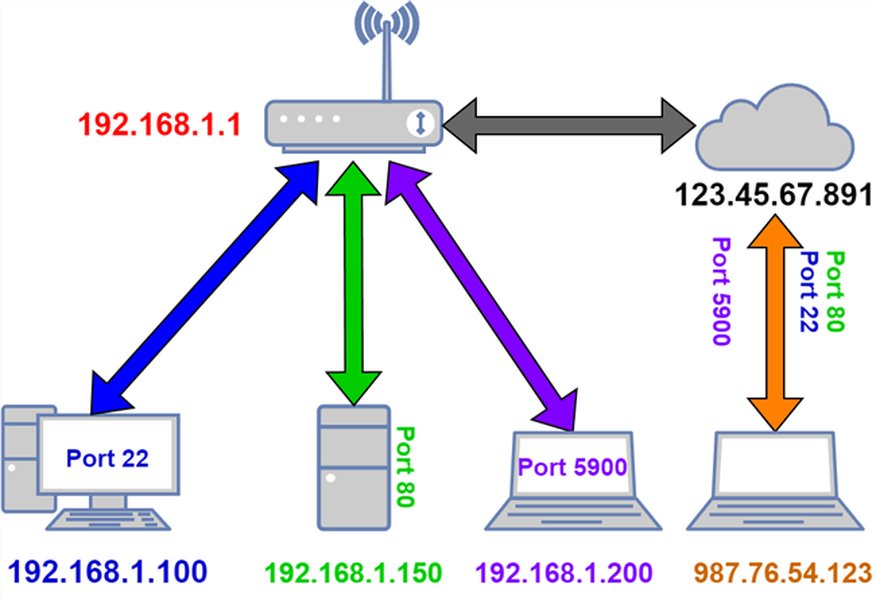
Diagram illustrating a common port forwarding scenario, conceptually similar to how LocalXpose provides external access.
Your Step-by-Step Troubleshooting Roadmap
To pinpoint the cause of the lower HTTPS throughput, a systematic approach is necessary. Start by isolating variables and then delve deeper into specific configurations.
Step 1: Establishing Baselines - Isolate the Bottleneck
Local Network Performance Check
First, test the performance of your Windows server directly on your local network, bypassing LocalXpose and CGNAT entirely. Access your server using its local IP address:
- Test with HTTP.
- Test with HTTPS (if you have a certificate configured for local access).
This helps determine if the fundamental HTTPS setup on your server is significantly slower even without external factors. Tools like curl -v -w "Connect: %{time_connect} TTFB: %{time_starttransfer} Total time: %{time_total}\n" [URL] or browser developer tools can measure connection times and time-to-first-byte (TTFB).
Testing Through LocalXpose
Once you have local baselines, repeat the tests using the LocalXpose public URL for both HTTP and HTTPS. Carefully compare these results to the local tests and to each other. This will highlight how much overhead LocalXpose and the internet path are adding.
Step 2: Deep Dive into HTTPS and HTTP/2 Behavior
Analyzing the TLS Handshake
Use browser developer tools (Network tab) or online SSL test tools (like Qualys SSL Labs Test, though this tests the public endpoint) to inspect the TLS handshake duration. A lengthy handshake can significantly delay initial page load. Look for issues like slow certificate validation or negotiation of cipher suites.
Scrutinizing HTTP/2 Performance (and testing with HTTP/1.1)
Since your browser reports HTTP/2 over HTTPS, this is a key area:
- Browser Developer Tools: The "Protocol" column in the Network tab of most browser developer tools will confirm HTTP/2 usage. Analyze the timing of individual requests.
- Temporarily Force HTTP/1.1: Some browsers or extensions allow you to disable HTTP/2 for testing. Alternatively, if you have control over the client, you might use
curlwith the--http1.1flag for HTTPS requests to compare. If HTTPS with HTTP/1.1 is significantly faster than with HTTP/2, it points to an issue with the HTTP/2 implementation or configuration on your server or an interaction with LocalXpose. - Wireshark: For very detailed analysis, Wireshark can capture the traffic and help you understand HTTP/2 frame exchanges, stream states, and potential issues like head-of-line blocking within the TCP connection if packet loss is occurring.
Step 3: Server-Side Investigation (Windows Server)
Optimizing SSL/TLS Configuration
- Modern TLS Versions: Ensure your Windows server (e.g., via IIS settings or Schannel registry configuration) is configured to use modern TLS versions (TLS 1.2, and preferably TLS 1.3). TLS 1.3 offers performance improvements like a faster handshake.
- Strong and Efficient Cipher Suites: Prioritize cipher suites that offer a good balance of security and performance (e.g., AES-GCM over AES-CBC, and ECDHE for key exchange).
- Hardware Acceleration: Windows CryptoAPI can leverage hardware acceleration for cryptographic operations if available. Ensure this is enabled.
- Certificate Chain: Ensure your SSL certificate and any intermediate certificates are correctly installed and the chain is complete to avoid delays during validation.
- TLS Session Resumption: Enable mechanisms like Session IDs or Session Tickets to speed up subsequent connections from the same client by reusing negotiated security parameters.
Web Server Software (IIS, etc.) Tuning for HTTP/2
If you're using IIS:
- Check for any specific HTTP/2 settings in IIS Manager or configuration files.
- Ensure your Windows Server version and IIS are up-to-date, as updates often include performance improvements and bug fixes for protocol handling.
- Some sources suggest that in certain specific scenarios or with particular configurations, HTTP/2 might not perform optimally. Consider temporarily disabling HTTP/2 on the server for HTTPS traffic (forcing it to HTTP/1.1) as a diagnostic step. If this improves throughput, further investigation into HTTP/2 server configuration is warranted.
Resource Monitoring (CPU, Memory, Network)
Monitor your Windows server's CPU, memory, disk I/O, and network utilization using Task Manager or Performance Monitor during HTTPS access. High CPU usage during HTTPS requests could indicate that encryption/decryption is a bottleneck. Insufficient memory or slow disk I/O can also impact web server performance.
Firewall and Antivirus Scrutiny
Windows Firewall or any third-party antivirus/security software could be inspecting HTTPS traffic differently or more intensively than HTTP traffic, causing slowdowns. Temporarily disable them (in a controlled testing environment) to see if performance improves. If it does, you'll need to configure exceptions or adjust their settings.
Step 4: Examining LocalXpose and Network Path
LocalXpose Configuration Review
- Tunnel Type & Settings: Review your LocalXpose tunnel configuration. Ensure it's optimized for your use case. Some services offer different tunnel types or protocols that might perform better.
- LocalXpose Logs: Check any logs or metrics provided by LocalXpose for errors, high latency, or connection issues specific to the HTTPS tunnel.
- Certificate Handling: If LocalXpose is handling TLS termination (decrypting and re-encrypting traffic), ensure this process is efficient. If you are using your own certificate, ensure it's correctly configured within LocalXpose.
Impact of LocalXpose Server Proximity
The geographical location of the LocalXpose server you're tunneling through can impact latency. If LocalXpose offers different regional servers, try selecting one closer to your physical server or your primary users.
DNS Resolution Checks
Slow DNS resolution for the LocalXpose domain could add to initial connection delays. While typically a smaller factor for established connections, it's worth ensuring your server and client are using fast and reliable DNS resolvers. You can try switching to public DNS servers like Google (8.8.8.8, 8.8.4.4) or Cloudflare (1.1.1.1) for testing.
Considering Alternative Tunneling Services
To isolate whether the issue is specific to LocalXpose, you might temporarily try another tunneling service (e.g., ngrok, Cloudflare Tunnel). If HTTPS performance is significantly better with an alternative, it might point to an issue or limitation within LocalXpose's handling of your HTTPS/HTTP2 traffic.
Comparative Performance Factors
The following table summarizes key differences and potential performance factors between HTTP, HTTPS with HTTP/1.1, and HTTPS with HTTP/2, particularly in the context of your setup with LocalXpose:
| Feature | HTTP | HTTPS (using HTTP/1.1) | HTTPS (using HTTP/2) |
|---|---|---|---|
| Security | None (plaintext) | Encrypted (TLS/SSL) | Encrypted (TLS/SSL) |
| Handshake Latency | Basic TCP handshake | TCP + Full TLS handshake (can be multiple round trips) | TCP + Full TLS handshake (TLS 1.3 can reduce round trips) |
| Encryption Overhead | None | CPU load for encryption/decryption | CPU load for encryption/decryption |
| Connections Per Origin | Multiple parallel TCP connections (browser limits) | Multiple parallel TCP connections (browser limits, keep-alive helps) | Typically one TCP connection (multiplexed streams) |
| Header Compression | No | No | Yes (HPACK), reduces data transfer |
| Multiplexing | No (suffers from Head-of-Line blocking per connection) | No (suffers from Head-of-Line blocking per connection) | Yes (reduces Head-of-Line blocking at application layer, but TCP HoL can still occur) |
| Common Issues | Insecure, easily intercepted | Initial handshake latency, CPU cost for crypto | Server implementation issues, sensitivity to packet loss, complex configuration |
| LocalXpose Impact | Standard tunneling overhead | Tunneling + HTTPS crypto overhead + potential LocalXpose TLS handling | Tunneling + HTTPS/HTTP2 complexities + potential LocalXpose TLS handling |
Visualizing Key Performance Influencers
The radar chart below provides a conceptual overview of various factors and their potential impact on throughput in your scenario. "Ideal Performance" represents minimal negative impact from each factor, while "Suspected Bottleneck Scenario" illustrates how these factors might be contributing to the observed slowdown with HTTPS/HTTP2 via LocalXpose. Your goal during troubleshooting is to move your actual performance closer to the "Ideal" profile by identifying and mitigating the high-impact areas.
Note: The values in the chart are illustrative. Your actual investigation will determine the true impact of each factor.
Mapping the Troubleshooting Landscape
This mindmap outlines the interconnected areas to investigate when diagnosing HTTPS throughput issues in a CGNAT environment using a tunneling service like LocalXpose. It provides a visual guide to ensure all potential causes are considered systematically.
(Windows Server + LocalXpose + CGNAT)"] id1["Diagnosis & Baselining"] id1a["Local Network Tests
(HTTP vs HTTPS)"] id1b["LocalXpose Tunnel Tests
(HTTP vs HTTPS)"] id1c["Protocol Analysis"] id1c1["TLS Handshake Times"] id1c2["HTTP/2 vs HTTP/1.1 Performance"] id1c3["Packet Capture (Wireshark)"] id2["Server-Side (Windows) Checks"] id2a["SSL/TLS Configuration"] id2a1["TLS Versions (1.2, 1.3)"] id2a2["Cipher Suites"] id2a3["Certificate Chain"] id2a4["Session Resumption"] id2b["Web Server (IIS) Configuration"] id2b1["HTTP/2 Settings"] id2b2["Updates & Patches"] id2c["System Resources"] id2c1["CPU Load"] id2c2["Memory Usage"] id2c3["Network Interface Stats"] id2d["Firewall & Antivirus"] id2d1["Rule Inspection"] id2d2["Temporary Disabling (Test)"] id3["LocalXpose & Tunneling Service"] id3a["LocalXpose Configuration"] id3a1["Tunnel Type/Settings"] id3a2["Certificate Handling"] id3b["LocalXpose Service Health"] id3b1["Regional Server Proximity"] id3b2["Service Logs/Metrics"] id3c["Alternative Tunneling Services
(e.g., ngrok, Cloudflare Tunnel for comparison)"] id4["Network & Client Factors"] id4a["DNS Resolution Speed"] id4b["Client Browser/System"] id4b1["Browser Version & Extensions"] id4c["ISP & CGNAT Constraints"] id4c1["Underlying path quality"]
This mindmap helps visualize the different avenues of investigation. Start with broader diagnosis and then drill down into specifics based on initial findings.
This video provides context on self-hosting behind CGNAT, which is relevant to understanding the challenges LocalXpose helps address.
The embedded video offers a broader perspective on self-hosting services when faced with CGNAT, similar to your situation. While not directly a troubleshooting guide for HTTPS performance, it explains the environment you're operating in and why tools like LocalXpose are used. Understanding these foundational concepts can be helpful when thinking about how different layers interact.
Frequently Asked Questions (FAQ)
1. Why is HTTPS generally slower than HTTP?
HTTPS involves an initial SSL/TLS handshake to establish a secure session, which adds latency (extra round trips between client and server). Furthermore, all data exchanged is encrypted by the sender and decrypted by the receiver, consuming CPU resources on both ends. HTTP, being unencrypted, bypasses these steps, resulting in faster raw data transfer and lower initial connection times.
2. Can HTTP/2 actually be slower than HTTP/1.1?
Yes, in some cases. While HTTP/2 is designed for better performance (e.g., through multiplexing and header compression), its benefits depend on proper server implementation, network conditions, and client support. Misconfigurations, server-side bugs, high packet loss (which can stall HTTP/2's single TCP connection), or inefficient resource handling for multiplexed streams can lead to HTTP/2 performing worse than HTTP/1.1 over HTTPS in specific scenarios.
3. How does CGNAT affect my server's accessibility and performance?
CGNAT (Carrier-Grade Network Address Translation) means your ISP assigns your connection a private IP address that is shared among multiple customers, rather than a unique public IP. This prevents direct incoming connections to your server (like traditional port forwarding). Services like LocalXpose bypass this by creating an outbound tunnel from your server to their publicly accessible servers. While this enables access, it adds an extra hop for your traffic, potentially increasing latency and becoming another point where performance can be impacted, distinct from the CGNAT itself.
4. Could LocalXpose itself be the bottleneck?
Yes, it's possible. The LocalXpose service (its servers, network capacity, tunnel encryption methods, and how it handles specific protocols like HTTPS/HTTP2) can introduce its own overhead or limitations. Factors like the geographical location of their proxy servers relative to your server and your users, their current server load, or specific configurations within your LocalXpose account could contribute to performance degradation. Testing with an alternative tunneling service can help isolate if LocalXpose is a primary factor.
5. What are the first three things I should check when HTTPS is much slower?
1. Server-Side SSL/TLS Configuration: Ensure you're using modern TLS versions (TLS 1.2/1.3) and efficient cipher suites on your Windows server. Check for certificate chain issues.
2. HTTP/2 vs. HTTP/1.1 Test: Temporarily force HTTPS connections to use HTTP/1.1 instead of HTTP/2 to see if throughput improves. This helps isolate if the HTTP/2 implementation is problematic.
3. Local vs. Tunneled Performance: Compare HTTPS performance when accessing your server locally (on your LAN) versus through the LocalXpose tunnel. This can help determine if the primary bottleneck is on your server itself or related to the tunneling service/internet path.
Recommended Further Exploration
- How can I optimize IIS for HTTP/2 and TLS 1.3 performance on Windows Server?
- What are the best practices for configuring LocalXpose for maximum throughput with HTTPS?
- Are there alternative tunneling services to LocalXpose that might offer better HTTPS performance behind CGNAT?
- How do I use Wireshark to diagnose slow TLS handshakes or HTTP/2 stream issues?
References
 imagekit.io

Last updated May 7, 2025