
Mastering Express.js Fundamentals in Under 30 Minutes
A Quick Dive into the Popular Node.js Web Framework
Express.js is a minimalist and flexible Node.js web application framework that provides a robust set of features for building web and mobile applications. It simplifies the development of server-side applications by offering an easy-to-use API for routing, middleware, and HTTP utilities. If you're looking to get up and running with backend development using JavaScript, Express.js is often the go-to choice due to its popularity and ease of use.
While becoming a complete Express.js expert in just 30 minutes is ambitious, we can certainly cover the core concepts and get you started with building a basic application. This guide is designed to quickly introduce you to the fundamental building blocks of Express.js, enabling you to create a simple server and understand how it handles requests and responses.
Key Highlights for a Rapid Introduction
- Express.js is a framework built on Node.js: It provides a structured way to build server-side applications using JavaScript.
- Routing is fundamental: Express.js uses routing to direct incoming requests to specific functions that handle them.
- Middleware is powerful: Middleware functions can process requests before they reach the final route handler, adding functionality like logging or authentication.
Setting Up Your Environment
Before you can start coding with Express.js, you need to have Node.js and npm (Node Package Manager) installed on your machine. npm is included with Node.js. If you don't have Node.js installed, you can download it from the official Node.js website.
Initializing Your Project
Once Node.js and npm are ready, create a new directory for your project and navigate into it using your terminal. Then, initialize a new Node.js project by running the following command:
npm init -yThe
-ypackage.jsonInstalling Express.js
Now, install Express.js as a dependency in your project:
npm install expressThis command downloads and installs the Express.js library into the
node_modulespackage.jsonYour First Express.js Application: "Hello World"
The simplest way to understand Express.js is by creating a basic "Hello World" application. This will demonstrate how to set up a server and respond to a simple HTTP GET request.
Creating the Application File
In your project directory, create a new file (e.g.,
app.js
const express = require('express');
const app = express();
const port = 3000;

app.get('/', (req, res) => {
  res.send('Hello World!');
});

app.listen(port, () => {
  console.log(<code>Example app listening on port ${port});
});
Understanding the Code
Let's break down this simple example:
: This line imports the Express.js library.const express = require('express');
: This creates an instance of the Express application.const app = express();
: This defines the port number the server will listen on.const port = 3000;
: This defines a route handler for HTTP GET requests to the root URL (app.get('/', (req, res) => { ... });
). The callback function receives/
(request) andreq
(response) objects.res
: This sends the string "Hello World!" as the response to the client.res.send('Hello World!');
: This starts the server and makes it listen for connections on the specified port. The callback function is executed once the server starts.app.listen(port, () => { ... });
Running the Application
To run your application, open your terminal in the project directory and execute:
node app.jsYou should see the message "Example app listening on port 3000" in your console. Now, open your web browser and navigate to http://localhost:3000. You should see "Hello World!" displayed.
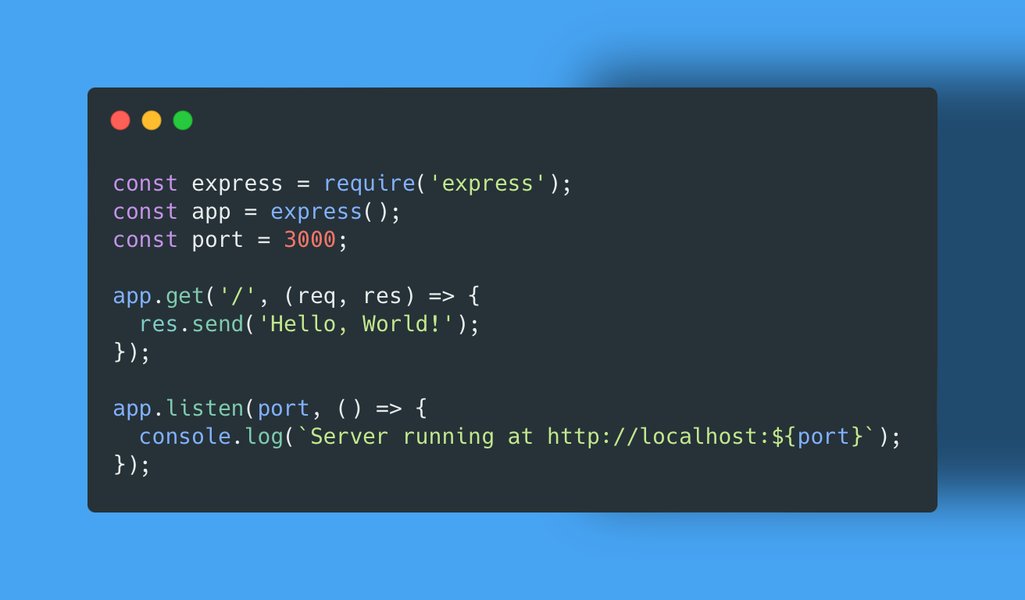
This image illustrates the basic structure of a Node.js and Express.js setup:
Express.js Project Setup
Exploring Core Express.js Concepts
Beyond the basic "Hello World," Express.js offers several key features that make building web applications efficient.
Routing
Routing is the process of determining how an application responds to a client request for a specific endpoint, which is a URI (or path) and a specific HTTP request method (GET, POST, and so on).
You can define different routes for different URL paths and HTTP methods. Here are a few examples:
// Responds to POST requests to /users
app.post('/users', (req, res) => {
  // Handle user creation
  res.send('Create new user');
});

// Responds to PUT requests to /users/:id
app.put('/users/:id', (req, res) => {
  const userId = req.params.id;
  // Update user with given ID
  res.send(<code>Update user ${userId});
});
In the example above,
:idreq.params.idMiddleware
Middleware functions are functions that have access to the request object (
reqres- Executing any code.
- Making changes to the request and the response objects.
- Ending the request-response cycle.
- Calling the next middleware function in the stack.
Middleware can be applied to all routes or specific routes. Here's an example of a simple logging middleware:
const requestLogger = (req, res, next) => {
  console.log(<code>${req.method} ${req.url} at ${new Date()});
  next(); // Call next to pass control to the next middleware function
};

app.use(requestLogger); // Use the middleware for all requests
You can also use third-party middleware for common tasks like parsing request bodies (e.g.,
body-parserServing Static Files
Express.js can easily serve static files like HTML, CSS, and images using the built-in
express.static
app.use(express.static('public')); // Serve static files from the 'public' directory
With this line, any files in the
publichttp://localhost:3000/images/logo.pnglogo.pngimagespublicWhere to Go From Here
While this 30-minute introduction covers the very basics, Express.js is a powerful framework with many more features to explore, including:
-
Template engines for rendering dynamic HTML (e.g., Pug, EJS).
-
Connecting to databases (e.g., MongoDB, PostgreSQL).
-
Building RESTful APIs.
-
Error handling.
-
Authentication and authorization.
To continue learning and deepen your understanding, consider the following resources:
Video Tutorials
Here's a relevant YouTube video that can further help you understand Express.js:
Learn Express JS In 35 Minutes
This video provides a concise overview of Express.js fundamentals, covering similar ground to this guide but with a visual and auditory explanation that can be very helpful for learning.
Official Documentation and Tutorials
The official Express.js website and the Mozilla Developer Network (MDN) provide comprehensive documentation and tutorials that go into much greater detail on all of Express.js's features.
Building Projects
The best way to learn is by doing. Try building small projects using Express.js, such as a simple to-do list application or a blog. This will help you solidify your understanding of the concepts and gain practical experience.
FAQ
Is Express.js the only Node.js framework?
No, Express.js is the most popular Node.js web framework, but there are others such as Koa (developed by the Express team) and Hapi.
Is Express.js suitable for building APIs?
Yes, Express.js is widely used for building RESTful APIs due to its flexibility and the ease with which it handles different HTTP methods and routes.
What is the role of Node.js when using Express.js?
Express.js is built on top of Node.js. Node.js provides the runtime environment for executing JavaScript on the server, while Express.js provides the framework and tools to simplify the development of web applications within that environment.
References
Last updated May 11, 2025