
Unlock the Core: Your Comprehensive Guide to Learning Kernel Programming
Dive deep into the heart of operating systems and master the fundamentals of kernel development.
Highlights
- Understand the Kernel's Role: Grasp how the kernel acts as the crucial bridge between software and hardware, managing all system resources.
- Master Core Concepts: Learn about kernel modules, device drivers, system calls, memory management, and synchronization – the building blocks of kernel programming.
- Follow a Practical Path: Discover the essential prerequisites, tools, and step-by-step process to start writing, compiling, and testing your own kernel code, particularly for Linux.
What Exactly is the Kernel?
At its heart, the kernel is the central component of an operating system (OS). Think of it as the master controller, a specialized program that has complete and privileged access to the computer's hardware. Its primary jobs are to manage the system's resources—like the CPU, memory, storage devices, and network interfaces—and to provide a secure, stable foundation upon which all other software runs.
The kernel operates in a protected area of memory known as kernel space. This space is segregated from user space, where regular applications (like your web browser or text editor) execute. User applications cannot directly access hardware or kernel memory; instead, they must request services from the kernel through a specific interface called system calls. This separation is a fundamental security and stability feature, preventing errant user programs from crashing the entire system.
Key Roles of the Kernel:
- Resource Manager: Allocating memory, scheduling CPU time for different processes, managing file systems, and controlling input/output (I/O) operations for devices.
- Control Program: Handling system events, interrupts from hardware, errors, and ensuring processes run efficiently and securely without interfering with each other.
- Hardware Abstraction: Providing a consistent interface for software to interact with diverse hardware components, hiding the complexities of specific hardware implementations.
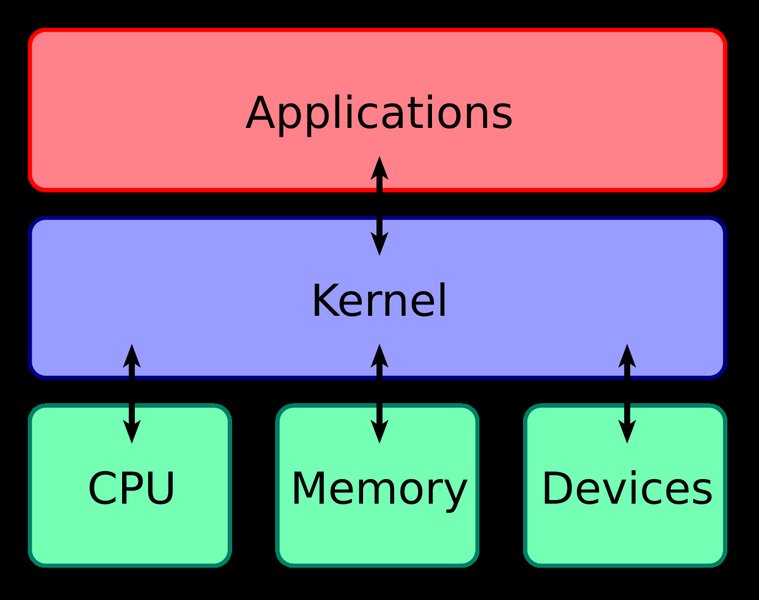
A visual representation of the kernel's position between hardware and user applications.
Essential Prerequisites for Your Journey
Before diving into the complexities of kernel code, it's crucial to build a solid foundation. Kernel programming demands precision and a deep understanding of system internals. Errors in kernel code can have severe consequences, potentially crashing the entire system.
Programming Proficiency: The C Language
The vast majority of modern kernels, including the widely studied Linux kernel, are written primarily in the C programming language, with some architecture-specific parts often implemented in assembly. Therefore, a strong command of C is non-negotiable. You should be comfortable with:
- Pointers and memory manipulation.
- Data structures (structs, unions, linked lists).
- Memory management (allocation and deallocation concepts, though kernel memory management differs from user space).
- Bitwise operations.
- Preprocessor directives.
Starting with foundational C books like "The C Programming Language" by Kernighan and Ritchie (K&R) is highly recommended before tackling kernel-specific texts.
Operating System Fundamentals
A theoretical understanding of operating system concepts provides the context for kernel programming. Familiarize yourself with:
- Process and thread management (creation, scheduling, states).
- Memory management concepts (virtual memory, paging, segmentation).
- Concurrency and synchronization principles (race conditions, deadlocks, mutexes, semaphores).
- Interrupts and exception handling.
- File systems basics.
- Inter-Process Communication (IPC).
Reading standard OS textbooks can provide this necessary background.
Tools and Development Environment
You'll need a suitable environment for kernel development, typically:
- A Linux System: While other kernels exist, Linux is the most accessible platform for learning due to its open-source nature. Using a Linux distribution like Ubuntu, Fedora, or Debian is common. Setting this up in a Virtual Machine (VM) is highly recommended to avoid destabilizing your primary system during experiments.
- C Compiler: GCC (GNU Compiler Collection) is the standard compiler used for the Linux kernel.
- Build Tools:
makeand related utilities are essential for compiling the kernel and its modules. - Text Editor/IDE: A good text editor (like Vim, Emacs, VS Code) or an IDE with C language support.
- Version Control: Proficiency with Git is crucial, as the Linux kernel source code is managed using Git, and contributing involves creating and submitting patches via Git.
- Command-Line Interface (CLI): Comfort working with the Linux terminal (bash or similar shell) is necessary for navigating, compiling, and managing modules.
Core Kernel Programming Concepts
Once you have the prerequisites, you can start exploring the key concepts involved in kernel programming:
Kernel Modules (Loadable Kernel Modules - LKMs)
Dynamic Functionality Extension
Kernel modules are fundamental to modern kernel design, especially in Linux. They are pieces of code that can be dynamically loaded into the running kernel and unloaded without requiring a system reboot. This modularity allows extending kernel functionality on demand. Common uses include:
- Device Drivers: Supporting new hardware.
- Filesystem Drivers: Adding support for different file systems.
- Network Protocols: Implementing new network functionalities.
- System Calls: Adding custom system calls (less common).
Modules interact with the core kernel using a defined interface, accessing only functions and data structures explicitly exported by the kernel.
The "Hello World" Module Example
The traditional starting point for practical kernel programming is writing a simple "Hello World" module. This typically involves:
- Writing C code with at least an initialization function (e.g.,
module_init()) and a cleanup function (e.g.,module_exit()). - Using the kernel's logging facility (
printk) to print messages. - Creating a
Makefileto compile the module against the currently running kernel's headers. - Loading the module into the kernel using
insmodormodprobe. - Viewing the output using
dmesg. - Unloading the module using
rmmod.
Successfully compiling and running a simple module is a significant first milestone.
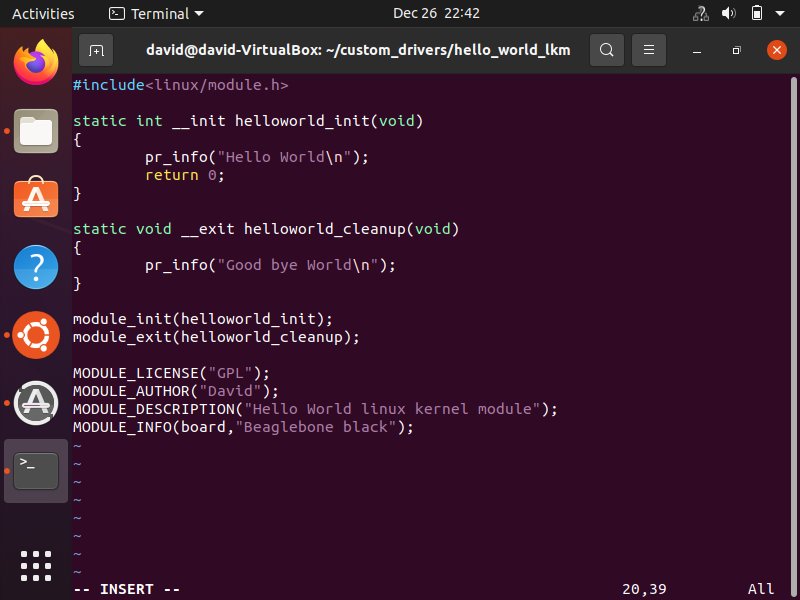
A typical "Hello World" kernel module source code snippet.
Device Drivers
Device drivers are specialized kernel modules (or sometimes built directly into the kernel) that act as translators between the OS and specific hardware devices (like graphics cards, network adapters, USB devices, etc.). Writing device drivers involves understanding hardware specifications, managing hardware resources (I/O ports, memory regions, interrupts), and implementing standard interfaces (e.g., character devices, block devices, network devices) so that user-space applications can interact with the hardware through the kernel.
System Calls: The Bridge to the Kernel
As mentioned earlier, user-space applications cannot directly call kernel functions or access kernel memory. The mechanism for requesting kernel services (like opening a file, creating a process, or sending data over the network) is through system calls. Understanding how system calls are implemented, how parameters are passed between user space and kernel space, and how the kernel handles these requests is crucial.
Resource Management
A core responsibility of the kernel is managing system resources efficiently and fairly:
- Memory Management: Handling physical and virtual memory, including page allocation, swapping/paging, and managing memory requests from processes and the kernel itself. Kernel memory management is particularly tricky due to the lack of safety nets available in user space.
- Process Scheduling: Deciding which process gets to run on the CPU(s) and for how long. Understanding scheduling algorithms and policies is key.
- I/O Management: Handling communication with storage devices, network interfaces, and other peripherals.
Concurrency and Synchronization
Kernels are inherently concurrent environments. Multiple processes might run simultaneously, hardware interrupts can occur at any time, and on multi-core systems, different parts of the kernel can execute in parallel. This necessitates robust synchronization mechanisms to protect shared data structures from race conditions and ensure consistency. Key mechanisms include:
- Spinlocks
- Mutexes
- Semaphores
- Atomic operations
Improper synchronization is a common source of bugs and instability in kernel code.
Interrupt Handling
Hardware devices signal events to the CPU using interrupts. The kernel must handle these interrupts promptly and efficiently, often involving quick low-level handling followed by deferring longer tasks. Understanding the interrupt handling path is vital, especially for device driver development.
Kernel Debugging and Tracing
Debugging kernel code is significantly more challenging than debugging user-space applications because a crash can bring down the entire system, and traditional debuggers may not be readily usable. Techniques include:
- Using
printkfor logging. - Using specialized kernel debuggers like
kgdborkdb. - Leveraging tracing frameworks like
ftrace,perf, or eBPF to observe kernel behavior. - Analyzing crash dumps (
vmcore).
Visualizing Key Concepts
This mindmap illustrates the relationships between the core concepts in kernel programming, showing how prerequisites lead to understanding fundamental ideas and practical application.
Comparing Kernel Programming Aspects
The following radar chart provides a subjective comparison of various kernel programming areas based on relative difficulty, importance for foundational understanding, typical learning curve steepness, and practicality for beginners. Scores range from 3 (Lower) to 10 (Higher).
This chart highlights that while module basics are relatively accessible, areas like memory management and synchronization present significant challenges but are fundamentally important. System calls offer a good balance of importance and slightly lower difficulty compared to deep internals.
Your Practical Path to Kernel Programming
Theory is essential, but kernel programming is best learned through hands-on practice. Here’s a suggested path:
Setting Up Your Development Lab
As mentioned in prerequisites, install a Linux distribution on a dedicated machine or, preferably, within a Virtual Machine (like VirtualBox or VMWare). This isolates your experiments and prevents accidental damage to your main system. Install necessary build tools (build-essential package on Debian/Ubuntu, Development Tools group on Fedora/CentOS), Git, and the kernel headers corresponding to your running kernel (linux-headers-$(uname -r)).
Getting and Building the Kernel Source
While you can start module programming using just the headers, exploring and potentially modifying the kernel requires the full source code. You can download it from kernel.org or clone the Git repository.
git clone git://git.kernel.org/pub/scm/linux/kernel/git/torvalds/linux.gitLearn the basic kernel build process:
- Configure the kernel (e.g.,
make menuconfigor copy existing config). - Compile the kernel (e.g.,
make -j$(nproc)). - Install the modules and the kernel image.
- Update the bootloader and reboot into your custom kernel.
This process itself teaches a lot about kernel structure and dependencies.
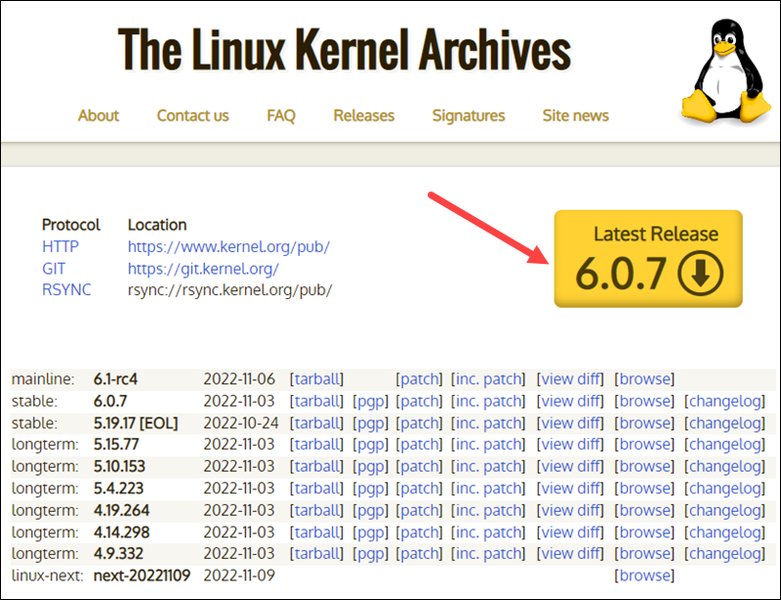
Downloading the Linux kernel source code is a key first step.
Writing and Managing Your First Module
Start with the "Hello World" module. Compile it using a Makefile that links against your kernel build/header files. Practice loading (insmod ./hello.ko), unloading (rmmod hello), and checking kernel messages (dmesg). Gradually add complexity: pass parameters to the module, create entries in the /proc filesystem to interact with the module from user space.
Reading Kernel Code and Community Engagement
The kernel source code is vast, but start small. Explore the code for simple drivers or subsystems you find interesting. Use tools like cscope or LXR (Linux Cross Reference) websites to navigate the code. Engage with the Linux kernel community through mailing lists (LKML - Linux Kernel Mailing List is the main one, but many subsystems have their own). Observe discussions, learn the etiquette, and eventually, try contributing small patches.
Video Tutorial: Compiling and Booting the Kernel
This video provides a practical walkthrough of downloading the Linux kernel source, configuring the development environment, compiling the kernel, and booting it – essential first steps for hands-on learning.
Watching experienced developers go through the process can demystify many steps and provide valuable insights into the typical workflow.
Essential Learning Resources
Leverage the wealth of resources available to guide your learning journey:
| Resource Type | Examples | Description |
|---|---|---|
| Online Courses |
|
Structured learning paths covering setup, core concepts, module programming, community interaction. |
| Guides & Tutorials |
|
Practical, often free, resources focusing on specific tasks like module writing, driver basics. LKMPG is highly recommended for module programming. |
| Books |
|
In-depth coverage of kernel internals, architecture, and specific subsystems like device drivers. |
| Official Documentation |
|
The definitive source for kernel APIs, development processes, and coding standards. |
| Community |
|
Engage with developers, ask questions (after thorough research), learn contribution processes. |
Best Practices and Avoiding Pitfalls
Kernel programming is powerful but unforgiving. Keep these points in mind:
- Test in a VM: Always test new kernel code or modules in a virtual machine first to avoid crashing your primary system. Snapshotting the VM state before loading new code is wise.
- Kernel Panics: Understand what a kernel panic is (a fatal, unrecoverable error). Your code can potentially cause them. Learn how to debug them (e.g., using
netconsoleor analyzing crash dumps). - Memory Management Diligence: Kernel memory allocation (
kmalloc,vmalloc) must be handled carefully. Memory leaks or invalid memory access in the kernel are much more serious than in user space. - Synchronization is Key: Assume concurrency. Protect any shared data appropriately using kernel synchronization primitives. Deadlocks and race conditions are common bugs.
- Follow Coding Standards: Adhere to the Linux kernel coding style (documented in the source tree). This makes code easier for others (and yourself) to read and maintain.
- Use Version Control Rigorously: Use Git for all your kernel development work, committing changes frequently with clear messages.
- Start Small, Iterate: Don't try to build a complex driver overnight. Start with simple modules and gradually add functionality, testing at each step.
Frequently Asked Questions (FAQ)
Why is C the primary language for kernel programming?
C is used primarily because it provides low-level access to memory and hardware, which is essential for an operating system kernel. It compiles to efficient machine code and has minimal runtime requirements, making it suitable for the performance-critical and resource-constrained environment of the kernel. Its long history and portability also contribute to its prevalence.
Is kernel programming dangerous? Can I break my computer?
Yes, errors in kernel code can be dangerous to system stability. A bug in a kernel module or the core kernel can lead to a system crash (kernel panic), data corruption, or security vulnerabilities. It's extremely unlikely you'll physically damage your hardware, but you can easily render your OS installation unusable. This is why developing and testing within a Virtual Machine is strongly recommended, as it isolates potential problems from your main system.
What's the difference between kernel programming and system programming?
System programming generally refers to writing software that interacts closely with the operating system, often using system calls and libraries to manage resources, processes, and I/O. It typically happens in user space. Kernel programming is a subset of system programming that specifically involves modifying or extending the kernel itself, operating within the privileged kernel space with direct access to hardware and core OS functions. Kernel programming requires a deeper understanding of OS internals and involves stricter rules and greater risks.
Do I need to know Assembly language?
While the vast majority of kernel code (especially in Linux) is written in C, some highly performance-sensitive or architecture-specific parts (like context switching or interrupt entry points) are written in Assembly. For general kernel module or driver development, deep Assembly knowledge is usually not required. However, being able to read and understand basic Assembly can be beneficial for debugging and understanding low-level interactions.
Recommended Next Steps
- Explore how to write a basic Linux character device driver.
- Delve deeper into Linux kernel memory management techniques.
- Study kernel synchronization primitives such as spinlocks and mutexes.
- Discover effective methods for debugging Linux kernel modules.
References

Last updated May 5, 2025