
Example Implementations of Maxwell's Equations in Java and Python
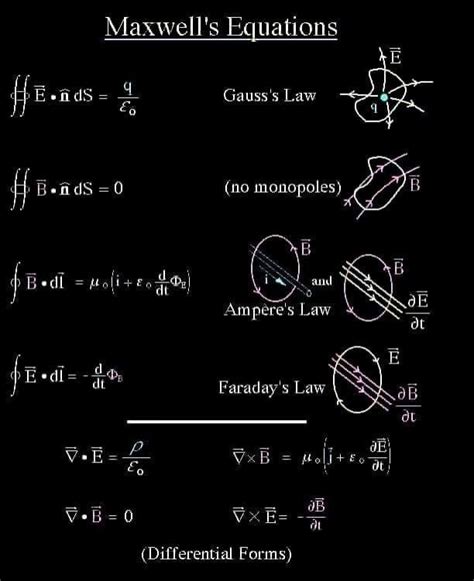
Maxwell's equations are fundamental to understanding electromagnetic phenomena, encompassing the behavior of electric and magnetic fields. Implementing these equations computationally allows for the simulation and analysis of complex electromagnetic systems. Below are comprehensive examples of how to set up and solve Maxwell's equations using Java and Python, focusing on the Finite-Difference Time-Domain (FDTD) method, a widely used numerical technique for solving partial differential equations like Maxwell's.
Overview of Maxwell's Equations
Maxwell's equations consist of four fundamental laws that describe how electric and magnetic fields propagate and interact:
- Gauss's Law for Electricity: \(\nabla \cdot \mathbf{E} = \frac{\rho}{\epsilon_0}\)
- Gauss's Law for Magnetism: \(\nabla \cdot \mathbf{B} = 0\)
- Faraday's Law of Induction: \(\nabla \times \mathbf{E} = -\frac{\partial \mathbf{B}}{\partial t}\)
- Ampère-Maxwell Law: \(\nabla \times \mathbf{B} = \mu_0 \mathbf{J} + \mu_0 \epsilon_0 \frac{\partial \mathbf{E}}{\partial t}\)
For computational purposes, these equations are often discretized using the FDTD method, which approximates the continuous fields on a discrete grid in both space and time.
Finite-Difference Time-Domain (FDTD) Method
The FDTD method involves discretizing both space and time into a grid and iteratively updating the electric and magnetic fields at each grid point. This method ensures numerical stability and accuracy when properly implemented.
Key steps in the FDTD method include:
- Discretization: Divide the simulation space into a grid with spatial steps \(dx\), \(dy\), and temporal step \(dt\).
- Initialization: Initialize the electric (\(E\)) and magnetic (\(H\)) field components to zero or specific initial conditions.
- Update Equations: Apply discrete versions of Faraday's and Ampère-Maxwell's laws to update the fields iteratively.
- Boundary Conditions: Implement boundary conditions to simulate open space, perfect conductors, or other physical constraints.
Python Implementation
Python, with its powerful libraries like NumPy for numerical computations and Matplotlib for visualization, is well-suited for implementing the FDTD method.
Python Example Using FDTD
The following Python code demonstrates a simple 1D FDTD simulation of electromagnetic wave propagation:
import numpy as np
import matplotlib.pyplot as plt

# Define constants
epsilon_0 = 8.854e-12  # Vacuum permittivity (F/m)
mu_0 = 4 * np.pi * 1e-7  # Vacuum permeability (H/m)
c = 1 / np.sqrt(epsilon_0 * mu_0)  # Speed of light (m/s)

# Simulation parameters
dx = 1e-3  # Spatial step (meters)
dt = dx / (2 * c)  # Time step (seconds), Courant condition for stability
nx = 200  # Number of spatial points
nt = 1000  # Number of time steps

# Initialize fields
E = np.zeros(nx)  # Electric field
H = np.zeros(nx)  # Magnetic field

# Source parameters
source_position = nx // 2
E[source_position] = 1.0  # Initial pulse

# Arrays to store field history for visualization
E_history = []
H_history = []

# Time-stepping loop
for n in range(nt):
    # Update magnetic field H
    H[:-1] += (E[1:] - E[:-1]) * (dt / (mu_0 * dx))

    # Update electric field E
    E[1:] += (H[1:] - H[:-1]) * (dt / (epsilon_0 * dx))

    # Apply a simple source (e.g., Gaussian pulse)
    E[source_position] += np.exp(-((n - 100)**2) / (2 * 10**2))

    # Store fields for visualization every 10 steps
    if n % 10 == 0:
        E_history.append(E.copy())
        H_history.append(H.copy())

# Visualization of the final electric and magnetic fields
plt.figure(figsize=(12, 6))
plt.subplot(2, 1, 1)
plt.plot(E, label='Electric Field E')
plt.title('Electric Field')
plt.xlabel('Spatial Position')
plt.ylabel('E')
plt.legend()

plt.subplot(2, 1, 2)
plt.plot(H, label='Magnetic Field H', color='orange')
plt.title('Magnetic Field')
plt.xlabel('Spatial Position')
plt.ylabel('H')
plt.legend()

plt.tight_layout()
plt.show()
Explanation:
- Constants: Defines the fundamental physical constants necessary for electromagnetic calculations.
- Simulation Parameters: Sets the spatial and temporal resolution based on stability criteria (Courant condition).
- Initialization: Initializes the electric and magnetic fields to zero, with an initial pulse added to the electric field.
- Time-Stepping Loop: Updates the magnetic and electric fields at each time step using discrete approximations of Maxwell's equations. A Gaussian pulse acts as the electromagnetic source.
- Visualization: Plots the evolution of the electric and magnetic fields over time.
Java Implementation
Java, with its object-oriented features and efficient performance, is also suitable for implementing FDTD simulations. Below is a Java example that mirrors the Python implementation.
Java Example Using FDTD
The following Java code performs a simple 1D FDTD simulation of electromagnetic wave propagation:
import java.util.Arrays;
import javax.swing.*;
import java.awt.*;

public class MaxwellFDtd {
    public static void main(String[] args) {
        // Define constants
        final double epsilon0 = 8.854e-12; // Vacuum permittivity (F/m)
        final double mu0 = 4 * Math.PI * 1e-7; // Vacuum permeability (H/m)
        final double c = 1 / Math.sqrt(epsilon0 * mu0); // Speed of light (m/s)

        // Simulation parameters
        final double dx = 1e-3; // Spatial step (meters)
        final double dt = dx / (2 * c); // Time step (seconds), Courant condition for stability
        final int nx = 200; // Number of spatial points
        final int nt = 1000; // Number of time steps

        // Initialize fields
        double[] E = new double[nx]; // Electric field
        double[] H = new double[nx]; // Magnetic field

        // Source parameters
        int sourcePosition = nx / 2;
        E[sourcePosition] = 1.0; // Initial pulse

        // Simulation loop
        for (int n = 0; n < nt; n++) {
            // Update magnetic field H
            for (int i = 0; i < nx - 1; i++) {
                H[i] += (E[i + 1] - E[i]) * (dt / (mu0 * dx));
            }

            // Update electric field E
            for (int i = 1; i < nx; i++) {
                E[i] += (H[i] - H[i - 1]) * (dt / (epsilon0 * dx));
            }

            // Apply a simple source (e.g., Gaussian pulse)
            E[sourcePosition] += Math.exp(-Math.pow((n - 100), 2) / (2 * Math.pow(10, 2)));
        }

        // Display the final electric and magnetic fields
        JFrame frame = new JFrame("Maxwell FDTD Simulation");
        frame.setDefaultCloseOperation(JFrame.EXIT_ON_CLOSE);
        frame.setSize(800, 600);

        // Create a panel to draw the fields
        JPanel panel = new JPanel() {
            protected void paintComponent(Graphics g) {
                super.paintComponent(g);
                int width = getWidth();
                int height = getHeight();

                // Draw Electric Field
                g.setColor(Color.BLUE);
                for (int i = 0; i < nx - 1; i++) {
                    int x1 = (int) ((double)i / (nx - 1) * width);
                    int y1 = height / 2 - (int) (E[i] * 1e6); // Scale for visualization
                    int x2 = (int) ((double)(i + 1) / (nx - 1) * width);
                    int y2 = height / 2 - (int) (E[i + 1] * 1e6);
                    g.drawLine(x1, y1, x2, y2);
                }

                // Draw Magnetic Field
                g.setColor(Color.RED);
                for (int i = 0; i < nx - 1; i++) {
                    int x1 = (int) ((double)i / (nx - 1) * width);
                    int y1 = height / 2 + 50 - (int) (H[i] * 1e6); // Offset for visibility
                    int x2 = (int) ((double)(i + 1) / (nx - 1) * width);
                    int y2 = height / 2 + 50 - (int) (H[i + 1] * 1e6);
                    g.drawLine(x1, y1, x2, y2);
                }
            }
        };

        frame.add(panel);
        frame.setVisible(true);
    }
}
Explanation:
- Constants: Similar to the Python example, defines the necessary physical constants.
- Simulation Parameters: Sets the spatial and temporal resolution based on the Courant condition.
- Initialization: Initializes the electric and magnetic fields with an initial pulse.
- Simulation Loop: Iteratively updates the magnetic and electric fields using discrete approximations of Maxwell's equations. A Gaussian pulse acts as the electromagnetic source.
- Visualization: Uses Java Swing to create a simple visualization of the final electric and magnetic fields.
Advanced Considerations
While the provided examples offer a foundational understanding of implementing Maxwell's equations, real-world applications require addressing several advanced aspects:
- Higher Dimensions: Extending simulations from 1D to 2D or 3D to model more complex electromagnetic phenomena.
- Boundary Conditions: Implementing absorbing boundary conditions (like Perfectly Matched Layers) to simulate open spaces and prevent artificial reflections.
- Material Properties: Incorporating different materials with varying permittivity and permeability, enabling the simulation of interfaces and wave propagation through different media.
- Stability and Accuracy: Ensuring numerical stability by adhering to the Courant-Friedrichs-Lewy (CFL) condition and utilizing higher-order discretization schemes for improved accuracy.
- Performance Optimization: Utilizing parallel computing techniques and optimized libraries to handle large-scale simulations efficiently.
Resources and Libraries
For more sophisticated simulations, leveraging specialized libraries and software can significantly enhance functionality and performance:
- Python Libraries:
-
NumPy: For efficient numerical computations. -
Matplotlib: For data visualization. -
FEniCS: For finite element analysis, useful in solving Maxwell's equations in complex geometries.
-
- Java Libraries:
Apache Commons Math: For advanced mathematical operations.JavaFX: For more sophisticated and interactive visualizations.
Conclusion
Implementing Maxwell's equations computationally provides deep insights into electromagnetic phenomena, enabling the simulation of wave propagation, antenna design, and more. While the provided Java and Python examples offer a starting point, advancing to more complex and realistic simulations necessitates a thorough understanding of numerical methods, stability criteria, and computational optimization. Utilizing specialized libraries and adhering to best practices in numerical simulations will facilitate the development of robust and accurate electromagnetic models.
Last updated December 31, 2024