
Mastering the Move: A Comprehensive Guide to Migrating Complex IQ Bot Instances to Document Automation
Transition seamlessly from IQ Bot to enhanced document processing with Automation Anywhere's Document Automation, especially for highly variable documents.
Migrating complex IQ Bot learning instances, particularly those designed to handle documents with high variability, to Automation Anywhere's Document Automation platform is a critical step for organizations looking to modernize their intelligent document processing capabilities. This transition, driven by the evolution of Automation Anywhere's offerings and the deprecation of older IQ Bot extraction packages, requires careful planning and execution to maintain accuracy and leverage the advanced features of Document Automation. This guide provides a detailed, step-by-step approach to ensure a successful migration.
Key Highlights for a Smooth Migration
Essential Insights for Success
- Utilize Official Migration Tools: Leverage the Automation Anywhere IQ Bot Migration Utility for efficient and accurate transfer of existing learning instances, minimizing manual rework.
- Adopt a Phased Approach: For complex scenarios involving highly variable documents, begin with a small subset of instances and documents for testing and validation before a full-scale rollout. This mitigates risks and allows for iterative improvements.
- Harness Advanced Capabilities: Document Automation offers enhanced features, including Generative AI, for superior extraction from unstructured and highly variable documents. Plan to explore and integrate these capabilities for optimal performance.
The Strategic Migration Pathway: From IQ Bot to Document Automation
Successfully migrating your intelligent document processing from IQ Bot to Document Automation involves a structured, multi-phase approach. Each step is crucial for ensuring data integrity, maintaining processing accuracy, and fully leveraging the capabilities of the new platform, especially when dealing with documents that exhibit significant structural and content variations.

Conceptual overview of Document Process Automation.
Phase 1: Comprehensive Assessment and Strategic Planning
Thorough preparation is the cornerstone of a successful migration. This phase focuses on understanding your current IQ Bot landscape and planning the transition meticulously.
Inventory and Complexity Evaluation
Begin by cataloging all existing IQ Bot learning instances. Pay special attention to those processing highly variable or unstructured documents. Evaluate the complexity, document formats, extraction fields, current accuracy rates, and any custom configurations. Note any existing issues, such as documents not classifying correctly.
Version Compatibility Check
Confirm your current IQ Bot version. Automation Anywhere documentation indicates that IQ Bot versions 11.3.4 or later may support a more direct migration path to Document Automation (part of Document AI). Understanding your version helps in selecting the appropriate migration tools and procedures.
Define Migration Scope and Approach
Decide whether to migrate all learning instances simultaneously or adopt a phased approach. For complex instances and highly variable documents, a phased migration is strongly recommended. Start with a small, representative subset of learning instances and documents to pilot the process.
Data Backup and Risk Assessment
Before initiating any migration activities, export and securely back up all existing IQ Bot learning instances, associated training data, and configurations. Identify potential risks, such as data loss, field extraction inconsistencies, or compatibility problems, especially with unstructured data.
Environment and Tool Preparation
Ensure you have administrative access to both the source IQ Bot environment and the target Document Automation setup within Automation 360 Control Room. Download and install the IQ Bot Migration Utility if it's not already part of your environment. This utility is crucial for exporting learning instances.
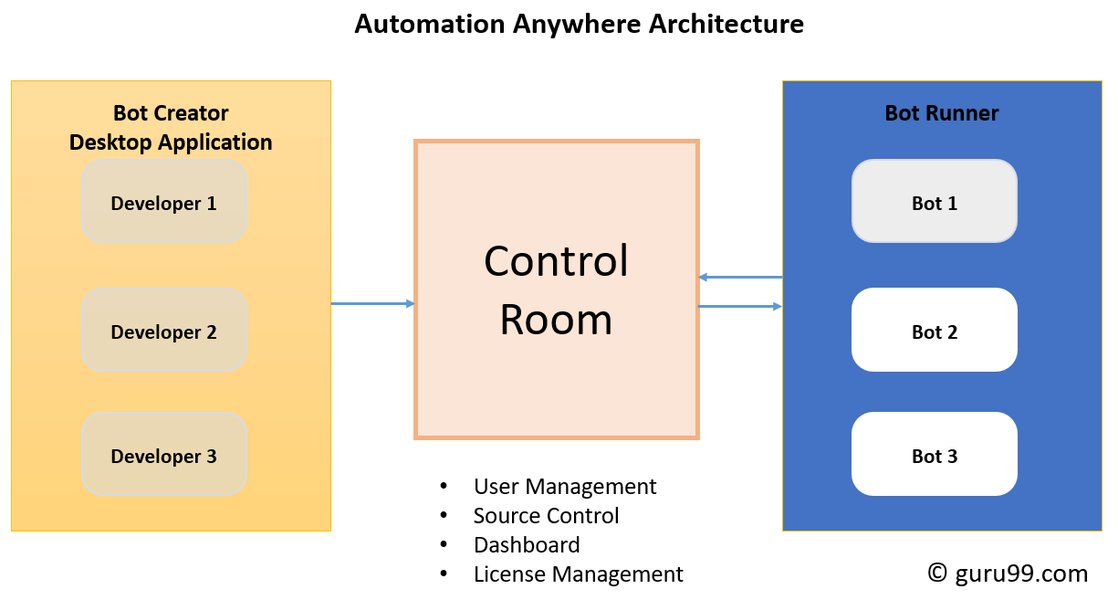
Conceptual diagram illustrating Automation Anywhere platform components.
Phase 2: Exporting Learning Instances from IQ Bot
This phase involves carefully extracting your learning instances from the existing IQ Bot environment using the designated tools.
Utilize the IQ Bot Migration Utility
Navigate to the IQ Bot section in your Automation Anywhere Control Room. Select the learning instances identified for migration. Use the IQ Bot Migration Utility to export these instances. This utility packages the learning models, field definitions, classification rules, and associated data.
Ensure Comprehensive Export
For complex learning instances handling variable documents, ensure the export includes all critical metadata, such as document classification rules, priority percentages, and field accuracy data. These details are vital for maintaining performance in Document Automation.
Validate Exported Files
After the export process, thoroughly verify the integrity and completeness of the exported package files. Check export logs for any errors or warnings, particularly concerning documents that may not have been classified correctly in the original environment.
Phase 3: Preparing the Document Automation Environment
Setting up the target environment in Automation 360 is crucial for a smooth import and optimal performance of migrated instances.
Configure Document Automation Module
Log in to the Automation 360 Control Room and navigate to the Document Automation module (often found under AI services). Ensure your Document Automation setup is current and correctly configured. This includes setting up necessary roles, permissions, and users for managing and processing documents.
Plan for Advanced Features
Document Automation in Automation 360 often includes advanced AI capabilities, such as Generative AI, which can significantly improve data extraction from unstructured and highly variable documents. Plan how you might leverage these features post-migration. This might involve tailoring document processing workflows to utilize these new models.
Destination and Initial Testing
Create or identify a destination (e.g., a new project or folder) within Document Automation for the imported learning instances. Before importing, consider testing the environment with a small sample of representative (and highly variable) documents to check basic compatibility and processing capabilities.
Phase 4: Importing Learning Instances into Document Automation
This is the core technical step where the exported IQ Bot learning instances are transferred into the Document Automation environment.
Use the Import Learning Instance Action
Within the Document Automation interface in Automation 360, use the "Import Learning Instance" functionality. This action is designed to accept the package files exported from IQ Bot.
Mapping and Configuration
During the import process, carefully map the learning instances to the corresponding structures in Document Automation. Pay close attention to field mappings, classification rules, and any specific configurations. Ensure that any path-dependent variables (e.g., references to $CurrentDirectory if applicable) are correctly handled in the new environment.
Monitor and Resolve Issues
Monitor the import process for any warnings or errors, especially those related to unstructured data or compatibility. Refer to migration utility logs for details. Some initial adjustments or minor reconfigurations might be necessary post-import.
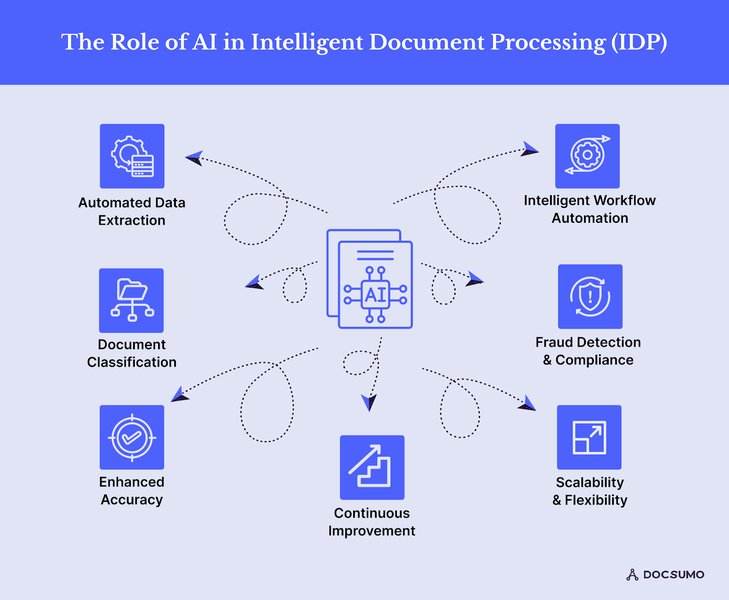
Conceptual representation of Intelligent Document Processing (IDP).
Phase 5: Rigorous Validation and Testing
Post-import, comprehensive testing is essential to ensure the migrated learning instances perform accurately and efficiently with your highly variable documents.
Pilot Testing with Representative Documents
Begin by processing a limited batch of documents, including a diverse set of your highly variable samples, through the migrated learning instances in Document Automation. Validate extraction accuracy, classification performance, and overall workflow integrity.
Fine-Tuning and Model Adjustment
Compare the performance against the baseline from IQ Bot. If extraction accuracy is lower, or if classification issues arise, you may need to adjust extraction rules, field settings, or even retrain the models within Document Automation using a sample of documents. Document Automation's continuous improvement features, like the Validator, are key here.
Test High Variability and Edge Cases
Specifically include documents that represent edge cases, challenging layouts, and the full spectrum of variability your process encounters. This ensures the robustness of the migrated solution.
User Acceptance Testing (UAT)
Involve business users and subject matter experts in UAT. Their validation of data capture accuracy and workflow integration is critical before moving to production.
End-to-End Staging Environment Testing
Before going live, perform end-to-end tests in a staging environment that mirrors production as closely as possible. This includes testing integrations with any upstream or downstream bot processes.
Comparative Analysis: Migration Complexity Factors
The migration from IQ Bot to Document Automation involves several factors that contribute to its complexity, especially when dealing with highly variable documents. The radar chart below provides an opinionated comparison of how these factors might be perceived in the legacy IQ Bot system versus the target Document Automation platform. This helps in understanding where focused effort might be required during the migration.
This chart illustrates potential areas of focus: Document Automation might offer better handling for document variability (lower score meaning less of a challenge with new tools like GenAI), but it demands higher attention to data integrity, process re-engineering, and rigorous testing due to the platform shift and enhanced capabilities.
Phase 6: Phased Rollout and Continuous Monitoring
Once validation is successful, you can proceed with deploying the migrated instances to your production environment.
Gradual Expansion
Following the phased approach, gradually expand the migration scope. Start with less critical processes or document types, monitor their performance in production, and then incrementally migrate more complex and higher-volume instances.
Performance Monitoring
Closely monitor key performance indicators (KPIs) such as extraction accuracy, processing times, validation rates, and exception handling. Proactively identify and address any issues that arise in the production environment.
Continuous Optimization
Document Automation platforms are designed for continuous learning and improvement. Regularly review performance, solicit feedback from users, and make necessary adjustments to configurations, models, or workflows to optimize efficiency and accuracy over time.
Phase 7: Decommissioning and Knowledge Sharing
The final phase involves retiring the old system for migrated processes and documenting the experience.
Complete Full Migration and Retire IQ Bot Usage
Once all targeted learning instances are successfully migrated, validated, and performing stably in Document Automation, you can formally decommission their usage in the legacy IQ Bot system.
Archive IQ Bot Data
Maintain archived copies of the original IQ Bot data, configurations, and performance metrics for audit, compliance, or historical reference purposes, as per your organization's data retention policies.
Document Lessons Learned
Capture all lessons learned throughout the migration project. Document challenges faced, solutions implemented, best practices discovered, and performance improvements achieved. This knowledge will be valuable for future automation initiatives and team training.
Visualizing the Migration Strategy
The mindmap below provides a high-level overview of the key phases and considerations in migrating complex IQ Bot learning instances to Document Automation. It helps visualize the structured approach required for this transition.
to Document Automation"] p1["Phase 1: Assessment & Planning"] sub1_1["Inventory & Complexity Analysis"] sub1_2["Version & Compatibility Check"] sub1_3["Define Scope (Phased Approach)"] sub1_4["Backup Data & Risk Assessment"] sub1_5["Prepare Tools & Admin Access"] p2["Phase 2: Export from IQ Bot"] sub2_1["Use IQ Bot Migration Utility"] sub2_2["Ensure Complete Metadata Export"] sub2_3["Validate Exported Files"] p3["Phase 3: Prepare Document Automation Env."] sub3_1["Setup DA Module in A360"] sub3_2["Configure Permissions & Roles"] sub3_3["Plan for GenAI & Advanced Features"] sub3_4["Initial Environment Test"] p4["Phase 4: Import to Document Automation"] sub4_1["Use 'Import Learning Instance' Action"] sub4_2["Verify Field Mappings & Rules"] sub4_3["Resolve Compatibility Issues"] p5["Phase 5: Rigorous Validation & Testing"] sub5_1["Pilot Testing with Variable Docs"] sub5_2["Fine-Tune Models (Validator)"] sub5_3["Edge Case & UAT"] sub5_4["Staging Environment End-to-End Tests"] p6["Phase 6: Phased Rollout & Monitoring"] sub6_1["Gradual Production Deployment"] sub6_2["Monitor KPIs (Accuracy, Speed)"] sub6_3["Continuous Optimization"] p7["Phase 7: Post-Migration & Optimization"] sub7_1["Decommission Legacy IQ Bot"] sub7_2["Archive Old Data"] sub7_3["Document Lessons Learned"]
Video Insight: Migrating Bots to Automation 360
While specific to broader bot migration to Automation 360 (the platform hosting Document Automation), the following video provides insights into the general migration process using Automation Anywhere tools. Understanding the overarching migration framework can be beneficial when transitioning IQ Bot learning instances.
This video explains using the Bot Migration Wizard for moving bots from older Enterprise versions to Automation 360, offering context for migration utilities.
Key Migration Stages: Activities and Considerations
The table below summarizes the primary stages of migration, detailing key activities, tools or techniques involved, and critical focus areas, especially when dealing with highly variable documents.
| Stage | Key Activities | Tools/Techniques | Critical Focus for Variable Documents |
|---|---|---|---|
| Assessment & Planning | Inventory instances, evaluate complexity, check versions, define scope, backup data, risk assessment. | IQ Bot interface, documentation, Migration Utility (for assessment). | Accurately identifying all variations in document structure and content; planning for robust classification. |
| Export from IQ Bot | Use Migration Utility, ensure complete export of models and metadata. | IQ Bot Migration Utility. | Ensuring all training data and complex classification rules for variable formats are captured. |
| Environment Setup (Document Automation) | Configure DA module, set permissions, plan for advanced AI features (e.g., Generative AI). | Automation 360 Control Room, Document Automation interface. | Setting up an environment that can leverage new AI to handle previously challenging variations. |
| Import to Document Automation | Use 'Import Learning Instance' action, map fields and rules, resolve compatibility. | Document Automation import tools. | Correct mapping of fields and validation rules to ensure consistent extraction logic. |
| Validation & Testing | Pilot testing, fine-tune models, UAT, test edge cases, end-to-end staging tests. | Document Automation Validator, sample document sets, testing frameworks. | Rigorous testing across the full spectrum of document variability to confirm accuracy and robustness. Addressing any degradation in performance. |
| Rollout & Monitoring | Gradual deployment, monitor KPIs, continuously optimize. | Automation 360 dashboards, performance logs. | Monitoring how well the system adapts to new or unseen variations in production; ongoing model tuning. |
Frequently Asked Questions (FAQ)
What is the IQ Bot Migration Utility?
The IQ Bot Migration Utility is a tool provided by Automation Anywhere designed to help export learning instances (including their trained models, field definitions, and configurations) from one IQ Bot environment and import them into another. In the context of moving to Document Automation, it's a key component for transferring your existing work without rebuilding instances from scratch.
Why is a phased approach recommended for complex migrations?
A phased approach (starting with a small subset of documents/processes) is crucial for complex migrations, especially with highly variable documents, because it allows for:
- Early identification and resolution of issues in a controlled environment.
- Refinement of the migration strategy based on initial results.
- Reduced risk of widespread disruption to business processes.
- Building confidence in the new platform's capabilities before a full-scale rollout.
How does Document Automation handle highly variable documents better?
Document Automation, particularly in newer versions of Automation 360, often incorporates more advanced AI/ML models, including object detection and potentially Generative AI. These technologies can offer:
- Improved resilience to layout changes and variations in document structure.
- Better extraction from unstructured or semi-structured content where data location is not fixed.
- Enhanced classification capabilities for distinguishing between diverse document types.
- Continuous learning features that allow models to adapt and improve over time with user validation.
What are common challenges during this migration?
Common challenges can include:
- Differences in how learning instances behave or are configured between IQ Bot and Document Automation.
- Ensuring all field mappings and extraction logic translate correctly.
- Potential degradation in extraction accuracy for some documents, requiring model fine-tuning or retraining in Document Automation.
- Adapting existing bot processes that interacted with IQ Bot to now work with Document Automation APIs or actions.
- Managing user change and retraining for the new Document Automation interface and validator tools.
Is it necessary to retrain models after migration to Document Automation?
While the migration utility aims to transfer trained models, some level of fine-tuning or retraining might be necessary. This is because Document Automation may use different underlying algorithms or features. Testing will reveal if accuracy meets expectations. If not, using Document Automation's training and validation tools with a representative set of documents (especially highly variable ones) will help optimize performance on the new platform.
Recommended Next Steps
Explore Further Insights
- How can I optimize Document Automation performance specifically for processing unstructured invoices?
- What are the best practices for managing user roles and permissions within Automation 360's Document Automation module?
- How can I effectively integrate Document Automation with downstream RPA processes in Automation 360?
- What are some practical ways to leverage Generative AI within Document Automation for complex document extraction scenarios?
References
Sources and Further Reading
 docs.aws.amazon.com
docs.aws.amazon.com
docs.aws.amazon.com
docs.aws.amazon.com
docs.aws.amazon.com
docs.aws.amazon.com
docs.aws.amazon.com
Last updated May 6, 2025