
Comprehensive Guide to Nmap Commands and Arguments for Enumeration
Unlock the full potential of Nmap for effective network discovery and security auditing.
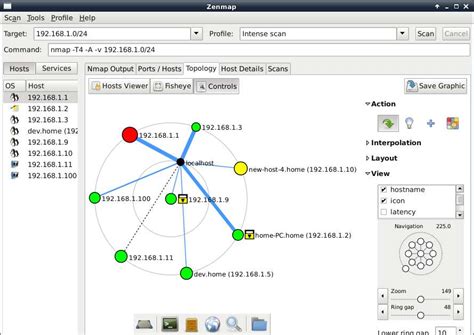
Key Takeaways
- Extensive Host Discovery: Utilize various scanning techniques to accurately identify live hosts and services within a network.
- Advanced Service and OS Detection: Leverage Nmap's capabilities to determine service versions and operating systems for comprehensive network profiling.
- Enhanced Security Auditing: Employ Nmap scripts and vulnerability scanning to assess and mitigate potential security threats.
Introduction to Nmap for Enumeration
Nmap (Network Mapper) is a versatile and powerful open-source tool widely used by network administrators and cybersecurity professionals. It facilitates the discovery of hosts, services, open ports, operating systems, and potential vulnerabilities within a network. This guide delves into detailed commands and arguments of Nmap tailored for effective enumeration, enabling users to perform comprehensive network assessments.
1. Host Discovery
Identifying Active Hosts in a Network
Host discovery is the preliminary step in network enumeration, focusing on identifying active devices within a specified range. Nmap offers several options to perform host discovery:
a. Ping Scan (-sn)
nmap -sn 192.168.1.0/24This command performs a "ping scan" to discover live hosts without conducting a port scan.
b. Treat All Hosts as Online (-Pn)
nmap -Pn 192.168.1.1By disabling host discovery, this option assumes all specified targets are online, which is useful when ICMP requests are blocked.
c. TCP SYN/ACK, UDP, or SCTP Discovery Probes (-PS/PA/PU/PY)
nmap -PS80,443 192.168.1.1These probes send specific types of packets to designated ports to determine if hosts are active.
2. Port Scanning
Determining Open, Closed, and Filtered Ports
Port scanning is essential for identifying open ports and the services running on them. Nmap provides various scanning techniques:
a. TCP SYN Scan (-sS)
nmap -sS 192.168.1.1Also known as a stealth scan, it sends SYN packets and analyzes responses without completing the TCP handshake.
b. TCP Connect Scan (-sT)
nmap -sT 192.168.1.1Performs a full TCP connection, which is more detectable but doesn't require elevated privileges.
c. UDP Scan (-sU)
nmap -sU 192.168.1.1Scans UDP ports to identify services that use the UDP protocol.
d. Scan Specific Ports (-p)
nmap -p 22,80,443 192.168.1.1Targets specific ports by listing them or specifying a range (e.g., -p 1-1000).
e. Scan All Ports (-p-)
nmap -p- 192.168.1.1Scans all 65,535 TCP ports, providing a comprehensive overview of open ports.
f. Fast Scan (-F)
nmap -F 192.168.1.1Performs a rapid scan of the top 100 most common ports, suitable for quick assessments.
3. Service and Version Detection
Identifying Services and Their Versions
Understanding the services running on open ports and their respective versions is crucial for vulnerability assessment:
a. Service Version Detection (-sV)
nmap -sV 192.168.1.1Enables detection of service versions running on open ports, aiding in identifying potential vulnerabilities.
b. Aggressive Scan (-A)
nmap -A 192.168.1.1Combines OS detection, version detection, script scanning, and traceroute in a single command for a thorough analysis.
c. Version Scan Intensity (--version-intensity)
nmap --version-intensity 5 192.168.1.1Adjusts the intensity level of the version scan (0-9), balancing speed and accuracy.
4. Operating System Detection
Determining the Target's Operating System
OS detection provides insights into the operating systems used by target hosts, which is vital for tailoring security measures:
a. OS Detection (-O)
nmap -O 192.168.1.1Enables OS detection based on TCP/IP stack fingerprinting, identifying the operating system running on the target.
b. Combining with Service Detection
nmap -A 192.168.1.1Utilizing the aggressive scan option combines OS detection with service and version detection for a comprehensive overview.
5. Script Scanning (Nmap Scripting Engine - NSE)
Leveraging NSE for Advanced Enumeration
The Nmap Scripting Engine (NSE) allows users to run scripts that can perform a wide range of network tasks, from service discovery to vulnerability detection:
a. Running Specific Scripts
nmap --script=http-enum 192.168.1.1Runs the specified script (e.g., http-enum) to enumerate directories and files on a web server.
b. Using Script Categories
nmap --script=default,vuln 192.168.1.1Executes scripts from specified categories such as 'default' and 'vuln' to perform a range of enumeration tasks.
c. Providing Script Arguments
nmap --script=ssh-brute --script-args userdb=/path/users.txt,passdb=/path/passwords.txt 192.168.1.1Supplies additional parameters to scripts for enhanced control and functionality.
d. Common NSE Script Categories
default: Runs a set of default scripts.vuln: Focuses on vulnerability detection.auth: Handles authentication-related scripts.discovery: Facilitates host and service discovery.
6. Network Scanning
Scanning Subnets and Entire Networks
Network scanning allows for the enumeration of devices within a subnet or an entire network:
a. Using CIDR Notation for Subnets
nmap -sn 192.168.1.0/24Scans all IP addresses within the specified subnet to identify active hosts.
b. Verbose Network Enumeration
nmap -v 192.168.1.0/24Provides detailed output while scanning the specified network range.
7. Firewall Evasion and Bypassing
Techniques to Evade Network Protections
In scenarios where firewalls or intrusion detection systems are in place, Nmap offers options to evade detection:
a. Using Decoy or Spoofed IPs (-D)
nmap -D RND:10 192.168.1.1Sends packets from multiple spoofed IP addresses alongside the actual scan, making it harder to track the origin.
b. Fragmented Packets (-f)
nmap -f 192.168.1.1Sends fragmented packets to bypass firewall packet filters.
c. Spoofing MAC Addresses (--spoof-mac)
nmap --spoof-mac 00:11:22:33:44:55 192.168.1.1Generates random or specified MAC addresses to evade MAC-based filtering.
8. Timing and Performance Options
Controlling Scan Speed and Stealth
Adjusting the timing and performance of scans can optimize for speed or stealthiness:
a. Timing Templates (-T0 to -T5)
nmap -T4 192.168.1.1Sets the timing template, where higher numbers speed up the scan:
- -T0: Paranoid - slowest, designed to evade IDS.
- -T1: Sneaky - slightly faster but still stealthy.
- -T2: Polite - reduces scan speed to minimize network impact.
- -T3: Normal - default scan speed.
- -T4: Aggressive - faster scans suitable for faster networks.
- -T5: Insane - the fastest, least stealthy option.
b. Fast Scan Option (-F)
nmap -F 192.168.1.1Performs a rapid scan of the top 100 ports, balancing speed and coverage.
9. Output Options
Saving and Formatting Scan Results
Recording scan results in various formats facilitates analysis and reporting:
a. Normal Output to File (-oN)
nmap -oN scan_results.txt 192.168.1.1Saves the scan output in a human-readable text format.
b. XML Output (-oX)
nmap -oX scan_results.xml 192.168.1.1Stores the scan results in XML format, suitable for parsing and integration with other tools.
c. Grepable Output (-oG)
nmap -oG scan_results.gnmap 192.168.1.1Produces output that can be easily grepped for specific information.
d. Verbose Output (-v)
nmap -v 192.168.1.1Increases the verbosity level, providing more detailed feedback during the scan.
e. Very Verbose Output (-vv)
nmap -vv 192.168.1.1Offers the highest level of verbosity for in-depth scan details.
f. All Output Formats (-oA)
nmap -oA allformats 192.168.1.1Saves the scan results in all available formats (normal, XML, grepable) simultaneously.
10. Comprehensive Scan Examples
Combining Multiple Options for In-Depth Enumeration
Combining various Nmap options can yield a thorough analysis of target systems:
a. Operating System, Service Version, and All Ports Scan
nmap -A -p- 192.168.1.1Executes an aggressive scan that includes OS detection, version detection, script scanning, traceroute, and scans all ports.
b. Network-Wide Enumeration with Scripts
nmap -sS -Pn -T4 --script=default,vuln 192.168.1.0/24Performs a stealth SYN scan on an entire subnet, assumes all hosts are online, uses aggressive timing, and runs default and vulnerability scripts.
11. Pro Tips for Effective Nmap Usage
Maximizing Nmap's Capabilities
-
Access Comprehensive Help: Use the
nmap -hcommand to view a complete list of options and arguments. -
Keep Nmap Updated: Regularly update Nmap and its script database to ensure access to the latest NSE scripts:
nmap --script-updatedb -
Understand Scan Implications: Be aware of the legal and ethical considerations when performing scans. Always obtain proper authorization before scanning networks.
-
Combine with Other Tools: Integrate Nmap with tools like
grep,awk, orsedfor advanced result processing and automation. -
Customize Scripts: Tailor NSE scripts to fit specific enumeration needs by modifying existing scripts or developing new ones.
Conclusion
Nmap is an indispensable tool for network enumeration and security auditing, offering a wide array of commands and arguments to tailor scans to specific objectives. By mastering host discovery, port scanning, service and OS detection, and leveraging the Nmap Scripting Engine, professionals can gain deep insights into network structures and potential vulnerabilities. Coupled with strategic use of timing options and output formats, Nmap facilitates efficient and effective network assessments, enhancing overall security posture.
References
Last updated January 19, 2025