
Unlock Your Data: Crafting Dynamic PHP & CSS Accordion Tables from MySQL
Seamlessly transform raw database entries into interactive, user-friendly displays with elegant accordion functionality.
Presenting data from a MySQL database in a web application is a common requirement. While simple tables are functional, they can become unwieldy with large amounts of information per row. An accordion table offers an elegant solution, allowing users to expand and collapse sections of data, keeping the interface clean and focused. This guide will walk you through creating such a feature using PHP to fetch data and CSS (with a touch of JavaScript) to build the interactive accordion display.
Essential Insights: Building Your Accordion Table
Key Takeaways for Dynamic Data Presentation
- Database Interaction is Key: PHP, typically using the MySQLi extension, connects to your database, executes SQL queries, and fetches the data.
- Structured HTML Forms the Base: A standard HTML table structure is used, with specific rows designated as clickable headers and others as collapsible content.
- CSS and JavaScript Bring Interactivity: CSS styles the accordion's appearance and manages the hidden/visible states, while JavaScript handles the click events to toggle content visibility.
The Core Components: PHP, MySQL, HTML, CSS, and JavaScript
Understanding the Technology Stack
Creating a dynamic CSS accordion table from a MySQL database involves a synergistic interplay of several web technologies. Each component plays a vital role in fetching, structuring, styling, and adding interactivity to your data display.
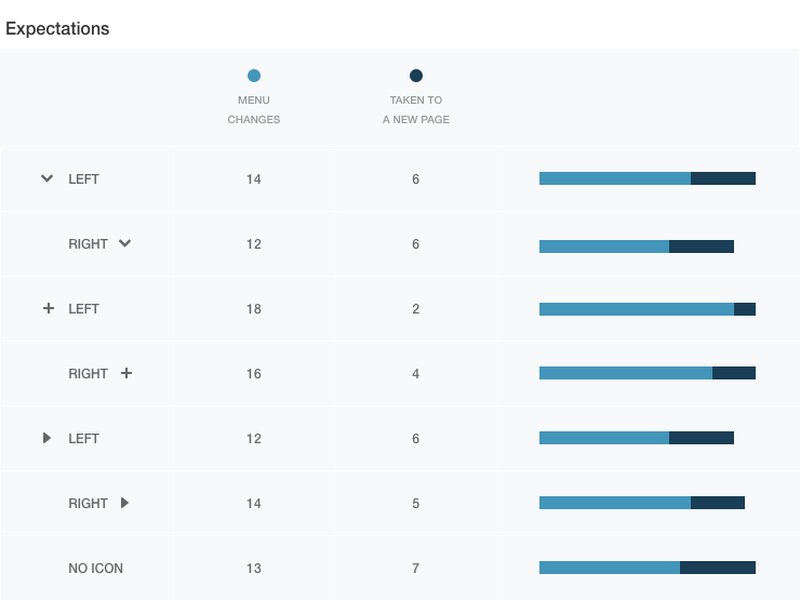
Visual cues like arrows are essential for intuitive accordion navigation.
1. PHP: The Backend Engine
PHP (Hypertext Preprocessor) serves as the server-side scripting language. Its primary responsibilities in this context are:
- Database Connection: Establishing a secure connection to your MySQL database server.
- Data Retrieval: Executing SQL (Structured Query Language) `SELECT` statements to fetch the required data from specific tables.
- Dynamic HTML Generation: Looping through the fetched database records and embedding the data into the HTML structure of the accordion table.
- Security: Implementing measures like using `htmlspecialchars()` to prevent Cross-Site Scripting (XSS) vulnerabilities when displaying data.
2. MySQL: The Data Repository
MySQL is a popular open-source relational database management system (RDBMS). It stores your application's data in structured tables, comprising rows and columns. The accordion table will display records fetched from one or more of these tables.
3. HTML: The Structural Foundation
HTML (HyperText Markup Language) provides the骨架 (gǔjià - skeleton) for your web page. For an accordion table, you'll typically use:
- ``, ``, ``, ``, `
`, and ` ` elements to create the basic table structure. - Specific classes or attributes on `` elements to distinguish between header rows (clickable) and content rows (collapsible).
4. CSS: The Stylistic Designer
CSS (Cascading Style Sheets) is responsible for the visual presentation of the accordion table. Key CSS tasks include:
- Styling the table headers, cells, and borders.
- Defining the initial state of content rows (e.g., `display: none;` to keep them hidden).
- Applying visual feedback on hover or click (e.g., changing background color, cursor type).
- Creating smooth transitions for the expand/collapse animation (optional, but enhances user experience).
5. JavaScript: The Interactive Enabler
While CSS can handle some basic show/hide effects, JavaScript is typically used for robust accordion functionality:
- Event Handling: Listening for click events on the accordion header rows.
- DOM Manipulation: Dynamically changing the `style.display` property of the content rows (or toggling a class) to show or hide them.
- State Management: Potentially managing the open/closed state of multiple accordion items (e.g., allowing only one item to be open at a time).
Step-by-Step Implementation Guide
Bringing Your Dynamic Accordion Table to Life
Step 1: Setting Up the Database Connection (PHP)
First, you need to establish a connection to your MySQL database. Replace the placeholder credentials with your actual database details.
<?php
// Database connection parameters
$servername = "localhost"; // Or your DB server IP/hostname
$username = "your_username";
$password = "your_password";
$dbname = "your_database";

// Create connection using MySQLi
$conn = new mysqli($servername, $username, $password, $dbname);

// Check connection
if ($conn->connect_error) {
  die("Connection failed: " . $conn->connect_error);
}
// echo "Connected successfully"; // Optional: for testing connection
?>
This script uses the MySQLi extension, which is the recommended way to interact with MySQL databases in modern PHP. Always include error handling to catch connection issues.
Step 2: Fetching Data from MySQL (PHP)
Once connected, you can execute an SQL query to retrieve the data you want to display. Let's assume you have a table named `products` with columns `id`, `name`, `summary`, and `details`.
<?php
// (Include database connection code from Step 1 here)

$sql = "SELECT id, name, summary, details FROM products ORDER BY name ASC";
$result = $conn->query($sql);

// The $result object now holds the data if the query was successful.
// We will loop through this result set later.
?>
Make sure to tailor the SQL query (`your_table_name`, column names) to your specific database schema. Using `ORDER BY` can help present the data in a more organized manner.
Step 3: Building the HTML Structure with PHP, CSS, and JavaScript
Now, we integrate PHP to loop through the fetched data and generate the HTML for the accordion table. We'll also embed the necessary CSS and JavaScript.
<!DOCTYPE html>
<html lang="en">
<head>
    <meta charset="UTF-8">
    <meta name="viewport" content="width=device-width, initial-scale=1.0">
    <title>PHP MySQL Accordion Table</title>
    <style>
        body {
            font-family: Arial, sans-serif;
            margin: 20px;
            background-color: #f9f9f9;
        }
        .accordion-table {
            width: 100%;
            border-collapse: collapse;
            box-shadow: 0 2px 5px rgba(0,0,0,0.1);
        }
        .accordion-table th, .accordion-table td {
            border: 1px solid #ddd;
            padding: 12px 15px;
            text-align: left;
        }
        .accordion-table th {
            background-color: #388278; /* A nice header color */
            color: white;
        }
        .accordion-header {
            cursor: pointer;
            background-color: #f1f1f1;
            transition: background-color 0.3s ease;
        }
        .accordion-header:hover {
            background-color: #e0e0e0;
        }
        .accordion-header.active {
            background-color: #d0d0d0;
        }
        .accordion-content {
            display: none; /* Hidden by default */
            background-color: #ffffff;
        }
        .accordion-content td {
            padding: 15px;
            border-top: 1px dashed #ccc; /* Differentiate content cell visually */
        }
        .accordion-header td:first-child::before {
            content: '\\25B6\\00a0'; /* Right-pointing triangle, non-breaking space */
            font-size: 0.8em;
            color: #333;
            transition: transform 0.2s ease-in-out;
            display: inline-block;
        }
        .accordion-header.active td:first-child::before {
            transform: rotate(90deg);
        }
    </style>
</head>
<body>

<h2 style="color: #cc9900;">Product Information</h2>

<?php
// Database connection parameters
$servername = "localhost";
$username = "your_username"; // Replace with your MySQL username
$password = "your_password"; // Replace with your MySQL password
$dbname = "your_database";   // Replace with your database name

// Create connection
$conn = new mysqli($servername, $username, $password, $dbname);

// Check connection
if ($conn->connect_error) {
  die("<p style='color:red;'>Connection failed: " . htmlspecialchars($conn->connect_error) . "</p>");
}

$sql = "SELECT id, name, summary, details FROM products ORDER BY name ASC"; // Adjust table and column names
$result = $conn->query($sql);
?>

<table class="accordion-table">
    <thead>
        <tr>
            <th>Product Name</th>
            <th>Summary</th>
            <th>ID</th>
        </tr>
    </thead>
    <tbody>
        <?php
        if ($result && $result->num_rows > 0) {
            // Output data for each row
            while($row = $result->fetch_assoc()) {
                // Using htmlspecialchars to prevent XSS
                $productId = htmlspecialchars($row["id"]);
                $productName = htmlspecialchars($row["name"]);
                $productSummary = htmlspecialchars($row["summary"]);
                $productDetails = nl2br(htmlspecialchars($row["details"])); // nl2br to preserve newlines in details

                echo "<tr class='accordion-header'>";
                echo "<td>" . $productName . "</td>";
                echo "<td>" . $productSummary . "</td>";
                echo "<td>" . $productId . "</td>";
                echo "</tr>";

                // Content row - hidden by default
                echo "<tr class='accordion-content'>";
                echo "<td colspan='3'><strong>Details:</strong><br>" . $productDetails . "</td>";
                echo "</tr>";
            }
        } else {
            echo "<tr><td colspan='3'>No results found.</td></tr>";
        }
        $conn->close(); // Close the database connection
        ?>
    </tbody>
</table>

<script>
    document.addEventListener('DOMContentLoaded', function () {
        const accordionHeaders = document.querySelectorAll('.accordion-table .accordion-header');

        accordionHeaders.forEach(header => {
            header.addEventListener('click', function () {
                // Toggle active class on the header
                this.classList.toggle('active');

                // Get the next element sibling, which is the content row
                const contentRow = this.nextElementSibling;

                if (contentRow.style.display === 'table-row') {
                    contentRow.style.display = 'none';
                } else {
                    contentRow.style.display = 'table-row';
                }
            });
        });
    });
</script>

</body>
</html>
Code Explanation:
- HTML Structure: A standard `` is created. Each database entry results in two `` elements:
- One `
- One ` ` with class `accordion-content`: This row is initially hidden and contains detailed information. It uses `colspan` to span across all columns of the header.
- CSS Styling:
- Basic table styling is applied for readability.
- `.accordion-header` gets a pointer cursor and hover effect to indicate interactivity. An `active` class (toggled by JavaScript) can change its appearance.
- `.accordion-content` is set to `display: none;` by default, making it invisible.
- A simple triangle icon (`::before` pseudo-element) is added to header rows, rotating on expansion.
- JavaScript Functionality:
- An event listener is attached to all elements with the class `accordion-header`.
- When a header row is clicked, its `active` class is toggled.
- The `nextElementSibling` (which is the corresponding `accordion-content` row) has its `display` style toggled between `none` and `table-row`, effectively showing or hiding it.
- Security: `htmlspecialchars()` is used when echoing data from the database. This converts special characters into HTML entities, which is a crucial step in preventing XSS attacks. `nl2br()` is used for the details to preserve line breaks.
Process Visualization: From Database to Interactive Table
Understanding the Data Flow and Component Interaction
The following mind map illustrates the journey of data from your MySQL database to the end-user's screen, highlighting the roles of PHP, HTML, CSS, and JavaScript in creating the dynamic accordion table.
(mysqli)"] id2b["SQL Query Execution
(SELECT statement)"] id2c["Data Fetching
(Result set iteration)"] id2d["Security
(htmlspecialchars)"] id2e["Dynamic HTML Generation"] id3["Frontend Structure (HTML)"] id3a["Table Element (``)"] id3b["Header Rows (``)
- Visible by default
- Clickable"] id3c["Content Rows (``)
- Hidden by default
- Contains details"] id4["Styling (CSS)"] id4a["Table Appearance"] id4b["Header Styling
(cursor, hover, active state)"] id4c["Content Visibility
(`display: none;`)"] id4d["Optional Transitions & Animations"] id4e["Iconography (e.g., arrows)"] id5["Interactivity (JavaScript)"] id5a["Event Listeners
(on header click)"] id5b["DOM Manipulation
(toggle content display)"] id5c["Class Toggling
(for active state styling)"]
This visualization helps in understanding how each technology contributes to the final interactive data presentation, ensuring a clear separation of concerns and a modular approach to development.
Comparative Analysis: Accordion Implementation Approaches
Evaluating Different Methods for Creating Accordions
There are various ways to implement accordion features in web development. The radar chart below provides an opinionated comparison of a few common approaches, including the custom PHP/CSS/JS method detailed here, versus using a frontend framework like Bootstrap, or aiming for a pure CSS solution (which has limitations for dynamic content).
This chart highlights that while framework-based solutions like Bootstrap might offer quicker setup and better out-of-the-box accessibility, a custom approach provides maximum styling flexibility and excellent integration with server-side dynamic data, often with good performance due to its tailored nature.
Key Technologies Summary
Roles and Responsibilities at a Glance
The following table summarizes the primary role of each technology used in building the dynamic accordion table:
| Technology | Primary Role | Key Functions/Features Used |
|---|---|---|
| MySQL | Data Storage | Storing structured data in tables (e.g., product ID, name, summary, details). |
| PHP | Backend Logic & Data Processing | mysqli for database connection, executing SELECT queries, iterating results (fetch_assoc), htmlspecialchars for security. |
| HTML | Content Structure | <table>, <thead>, <tbody>, <tr>, <th>, <td>; class attributes for identifying header and content rows. |
| CSS | Presentation & Styling | Styling table elements, controlling initial visibility (display: none), hover effects, active states, pseudo-elements for icons. |
| JavaScript | Interactivity & DOM Manipulation | document.querySelectorAll, addEventListener('click'), manipulating style.display, toggling CSS classes. |
Further Learning: Dynamic Accordions with PHP & MySQL
Visual Demonstration and Additional Insights
To see a practical demonstration of building dynamic accordions, including how to structure them for FAQ sections or similar content fetched from a database, the following video provides valuable insights. It covers creating dynamic Bootstrap accordions using PHP and MySQL, which shares many core principles with the custom CSS accordion table discussed here, particularly concerning the PHP data fetching and looping logic.
Video demonstrating how to create dynamic accordions with PHP and MySQL, often used for FAQs.
While this video might focus on Bootstrap, the backend PHP logic for retrieving and iterating through database records is highly relevant and can be adapted for various frontend implementations, including the custom CSS table accordion.
Best Practices and Considerations
Ensuring a Robust and User-Friendly Implementation
- Security First: Always sanitize data retrieved from the database before displaying it in HTML using functions like `htmlspecialchars()` to prevent XSS attacks. For database inputs, use prepared statements to prevent SQL injection.
- Error Handling: Implement comprehensive error handling for database connections and queries. Inform users gracefully if data cannot be retrieved.
- Accessibility (ARIA): For improved accessibility, consider adding ARIA (Accessible Rich Internet Applications) attributes. For example, `aria-expanded` on the header, and `aria-controls` linking the header to its content panel. Update `aria-expanded` (true/false) via JavaScript.
- Performance: For very large datasets, consider implementing pagination or lazy loading for the accordion content to improve initial page load times.
- User Experience (UX): Provide clear visual cues (like icons or text changes) to indicate whether an accordion section is open or closed. Ensure the clickable area is sufficiently large.
- Alternative Structures: While this example uses a table, for non-tabular data, you might prefer a structure of `` elements for headers and panels, which can offer more layout flexibility. This is common with frameworks like Bootstrap.
- Modularity: Keep your PHP, HTML, CSS, and JavaScript code as separate as possible. For larger applications, consider placing CSS in an external stylesheet and JavaScript in an external file.
Frequently Asked Questions (FAQ)
How do I make only one accordion item open at a time?
To allow only one item to be open, you'd modify the JavaScript. When an accordion header is clicked, before opening it, loop through all other accordion content panels and close them (set their `display` to `none` and remove the `active` class from their headers).
// Inside the click event listener for a header:
accordionHeaders.forEach(otherHeader => {
    if (otherHeader !== this) { // 'this' is the clicked header
        otherHeader.classList.remove('active');
        otherHeader.nextElementSibling.style.display = 'none';
    }
});
// Then proceed to toggle the current item
this.classList.toggle('active');
const contentRow = this.nextElementSibling;
// ... (rest of the toggle logic)
Can I use a frontend framework like Bootstrap for the accordion?
Yes, absolutely. Bootstrap provides pre-styled accordion components that are responsive and often include ARIA attributes for accessibility. You would still use PHP to fetch data and loop through it, but instead of custom HTML/CSS/JS for the accordion mechanism, you'd generate Bootstrap's required HTML markup. The PHP logic for data fetching remains largely the same.
How can I improve the visual indication of an open/closed accordion item?
You can use CSS to change an icon (e.g., from a "+" to a "-"; or a right-pointing arrow to a down-pointing arrow). In the example provided, the `::before` pseudo-element with a triangle rotates. You can also change background colors or add borders to the active header.
What if my "details" content contains HTML?
If your database stores HTML content that you trust and intend to render, you should not use `htmlspecialchars()` on that specific field. However, this carries security risks if the HTML comes from untrusted user input. If you must store and render user-supplied HTML, use a robust HTML sanitizer/purifier library on the server-side before saving to the database or before rendering it. For simple formatting like line breaks, `nl2br(htmlspecialchars($data))` is safe, as `htmlspecialchars` runs first.
Conclusion
Empowering Your Data Presentation
Creating a CSS accordion table with PHP and MySQL is a powerful way to present detailed information compactly and intuitively. By combining server-side data retrieval with client-side interactivity, you can build dynamic, user-friendly interfaces that enhance data exploration. Remember to prioritize security, accessibility, and user experience in your implementation. With the steps and code provided, you have a solid foundation for integrating this feature into your web applications.
Recommended Further Exploration
Dive Deeper into Related Topics
- How can I add pagination to my PHP and MySQL data display for very large tables?
- What are the benefits of using AJAX to load accordion content dynamically in PHP?
- Explore advanced CSS techniques for styling HTML tables and accordion components for a more modern look.
- How do I correctly implement ARIA attributes to make custom JavaScript accordions more accessible?
References
Sources and Further Reading
Last updated May 21, 2025