
Unveiling Failure's Secrets: A Python Utility for Pinpointing Log Discrepancies
Intelligently compare passing and failing logs to accelerate root cause analysis with our custom Python script.
When systems misbehave, log files are often the first place engineers turn to for clues. However, sifting through thousands of lines, especially when comparing a "good" (reference) log with a "bad" (target) log, can be a daunting and time-consuming task. To streamline this process, we've developed RootCauser.py, a Python utility designed to highlight critical differences and guide you towards the root cause of failures.
Essential Insights
- Automated Comparison: The utility automates the comparison of a reference (passing) log and a target (failing) log, saving significant manual effort.
- Intelligent Filtering: By masking dynamic data like timestamps and IDs, and then deduplicating entries, the script focuses on truly unique and relevant error/warning messages.
- Prioritized Root Causes: The script identifies "special" errors and warnings unique to the failed log and ranks them by frequency, offering a prioritized list of potential root causes.
Introducing RootCauser.py: Your Log Analysis Ally
The RootCauser.py script is engineered to meticulously analyze two log files: one from a successful execution (-reference_file) and one from a failed execution (-target_file). Its core strength lies in its ability to normalize log entries by masking variable data (like timestamps or process IDs) and then pinpointing significant deviations in the failed log. This helps in cutting through the noise and focusing on actionable intelligence.
Core Functionalities
The script performs several key operations to achieve its goal:
- Argument Parsing: It utilizes Python's
argparsemodule to accept the paths to the reference and target log files as command-line arguments. - Log Ingestion: Reads both log files line by line.
- Message Categorization: Identifies lines containing error keywords (e.g., "ERROR", "FAIL", "EXCEPTION") and warning keywords (e.g., "WARNING", "WARN"). It also looks for predefined "flow" keywords (e.g., "STEP", "PROCESS", "COMPLETE") that might indicate procedural steps.
- Variable Masking: Employs regular expressions to replace dynamic content such as timestamps, hexadecimal IDs, numeric identifiers, and file path/line number combinations with generic placeholders (e.g.,
<TIMESTAMP>,<HEX_ID>). This normalization is crucial for comparing messages that are structurally identical but differ only in variable data. - Deduplication: After masking, unique error and warning messages are identified for each log file, eliminating redundant entries.
- Difference Analysis:
- It identifies "special errors" and "special warnings": those masked messages that appear in the target (failed) log but not in the reference (successful) log.
- It identifies "special flow commands": those masked flow-related messages that appear in the reference log but are absent in the target log, potentially indicating a break in the expected execution sequence.
- Root Cause Sorting: The script presents a list of potential root causes by taking the special errors and warnings found in the failed log and sorting them based on their frequency of occurrence in the (masked) target log. The most frequent, unique issues are prioritized.
- Formatted Output: The findings are presented in a clear, structured text format as specified in the initial request.
The Python Script: RootCauser.py
Below is the complete Python code for the RootCauser.py utility. You can save this code into a file named RootCauser.py and execute it from your terminal.
import argparse
import re
from collections import Counter
from typing import List, Set, Dict, Tuple

# Define keywords for categorizing log lines
ERROR_KEYWORDS = ['ERROR', 'FAIL', 'EXCEPTION', 'CRITICAL', 'FATAL', 'TRACEBACK']
WARNING_KEYWORDS = ['WARNING', 'WARN']
# Flow keywords can be highly specific to the log format. These are examples.
FLOW_KEYWORDS = [
    'STEP', 'CONTINUE', 'DISPATCH', 'START', 'END', 'PROCESS', 'EXECUTE',
    'CALL', 'REQUEST', 'RESPONSE', 'SUCCESS', 'COMPLETE', 'INITIATE', 'TERMINATE'
]

def parse_arguments() -> argparse.Namespace:
    """Parses command-line arguments."""
    parser = argparse.ArgumentParser(description="Compare two log files to find the root cause of failure.")
    parser.add_argument("-reference_file", required=True, help="Path to the reference (passing) log file.")
    parser.add_argument("-target_file", required=True, help="Path to the target (failing) log file.")
    return parser.parse_args()

def read_log_file(file_path: str) -> List[str]:
    """Reads a log file and returns a list of lines."""
    try:
        with open(file_path, 'r', encoding='utf-8', errors='ignore') as f:
            return [line.strip() for line in f.readlines()]
    except FileNotFoundError:
        print(f"Error: File not found at {file_path}")
        exit(1)
    except Exception as e:
        print(f"Error reading file {file_path}: {e}")
        exit(1)

def mask_variables(line: str) -> str:
    """Masks variable parts in a log line using regex."""
    # Mask timestamps (various common formats)
    line = re.sub(r'\d{4}-\d{2}-\d{2}[ T]\d{2}:\d{2}:\d{2}(?:[.,]\d+)?Z?', '<TIMESTAMP>', line) # ISO 8601 with optional Z
    line = re.sub(r'\d{2}/\w{3}/\d{4}:\d{2}:\d{2}:\d{2} -\d{4}', '<TIMESTAMP>', line) # Apache style
    line = re.sub(r'\w{3}\s+\d{1,2}\s+\d{2}:\d{2}:\d{2}', '<TIMESTAMP>', line) # Syslog style (e.g., Jul 12 09:45:30)
    line = re.sub(r'\d{2}:\d{2}:\d{2}(?:[.,]\d+)?', '<TIME>', line) # Just time

    # Mask IP addresses (IPv4 and basic IPv6)
    line = re.sub(r'\b\d{1,3}\.\d{1,3}\.\d{1,3}\.\d{1,3}\b', '<IP_ADDRESS>', line)
    line = re.sub(r'\b(?:[0-9a-fA-F]{1,4}:){7}[0-9a-fA-F]{1,4}\b', '<IPV6_ADDRESS>', line) # Basic IPv6

    # Mask Hexadecimal IDs (e.g., memory addresses, session IDs) - typically 4+ chars
    line = re.sub(r'0x[0-9a-fA-F]{4,}', '<HEX_ADDR>', line)
    line = re.sub(r'\b[0-9a-fA-F]{8,}\b', '<HEX_ID>', line) # Standalone hex strings (e.g. UUID parts)

    # Mask UUIDs
    line = re.sub(r'\b[0-9a-fA-F]{8}-[0-9a-fA-F]{4}-[0-9a-fA-F]{4}-[0-9a-fA-F]{4}-[0-9a-fA-F]{12}\b', '<UUID>', line)

    # Mask numeric IDs (e.g., process IDs, user IDs) - typically 3+ digits
    line = re.sub(r'\b\d{3,}\b', '<NUMERIC_ID>', line)

    # Mask file paths and file:line patterns (common in stack traces)
    line = re.sub(r'([_a-zA-Z0-9\-\.]+\.(?:py|java|c|cpp|js|cs|go|rb|php|sh|pl))[:\s\(,]*line \d+', r'\1:<LINENUM>', line)
    line = re.sub(r'([_a-zA-Z0-9\-\.]+\.(?:py|java|c|cpp|js|cs|go|rb|php|sh|pl)):\d+', r'\1:<LINENUM>', line)
    line = re.sub(r'(?i)(?:/[a-z0-9_.-]+)+/?', '<FILE_PATH>', line) # Unix paths
    line = re.sub(r'(?i)(?:[a-z]:\(?:[a-z0-9_.-]+\)*)[a-z0-9_.-]*', '<FILE_PATH>', line) # Windows paths

    # Mask URLs
    line = re.sub(r'https?://\S+', '<URL>', line)

    return line

def extract_and_process_messages(
    lines: List[str],
    error_kws: List[str],
    warning_kws: List[str],
    flow_kws: List[str]
) -> Dict[str, List | Set]:
    """Extracts, masks, and categorizes messages from log lines."""
    original_errors: List[str] = []
    original_warnings: List[str] = []
    original_flow: List[str] = []

    masked_lines: List[str] = []
    masked_errors: List[str] = []
    masked_warnings: List[str] = []
    masked_flow: List[str] = []

    for line in lines:
        is_error = any(kw.lower() in line.lower() for kw in error_kws)
        is_warning = any(kw.lower() in line.lower() for kw in warning_kws)
        is_flow = any(kw.lower() in line.lower() for kw in flow_kws)

        if is_error:
            original_errors.append(line)
        if is_warning: # A line can be both error and warning if keywords overlap or message contains both
            original_warnings.append(line)
        if is_flow:
             original_flow.append(line)

        masked_line = mask_variables(line)
        masked_lines.append(masked_line)
        if is_error:
            masked_errors.append(masked_line)
        if is_warning:
            masked_warnings.append(masked_line)
        if is_flow:
            masked_flow.append(masked_line)

    return {
        "original_lines": lines,
        "masked_lines": masked_lines,
        "original_errors": original_errors,
        "unique_masked_errors": set(masked_errors),
        "all_masked_errors": masked_errors, # For frequency counting
        "original_warnings": original_warnings,
        "unique_masked_warnings": set(masked_warnings),
        "all_masked_warnings": masked_warnings, # For frequency counting
        "original_flow": original_flow,
        "unique_masked_flow": set(masked_flow)
    }

def analyze_and_print_report(ref_data: Dict, target_data: Dict):
    """Analyzes processed log data and prints the report."""

    # Line counts
    print("lines_count")
    print(f"  Reference: {len(ref_data['original_lines'])}")
    print(f"  Target: {len(target_data['original_lines'])}")

    # Original error counts (target log)
    print("original errors count")
    print(f"  Target: {len(target_data['original_errors'])}")

    # After mask and drop duplicate errors count (target log)
    print("after mask variables and drop duplicate errors count")
    print(f"  Target: {len(target_data['unique_masked_errors'])}")

    # Original warnings count (target log)
    print("original warnings count")
    print(f"  Target: {len(target_data['original_warnings'])}")

    # After mask and drop duplicate warnings count (target log)
    print("after mask variables and drop duplicate warnings count")
    print(f"  Target: {len(target_data['unique_masked_warnings'])}")

    # Special errors in fail log
    special_errors_fail = target_data['unique_masked_errors'] - ref_data['unique_masked_errors']
    print("the special errors in fail log")
    if special_errors_fail:
        for error in sorted(list(special_errors_fail)):
            print(f"  - {error}")
    else:
        print("  - None")

    # Special warnings in fail log
    special_warnings_fail = target_data['unique_masked_warnings'] - ref_data['unique_masked_warnings']
    print("the special warnings in fail log")
    if special_warnings_fail:
        for warning in sorted(list(special_warnings_fail)):
            print(f"  - {warning}")
    else:
        print("  - None")

    # Special flow commands in pass log (i.e., missing or different in fail log)
    special_flow_pass = ref_data['unique_masked_flow'] - target_data['unique_masked_flow']
    print("the special flow command in pass log")
    if special_flow_pass:
        for flow_cmd in sorted(list(special_flow_pass)):
            print(f"  - {flow_cmd}")
    else:
        print("  - None")

    # Root cause sorting
    print("the root cause sorting:")
    potential_root_causes_messages = list(special_errors_fail) + list(special_warnings_fail)

    if not potential_root_causes_messages:
        print("   No distinct special errors or warnings found in the target log to suggest root causes.")
    else:
        # Count frequency of these special messages within the entire masked target log
        target_error_counts = Counter(target_data['all_masked_errors'])
        target_warning_counts = Counter(target_data['all_masked_warnings'])

        root_cause_candidates = []
        for msg in special_errors_fail:
            root_cause_candidates.append({'message': msg, 'type': 'Error', 'count': target_error_counts.get(msg, 0)})
        for msg in special_warnings_fail:
            root_cause_candidates.append({'message': msg, 'type': 'Warning', 'count': target_warning_counts.get(msg, 0)})

        # Sort by count (descending), then by type (Error before Warning), then alphabetically
        sorted_root_causes = sorted(root_cause_candidates, key=lambda x: (-x['count'], x['type'] == 'Warning', x['message']))

        if not sorted_root_causes:
             print("   No specific root causes identified based on frequency of special messages.")
        else:
            for i, cause_info in enumerate(sorted_root_causes, 1):
                print(f"   {i}. ({cause_info['type']}, Count: {cause_info['count']}) {cause_info['message']}")

def main():
    """Main function to orchestrate log analysis."""
    args = parse_arguments()

    reference_lines = read_log_file(args.reference_file)
    target_lines = read_log_file(args.target_file)

    ref_processed_data = extract_and_process_messages(reference_lines, ERROR_KEYWORDS, WARNING_KEYWORDS, FLOW_KEYWORDS)
    target_processed_data = extract_and_process_messages(target_lines, ERROR_KEYWORDS, WARNING_KEYWORDS, FLOW_KEYWORDS)

    analyze_and_print_report(ref_processed_data, target_processed_data)

if __name__ == "__main__":
    main()
How to Use RootCauser.py
- Save the code above as a Python file named
RootCauser.py. - Open your terminal or command prompt.
- Navigate to the directory where you saved the file.
- Run the script using the following command structure, replacing
log_pass.txtandlog_fail.txtwith the actual paths to your reference (successful) and target (failed) log files:python RootCauser.py -reference_file log_pass.txt -target_file log_fail.txt - The script will print its analysis directly to the console in the specified format.
For example, if you have my_app_success.log and my_app_failure.log, the command would be:
python RootCauser.py -reference_file my_app_success.log -target_file my_app_failure.logVisualizing Log Analysis Metrics
To provide a clearer picture of the differences between the reference and target logs, a radar chart can be highly effective. This chart visualizes key metrics, offering an at-a-glance comparison. The data points below are illustrative and would be dynamically generated by the script based on the analyzed logs.
The radar chart below compares hypothetical counts for: Total Lines, Original Error Count, Unique Masked Error Count, Original Warning Count, and Unique Masked Warning Count for both a reference (passing) log and a target (failing) log. Such a visualization can quickly highlight the magnitude of differences in error and warning occurrences.
Illustrative radar chart comparing key metrics between reference and target logs.
Mindmap of the Log Analysis Process
The following mindmap illustrates the workflow of the RootCauser.py utility, from input log files to the final root cause suggestions. This visual representation helps in understanding the various stages of processing and analysis involved in pinpointing potential issues.
(Timestamps, IDs, Paths etc.)
using Regular Expressions"] id2_3["3. Categorize Lines
(Errors, Warnings, Flow Commands)
based on Keywords"] id2_4["4. Deduplicate Masked Lines
within each category per log"] id3["Comparative Analysis"] id3_1["Calculate Line Counts"] id3_2["Count Original Errors & Warnings (Target Log)"] id3_3["Count Unique Masked Errors & Warnings (Target Log)"] id3_4["Identify 'Special' Errors
(Unique to Target Log)"] id3_5["Identify 'Special' Warnings
(Unique to Target Log)"] id3_6["Identify 'Special' Flow Commands
(In Reference Log, Missing/Different in Target Log)"] id4["Output & Reporting"] id4_1["Formatted Text Report (Console)"] id4_1_1["Overall Statistics"] id4_1_2["Lists of Special Entries"] id4_2["Prioritized Root Cause Suggestions
(Based on frequency of special errors/warnings in target log)"]
Mindmap detailing the RootCauser.py analysis workflow.
Visual Aid: Comparing Log Entries
Effectively comparing log entries often involves tools or techniques that can highlight differences while ignoring irrelevant variations like timestamps. The image below conceptually illustrates how log comparison tools might present differences, which is analogous to what our RootCauser.py script automates through masking and set operations.
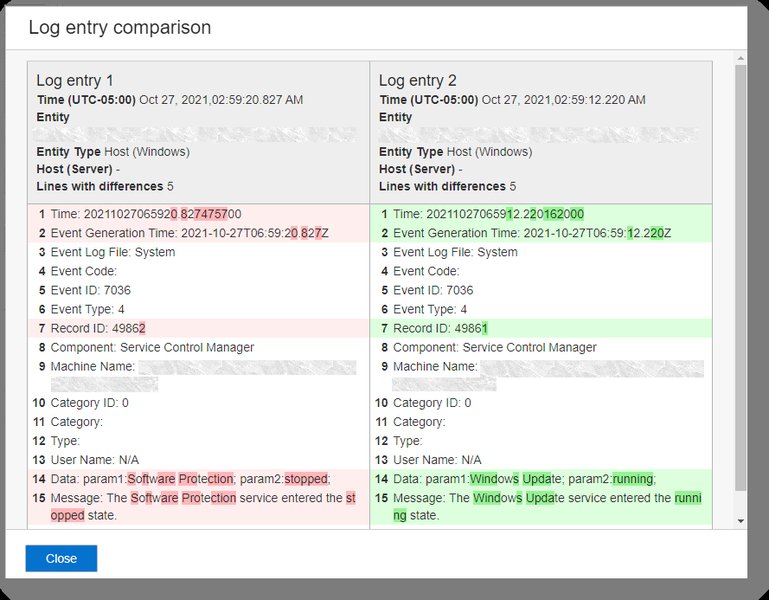
Conceptual representation of comparing log records, similar to the differencing performed by the utility. (Source: Oracle Docs)
Tabular Summary of Log Analysis Metrics
While the script itself outputs a detailed textual report, the following HTML table provides a structured, side-by-side comparison of key metrics for the reference (passing) and target (failing) logs. This can be particularly useful for a quick overview. The values presented here would be derived from an actual run of the RootCauser.py script.
| Metric | Reference Log (Pass) | Target Log (Fail) | Description |
|---|---|---|---|
| Total Lines | (e.g., 1250) | (e.g., 1300) | Total number of lines in each log file. |
| Original Error Count | (e.g., 10) | (e.g., 75) | Total count of lines identified as errors before any processing. |
| Unique Masked Error Count | (e.g., 3) | (e.g., 20) | Count of unique error messages after masking variables and deduplication. |
| Original Warning Count | (e.g., 25) | (e.g., 90) | Total count of lines identified as warnings before any processing. |
| Unique Masked Warning Count | (e.g., 5) | (e.g., 15) | Count of unique warning messages after masking variables and deduplication. |
| Special Errors in Target Log | N/A | (e.g., 18) | Number of unique masked error messages present in the Target Log but not in the Reference Log. |
| Special Warnings in Target Log | N/A | (e.g., 12) | Number of unique masked warning messages present in the Target Log but not in the Reference Log. |
| Special Flow Commands in Reference Log (Missing in Target) | (e.g., 2) | N/A | Number of unique masked flow command messages present in the Reference Log but not in the Target Log. |
Note: Values in italics are illustrative examples and would be replaced by actual data from the script's execution.
Understanding Log File Parsing in Python
Parsing log files is a common task in software development and system administration. Python, with its strong text processing capabilities and rich ecosystem of libraries, is an excellent choice for such tasks. The video below provides an introduction to log file analysis using Python, covering concepts that are fundamental to the workings of our RootCauser.py utility, such as reading files and searching for patterns.
Log File Analysis: Python Log Parsing - A helpful introduction to the basics of log parsing with Python.
This video explores how Python can be used to search through log files, a foundational skill for building more complex analysis tools. While `RootCauser.py` goes further by incorporating masking, deduplication, and comparative analysis, understanding basic parsing is key. The techniques discussed often involve reading files line by line, using string methods or regular expressions to find specific keywords or patterns (like "ERROR" or timestamps), and then aggregating this information for analysis, much like our utility does.
Frequently Asked Questions (FAQ)
How does the `RootCauser.py` script identify "errors" and "warnings"?
The script identifies errors and warnings by searching for predefined keywords within each log line. The default keywords include common terms like "ERROR", "FAIL", "EXCEPTION", "CRITICAL", "FATAL" for errors, and "WARNING", "WARN" for warnings. These keyword lists (ERROR_KEYWORDS, WARNING_KEYWORDS) can be customized within the script to match the specific terminology used in your logs.
What kind of "variables" does the masking function handle?
The `mask_variables` function uses regular expressions to find and replace common dynamic data patterns with generic placeholders. This includes:
- Timestamps (various common formats like ISO 8601, Apache log style, syslog style, or just time)
- IP Addresses (IPv4 and basic IPv6)
- Hexadecimal IDs or addresses (e.g.,
0x7ffeebc0, session tokens) - UUIDs
- Numeric IDs (sequences of digits, often process IDs or counters)
- File paths (both Unix-like and Windows-like) and file:line number patterns (e.g.,
main.py:123) - URLs
The goal is to normalize lines so that, for example, "Error connecting to <IP_ADDRESS> at <TIMESTAMP>" is treated as the same underlying message regardless of the specific IP or time.
How are "special flow commands" determined?
"Special flow commands" are lines in the reference (passing) log, identified by keywords like "STEP", "PROCESS", "COMPLETE", etc. (customizable via FLOW_KEYWORDS), that are not found in the target (failing) log after both logs' respective flow command lines have been masked. Their absence in the failing log might indicate that an expected process or step did not occur or complete, potentially pointing to where the failure happened.
How is the "root cause sorting" performed?
The root cause sorting prioritizes messages that are "special" to the failed log (i.e., present in the failed log's masked unique errors/warnings but not in the reference log's). It then counts the occurrences of these specific special messages within the entirety of the (masked) target log. The potential root causes are then listed, sorted primarily by these frequencies in descending order (most frequent first). Errors are generally prioritized over warnings if frequencies are similar. This heuristic assumes that more frequently occurring unique problems in the failed log are more likely to be related to the root cause.
Can I customize the keywords for errors, warnings, or flow commands?
Yes, absolutely. The keywords are defined as Python lists at the beginning of the script: ERROR_KEYWORDS, WARNING_KEYWORDS, and FLOW_KEYWORDS. You can modify these lists to include or exclude terms that are specific to your application's log format and conventions. This allows you to tailor the script's detection logic to better suit your needs.
Recommended Next Steps
To further explore log analysis and root cause determination, consider these related queries:
- What are some advanced techniques for clustering similar log messages and detecting anomalies beyond simple keyword matching?
- How can log analysis tools like this be integrated into CI/CD pipelines for proactive failure detection?
- What machine learning approaches can be used for more sophisticated automated root cause analysis from application logs?
- What are the best practices for structured logging (e.g., JSON format) to make automated log analysis more effective?
References
 docs.aws.amazon.com
Last updated May 9, 2025