
Unlock Seamless 3D Rotations: Mastering mat2quat in Python's transforms3d
Convert rotation matrices to quaternions effortlessly and understand why it matters for your 3D applications.
Highlights: Key Insights into mat2quat
- Matrix to Quaternion Conversion: The primary role of
mat2quatis to transform a 3x3 rotation matrix into its equivalent unit quaternion representation[w, x, y, z]. - Avoiding Gimbal Lock: Quaternions, unlike Euler angles, are immune to gimbal lock, providing a more robust way to represent and manipulate 3D orientations.
- Part of
transforms3d: This function belongs to thetransforms3dlibrary, a powerful Python tool for handling various 3D spatial transformations including rotations, translations, and scaling.
Introduction to mat2quat and the transforms3d Library
The mat2quat function is a specific utility found within the transforms3d.quaternions module of the popular Python library transforms3d. This library provides a comprehensive suite of tools for working with 3D spatial data, enabling conversions between various representations of orientation and position.
Specifically, mat2quat addresses the common task of converting a 3x3 rotation matrix into its corresponding quaternion. Quaternions offer a mathematically elegant and computationally efficient way to handle rotations in 3D space.
Why Convert Matrices to Quaternions?
While rotation matrices are intuitive for representing a fixed orientation, quaternions present several advantages, especially in dynamic scenarios:
- Compactness: A quaternion uses only 4 numbers
[w, x, y, z]compared to the 9 numbers in a 3x3 matrix. - Computational Efficiency: Composing rotations (applying one after another) is often faster with quaternions.
- Gimbal Lock Immunity: Unlike Euler angles, quaternions do not suffer from gimbal lock, a phenomenon where one degree of rotational freedom is lost.
- Smooth Interpolation: Quaternions are ideal for smoothly interpolating between two orientations using methods like Spherical Linear Interpolation (SLERP), crucial for animation and robotics.
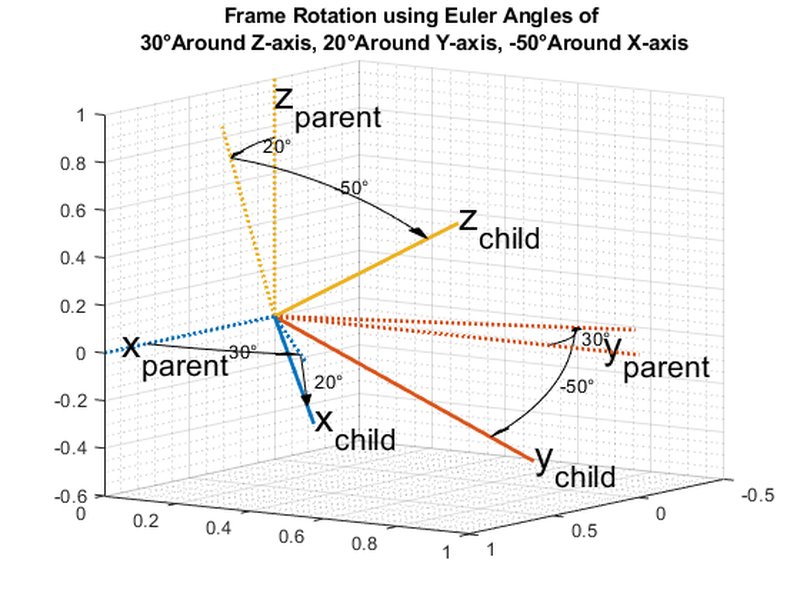
Visual representation comparing different rotation formalisms.
Understanding How mat2quat Works
Input Requirements
The mat2quat function expects a single argument:
- M: A 3x3 array-like object (e.g., a NumPy array) representing a valid rotation matrix. This means the matrix must be orthogonal (its transpose is its inverse) and have a determinant of +1. It should represent a pure rotation without scaling or shearing.
If you have a 4x4 transformation matrix (which includes translation), you need to extract the upper-left 3x3 submatrix before passing it to mat2quat.
The Conversion Algorithm
The function implements a numerically stable algorithm to calculate the four components [w, x, y, z] of the quaternion corresponding to the input rotation matrix M. The underlying mathematics are derived from the geometric relationship between matrices and quaternions, often referencing methods like those described by Bar-Itzhack or found in standard computer graphics literature.
Output Quaternion
The function returns:
- q: A 4-element NumPy array representing the unit quaternion
[w, x, y, z].wis the scalar (real) part.[x, y, z]is the vector (imaginary) part.
Crucially, the returned quaternion is normalized (has a magnitude of 1) and is adjusted such that the scalar component w is always non-negative (w >= 0). This ensures a unique representation, as both q and -q represent the same rotation.
Using mat2quat in Python
Importing the Function
First, ensure you have the transforms3d library installed (pip install transforms3d). Then, import the function like so:
# Import the function
from transforms3d.quaternions import mat2quat
import numpy as np
Code Examples
Example 1: Identity Matrix (No Rotation)
Converting the 3x3 identity matrix should result in the identity quaternion.
# Identity matrix represents no rotation
identity_matrix = np.eye(3)

# Convert to quaternion
q_identity = mat2quat(identity_matrix)

print(f"Identity Matrix:\n{identity_matrix}")
print(f"Corresponding Quaternion: {q_identity}")
# Expected Output: [1. 0. 0. 0.]
Example 2: 180-Degree Rotation around X-axis
A diagonal matrix with [1, -1, -1] represents a 180-degree rotation about the x-axis.
# 180-degree rotation matrix around X
rot_x_180 = np.diag([1, -1, -1])

# Convert to quaternion
q_rot_x_180 = mat2quat(rot_x_180)

print(f"180-deg X-Rotation Matrix:\n{rot_x_180}")
print(f"Corresponding Quaternion: {q_rot_x_180}")
# Expected Output: [0. 1. 0. 0.] (or very close due to float precision)
# Note: w=0, x=1, y=0, z=0
Example 3: 90-Degree Rotation around Z-axis
Converting a matrix representing a 90-degree rotation around the Z-axis.
# 90-degree rotation matrix around Z
# Corresponds to rotating X-axis to Y-axis, Y-axis to -X-axis
rot_z_90 = np.array([
    [0, -1, 0],
    [1,  0, 0],
    [0,  0, 1]
])

# Convert to quaternion
q_rot_z_90 = mat2quat(rot_z_90)

print(f"90-deg Z-Rotation Matrix:\n{rot_z_90}")
print(f"Corresponding Quaternion: {q_rot_z_90}")
# Expected Output: [0.70710678 0.         0.         0.70710678] (approx sqrt(0.5))
# Note: w=sqrt(0.5), x=0, y=0, z=sqrt(0.5)
Comparing Rotation Representations
Different methods exist for representing 3D rotations, each with strengths and weaknesses. The transforms3d library helps navigate these representations. The radar chart below offers a visual comparison based on common criteria.
This chart highlights why quaternions (red line) are often preferred for tasks requiring smooth interpolation and robustness against issues like gimbal lock, despite being less intuitive than Euler angles (green line).
Integration within the transforms3d Ecosystem
The mat2quat function doesn't exist in isolation. It's part of a suite of tools in transforms3d for seamless conversion between rotation representations.
Mindmap of Rotation Conversions
The following mindmap illustrates the central role of mat2quat and its relationship with other key conversion functions within the transforms3d library.
(transforms3d)"] id1["Rotation Matrix (3x3)"] id1a["mat2quat"] --> id2["Quaternion [w, x, y, z]"] id1b["mat2euler"] --> id3["Euler Angles"] id2["Quaternion [w, x, y, z]"] id2a["quat2mat"] --> id1["Rotation Matrix (3x3)"] id2b["quat2euler"] --> id3["Euler Angles"] id3["Euler Angles"] id3a["euler2mat"] --> id1["Rotation Matrix (3x3)"] id3b["euler2quat"] --> id2["Quaternion [w, x, y, z]"] id4["4x4 Transformation Matrix"] id4a["Extract 3x3 Submatrix"] --> id1["Rotation Matrix (3x3)"]
This shows how you can convert between matrices, quaternions, and Euler angles using functions provided by the library. For example, you can convert a matrix to a quaternion (mat2quat) and then back to a matrix (quat2mat), or convert Euler angles to a matrix (euler2mat) and then to a quaternion (mat2quat).
Key Conversion Functions Summary
Here's a table summarizing the main conversion functions related to mat2quat within transforms3d:
| Function | Module | Input | Output | Description |
|---|---|---|---|---|
mat2quat |
transforms3d.quaternions |
3x3 Rotation Matrix | Quaternion [w, x, y, z] |
Converts a rotation matrix to a quaternion. |
quat2mat |
transforms3d.quaternions |
Quaternion [w, x, y, z] |
3x3 Rotation Matrix | Converts a quaternion back to a rotation matrix. |
euler2mat |
transforms3d.euler |
Euler Angles (e.g., ax, ay, az) |
3x3 Rotation Matrix | Converts Euler angles to a rotation matrix (various conventions supported). |
mat2euler |
transforms3d.euler |
3x3 Rotation Matrix | Euler Angles (e.g., ax, ay, az) |
Converts a rotation matrix to Euler angles (various conventions supported). |
euler2quat |
transforms3d.euler |
Euler Angles (e.g., ax, ay, az) |
Quaternion [w, x, y, z] |
Converts Euler angles directly to a quaternion. |
quat2euler |
transforms3d.euler |
Quaternion [w, x, y, z] |
Euler Angles (e.g., ax, ay, az) |
Converts a quaternion directly to Euler angles. |
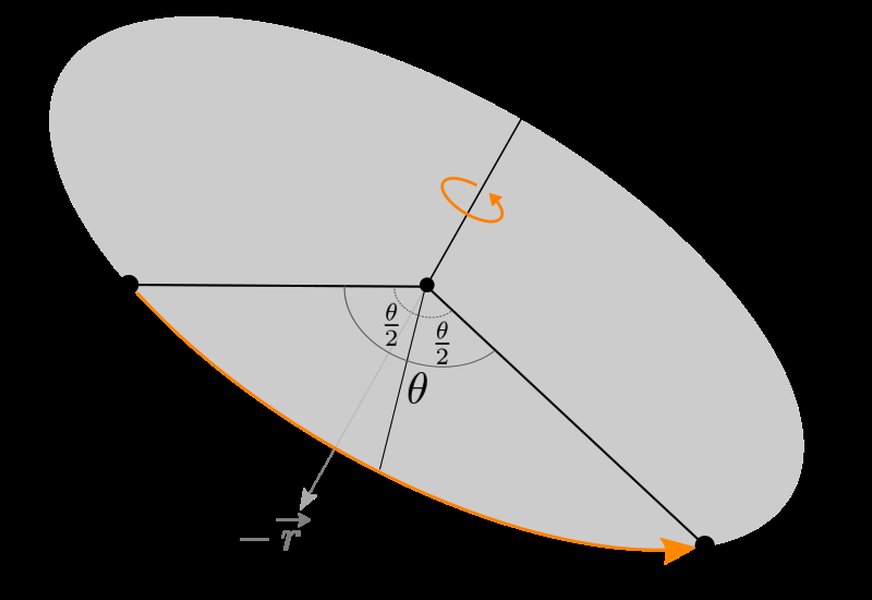
Visualizing the components of a quaternion related to an axis and angle of rotation.
Practical Considerations and Best Practices
- Input Matrix Validity: Always ensure the input 3x3 matrix is a valid rotation matrix (orthogonal with determinant +1). Non-orthogonal matrices can lead to unexpected or incorrect quaternion results. Numerical errors can sometimes slightly distort matrices; consider normalizing them if necessary.
- Floating-Point Precision: Conversions between representations (e.g., matrix -> quaternion -> matrix) might introduce tiny numerical differences due to floating-point arithmetic. Use tolerance checks (e.g.,
numpy.allcloseortransforms3d.quaternions.nearly_equivalent) when comparing results. - Application Context: The
mat2quatfunction is widely used in fields like robotics (pose representation), computer graphics (object orientation, animation), virtual/augmented reality, and physics simulations. - Library Integration:
transforms3dworks seamlessly with NumPy arrays, making it easy to integrate into scientific Python workflows. It can also be used alongside libraries like SciPy (which has its own rotation utilities inscipy.spatial.transform), PyTorch, or TensorFlow, though data types might need conversion (e.g., NumPy array to Tensor).
Frequently Asked Questions (FAQ)
What is the format of the quaternion returned by mat2quat?
mat2quat returns a 4-element NumPy array representing the quaternion in the format [w, x, y, z], where w is the scalar (real) part and [x, y, z] is the vector (imaginary) part. It's always a unit quaternion (magnitude 1).
Why is the 'w' component guaranteed to be non-negative?
A rotation can be represented by two unit quaternions: `q` and `-q`. To ensure a unique, canonical representation, `mat2quat` always returns the quaternion where the scalar component `w` is non-negative (`w >= 0`). This doesn't change the rotation it represents but provides consistency.
What happens if the input matrix isn't a pure rotation matrix?
The algorithm assumes the input is a valid 3x3 rotation matrix. If the matrix includes scaling, shearing, or reflection (determinant -1), or is numerically far from orthogonal, the resulting quaternion might not accurately represent the intended rotation or might not even be a unit quaternion. It's best practice to validate or orthogonalize the matrix beforehand if its properties are uncertain.
How does `mat2quat` compare to similar functions in other libraries like SciPy?
Libraries like SciPy (`scipy.spatial.transform.Rotation.from_matrix`) offer similar functionality. Key differences might include the quaternion convention (e.g., `[x, y, z, w]` vs. `[w, x, y, z]`) and specific implementation details or numerical stability strategies. `transforms3d` is specifically focused on these types of transformations and offers a consistent API across various representations (matrices, quaternions, Euler angles, axis-angle, etc.).
Can I use `mat2quat` with libraries like NumPy or TensorFlow/PyTorch?
`mat2quat` is designed to work directly with NumPy arrays as input. If you are using TensorFlow or PyTorch, you would typically convert your tensor representation of the matrix to a NumPy array before passing it to `mat2quat`, and then convert the resulting NumPy quaternion back to a tensor if needed for further computation within the deep learning framework.
Recommended Reading & Exploration
- How can I perform SLERP interpolation between two quaternions using transforms3d?
- What are the steps to convert Euler angles to a quaternion in transforms3d, accounting for different rotation orders?
- What are the best practices for handling sequences of 3D rotations using quaternions in the transforms3d library?
- How does the transforms3d library compare to scipy.spatial.transform for handling rotation conversions in Python?
References
Last updated May 6, 2025