
Unlocking Android Control: Scrcpy's Synergy with Cosmic Atomic Desktops
Seamless Integration for Enhanced Productivity and Development Across Linux Environments
Scrcpy, a free and open-source application, offers unparalleled control and display capabilities for Android devices directly from your computer. Its efficiency, low latency, and ease of use make it a powerful tool for various users, from casual users to developers. When combined with the innovative "Cosmic Atomic" desktop environments, users can experience a highly stable and integrated workflow.
Key Highlights of Scrcpy on Cosmic Atomic
- Effortless Android Integration: Scrcpy enables seamless mirroring and control of Android devices, transforming your desktop into a versatile extension of your mobile experience.
- Performance and Responsiveness: Known for its low latency (35-70ms) and high frame rates (30-60 FPS), Scrcpy provides a fluid and responsive interaction, almost as if you're holding the device in hand.
- Robust Desktop Environment: Cosmic Atomic desktops, such as Fedora Cosmic Atomic, offer a stable and modern foundation for running Scrcpy, ensuring reliable performance and a polished user experience.
Understanding Scrcpy: The Android Mirroring Marvel
Scrcpy, short for "screen copy," is a lightweight application developed by Genymobile SAS, the creators of the Genymotion Android emulator. It allows users to display and control their Android devices from a desktop computer via a USB connection or over TCP/IP. A key advantage of Scrcpy is that it does not require root access on the Android device or any special application installed on it, making it incredibly user-friendly and non-intrusive. It simply leverages the Android Debug Bridge (ADB) to establish a connection.
Core Features and Capabilities
Scrcpy is renowned for its performance, offering a high-quality video feed with minimal latency. It supports resolutions of 1920x1080 or above and provides smooth frame rates between 30 and 60 FPS. Beyond simple screen mirroring, Scrcpy allows full control of your Android device using your computer's keyboard and mouse. This functionality is invaluable for a variety of tasks:
- Gaming: Play Android games on a larger screen with precise keyboard and mouse control.
- Development and Testing: Developers can test applications on a real device, simulate touch and key input, and debug with ease without constantly switching between devices.
- Productivity: Manage messages, browse content, and interact with apps more efficiently from your desktop.
- Presentations and Demos: Mirror your phone's screen for presentations or demonstrations. Scrcpy can even show physical touches on the Android device for clearer explanations.
Recent versions of Scrcpy have introduced significant enhancements, such as audio forwarding (supported for Android 11+), the ability to turn off the device screen while mirroring, and clipboard content sharing between the device and computer. It also supports drag-and-drop for installing APKs or transferring files to the device's /sdcard directory.
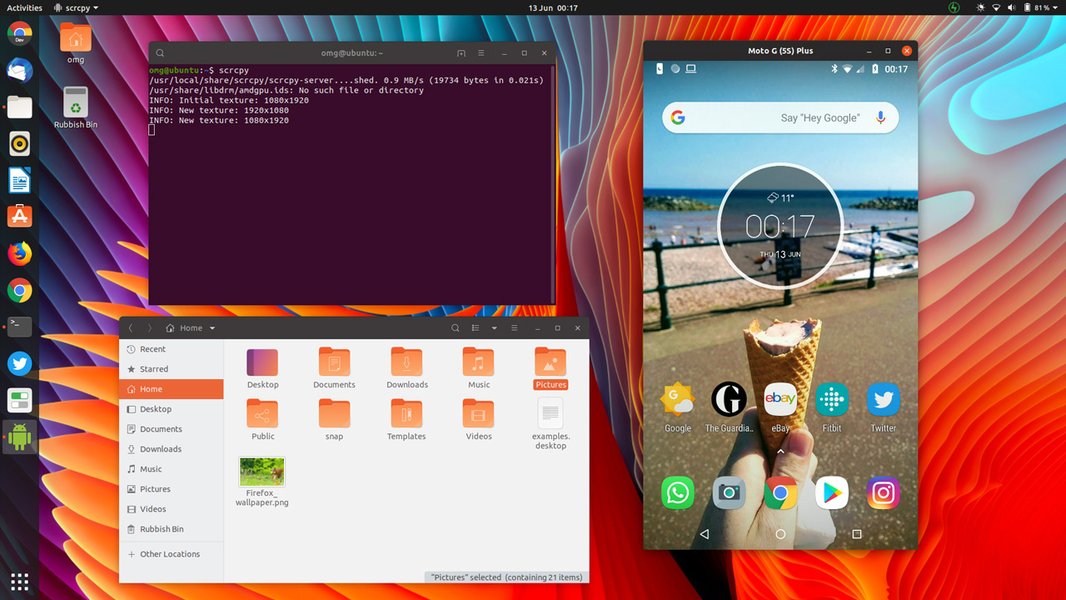
Scrcpy in action, seamlessly mirroring an Android device to a Linux desktop.
Exploring Cosmic Atomic Desktops
Cosmic Atomic refers to a new generation of desktop environments, often built on an "atomic" foundation, which emphasizes system stability, reliability, and transactional updates. Fedora Cosmic Atomic, for example, ships with the COSMIC desktop environment (developed by System76) in an atomic fashion. This approach leverages technologies like rpm-ostree, a hybrid image/package system that combines libostree and libdnf, to provide atomic and safe upgrades with local RPM package layering. This means system updates are treated as a single, indivisible operation, minimizing the risk of breakage and ensuring a consistent system state.
The Philosophy Behind Atomic Desktops
The "atomic" nature of these desktops provides several benefits:
- Immutability: The base operating system is largely immutable, meaning core system files are read-only, preventing accidental corruption or unauthorized changes.
- Rollbacks: If an update causes issues, the system can be easily rolled back to a previous, stable state.
- Layering: Users can layer additional software (like Scrcpy) on top of the immutable base, but these layers are managed in a way that preserves the system's integrity.
- Stability: This model significantly reduces the chances of system instability, making it an ideal environment for critical applications and everyday use.
The COSMIC desktop environment itself is designed for modern Linux users, often featuring a keyboard-driven workflow, clean aesthetics, and a focus on user experience. System76's COSMIC, specifically, is being rewritten in Rust, aiming for enhanced performance and a refined user interface.
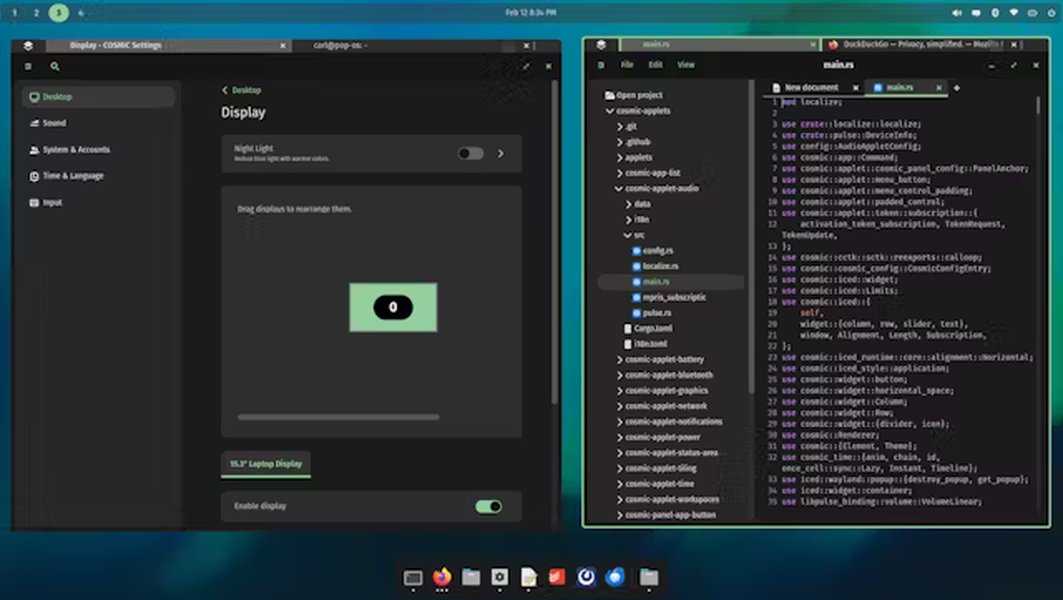
A glimpse of the clean and modern interface of the Cosmic Desktop Environment.
Installing Scrcpy on Cosmic Atomic Environments
While the atomic nature of these distributions aims for stability, installing applications like Scrcpy generally follows standard Linux procedures, often leveraging package managers or snaps.
Installation Methods
For most Linux distributions, including those with Cosmic Atomic environments, several methods are available for installing Scrcpy:
Package Managers (Apt, Dnf, Pacman, etc.)
Scrcpy is packaged in many distributions. For Debian/Ubuntu-based systems (which many Cosmic Atomic users might encounter, especially with Pop!_OS), you would typically use:
sudo apt update
sudo apt install scrcpy adb
However, users might find that repository versions are not always the latest. If a specific Cosmic Atomic spin (like Fedora Cosmic Atomic) uses dnf or rpm-ostree, the commands would adapt accordingly. For example, on Fedora, you might use sudo dnf install scrcpy.
Snap Packages
Snaps offer a convenient, containerized way to install applications, ensuring that all dependencies are bundled. Scrcpy is available as an unofficial snap package, which can be easily installed on systems with snapd enabled:
sudo snap install scrcpySnaps also provide automatic updates, ensuring you always have the latest version without manual intervention. However, some users have reported issues with unofficial snap packages in the past, so checking the official GitHub repository for the latest recommended installation methods is always a good practice.
Building from Source
For the absolute latest features and full control, building Scrcpy from source is always an option. This involves cloning the official GitHub repository and compiling it. This method requires installing development dependencies such as ffmpeg, libsdl2-dev, adb, meson, and ninja-build. While more involved, it guarantees the most up-to-date version.
Prerequisites and Configuration
Regardless of the installation method, two crucial steps are required on your Android device:
- Enable Developer Options: Go to your phone's "About phone" settings and tap "Build number" seven times.
- Enable USB Debugging: Within the newly unlocked Developer Options, enable "USB debugging."
Once Scrcpy is installed and USB debugging is enabled, connect your Android device to your computer via a USB cable. Upon first connection, your phone will likely prompt you to authorize the computer for USB debugging. Accept this. Then, simply run scrcpy from your terminal, and your Android screen should appear on your desktop.
Optimizing Scrcpy Performance on Cosmic Atomic
While Scrcpy is inherently performant, several options can be used to optimize its behavior, especially in a Cosmic Atomic environment where system resources are efficiently managed.
Common Scrcpy Command-Line Arguments
Scrcpy offers a rich set of command-line arguments to tailor its performance and features:
--max-size: Limits the width/height of the video to pixels. Useful for reducing resource usage.--max-fps: Caps the frame rate to FPS.--bit-rate: Sets the video bit rate in bits/s. A lower value reduces quality but also bandwidth.--no-audio: Disables audio forwarding.--no-control: Disables computer control, making it a read-only mirror.--turn-screen-off: Turns the device screen off while mirroring to save battery.--show-touches: Shows physical touches on the device screen.
Example for optimized usage:
scrcpy --video-codec=h265 --max-size=1920 --max-fps=60 --bit-rate=8M --no-audioThis command specifies H.265 video codec, limits the resolution to 1920 pixels on the longest side, sets a maximum of 60 FPS, a bit rate of 8 Mbps, and disables audio, which can be useful if experiencing lag or if audio forwarding is not needed.
Considerations for Cosmic Atomic Environments
Users on Cosmic Atomic desktops might find Scrcpy to be particularly stable due to the underlying system's transactional update model. However, specific issues related to media control commands have been reported when using Scrcpy in conjunction with the Cosmic desktop environment on Arch Linux, where Bluetooth earbud media controls targeted local media instead of the piped phone-audio stream. Such issues are often specific to the desktop environment's integration with audio handling and may require specific configuration or updates.
This radar chart illustrates the perceived strengths of Scrcpy when integrated with a Cosmic Atomic desktop, highlighting the synergy between the two technologies.
Comparative Analysis: Scrcpy vs. Alternatives
While Scrcpy excels in performance and simplicity, it's worth briefly comparing it to other screen mirroring solutions.
Scrcpy's Competitive Edge
Tools like AirMirror and Vysor offer similar functionalities but often come with more complex setups, require paid subscriptions for advanced features, or involve installing companion apps on the Android device. Scrcpy's open-source nature, lack of intrusiveness on the Android device, and exceptional performance metrics set it apart.
The table below summarizes key differences:
| Feature | Scrcpy | Typical Proprietary Solution (e.g., Vysor) |
|---|---|---|
| Cost | Free & Open Source | Often Freemium with paid tiers for full features |
| Root Access Required (Android) | No | Rarely, but some features might |
| App on Android Device | No | Yes, usually a companion app |
| Latency | Very Low (35-70ms) | Varies, often higher than Scrcpy |
| Control via PC | Keyboard & Mouse | Keyboard & Mouse |
| Audio Forwarding | Yes (Android 11+) | Commonly supported |
| Cross-Platform | Linux, Windows, macOS | Linux, Windows, macOS |
| Installation Complexity | Relatively simple (via package managers/snaps) | Can vary, sometimes involves drivers |
As the table illustrates, Scrcpy offers a compelling combination of features, performance, and accessibility without the common limitations of proprietary alternatives. Its integration capabilities with robust Linux desktop environments like Cosmic Atomic further enhance its appeal.
Video Deep Dive: Installing Scrcpy on Ubuntu
For users who prefer a visual guide, the following video provides a comprehensive walkthrough on installing and using Scrcpy on an Ubuntu-based system. While the video specifically focuses on Ubuntu, the general principles and steps for enabling USB debugging and running Scrcpy commands are widely applicable to other Linux distributions, including those utilizing Cosmic Atomic desktops. This visual tutorial helps demystify the installation process and demonstrates the practical aspects of mirroring and controlling an Android device.
This video titled "How to Install Scrcpy [Screen Copy] on Ubuntu 22.04 Jammy Jellyfish | ADB Scrcpy [Debugging Bridge]" is particularly relevant as it covers the foundational steps for getting Scrcpy up and running, including the crucial ADB debugging setup. This knowledge is transferable to any Linux distribution, including the newer Cosmic Atomic variants, ensuring users can replicate the process effectively.
Future Outlook and Community Engagement
The development of Scrcpy is ongoing, with continuous improvements and new features being added. The open-source nature fosters a strong community, allowing for bug reporting, feature requests, and community-driven packaging for various Linux distributions. Similarly, Cosmic desktop environments are actively developed, with initiatives like Fedora Cosmic Atomic demonstrating the push towards more stable and modern Linux experiences.
The synergy between Scrcpy and Cosmic Atomic desktops represents a promising direction for Android-Linux integration. As desktop environments become more stable and feature-rich, and tools like Scrcpy continue to refine their performance, users can anticipate an even more seamless and productive cross-device workflow.
Frequently Asked Questions
What is Scrcpy and what does it do?
What are Cosmic Atomic desktops?
Is it difficult to install Scrcpy on a Linux distribution with a Cosmic Atomic desktop?
apt, dnf) or install it via a snap package. Building from source is also an option for the latest features. The key is to enable USB debugging on your Android device.Does Scrcpy support audio mirroring?
Can I use Scrcpy wirelessly?
What are the main benefits of using Scrcpy on a Cosmic Atomic desktop?
Does Scrcpy require root access on my Android phone?
Conclusion
Scrcpy stands out as an exceptional tool for anyone looking to bridge the gap between their Android device and desktop computer. Its free, open-source nature, coupled with remarkable performance, low latency, and a rich feature set, makes it a superior choice compared to many proprietary alternatives. When deployed on a robust and modern foundation like a Cosmic Atomic desktop environment, users gain the advantage of a highly stable and efficient system. The synergy between Scrcpy's seamless mirroring capabilities and the reliability of atomic desktops creates a powerful and productive ecosystem, catering to the needs of developers, gamers, and everyday users alike.
Recommended Further Exploration
- Discover advanced command-line options to fine-tune your Scrcpy experience.
- Explore the full range of features and future development plans for the Cosmic desktop environment.
- Learn how to troubleshoot and resolve common issues with audio forwarding in Scrcpy.
- Delve into a comparative analysis of different atomic Linux distributions and their unique advantages.
References
Last updated May 21, 2025