
The Importance of Git Commit Messages for New Programmers
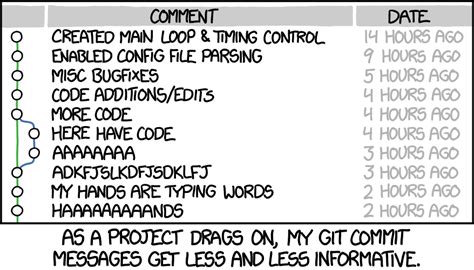
Git commit messages are a fundamental aspect of software development, serving as a crucial communication tool and historical record within a project. For new programmers, mastering the art of writing clear and effective commit messages is not just a best practice, but a skill that significantly enhances their ability to collaborate, debug, and maintain code. This detailed explanation will explore why commit messages are so important, particularly for beginners, and illustrate their significance with virtual case studies.
Why Git Commit Messages Matter
Git commit messages are short descriptions that accompany each commit, which is essentially a snapshot of changes made to a codebase. These messages serve multiple vital purposes:
-
Historical Record and Documentation
Commit messages act as a project's logbook, documenting what changes were made, when, and why. This historical record is invaluable for tracking progress, understanding the evolution of the codebase, and revisiting past decisions. For a new programmer, this is particularly useful for tracking their learning progress and understanding how their code has evolved. Well-written commit messages act as a breadcrumb trail, making it easier to retrace steps when debugging or reviewing code.
-
Collaboration and Communication
In team environments, commit messages are a primary mode of communication. They inform team members about the changes made, reducing misunderstandings and conflicts. This is especially important in open-source projects or professional settings where multiple developers collaborate on the same codebase. Clear commit messages ensure that a newbie's contributions are understood by others, fostering better teamwork.
-
Debugging and Troubleshooting
When bugs arise, commit messages can help pinpoint the exact change that introduced the issue. Instead of sifting through lines of code, developers can use tools like
git logto quickly identify the problematic commit based on its message. This can save significant time and effort, especially for new programmers who may not yet have the experience to quickly identify the root cause of a problem. -
Code Review Efficiency
Clear commit messages make the code review process faster and more effective. Reviewers can quickly grasp the intent behind changes without having to dive into the code itself. This is particularly helpful for new programmers who are learning to write code that is easy to understand and maintain.
-
Future Reference
A well-written commit message helps your future self or other developers understand the context of a change, even months or years later. As a new programmer grows in their skills, they will often revisit old projects. Clear commit messages make it easier for their future selves to understand what they were thinking at the time of writing the code, which is especially helpful when refactoring or extending functionality.
-
Professionalism and Best Practices
Writing good commit messages is a hallmark of a professional developer. For a beginner, adopting this habit early on sets them apart and prepares them for real-world software development. It also demonstrates their attention to detail and commitment to maintaining a clean and understandable codebase. This can significantly impact their job prospects, as employers often review a candidate's GitHub profile or other version control repositories. A history of well-written commit messages demonstrates professionalism and a commitment to best practices.
-
Learning to Think Structurally
Writing commit messages forces new programmers to think about their changes in a structured way. This habit helps them develop a disciplined approach to coding, encouraging them to articulate the purpose and impact of their work, which can deepen their understanding of the codebase and improve their problem-solving skills.
Virtual Case Studies: Illustrating the Impact
To further illustrate the importance of good commit messages, let's consider a few virtual case studies involving new programmers.
Case Study 1: The Tale of Two Programmers
Let's consider two new programmers, Alice and Bob, working on a simple web application project.
Alice's Approach: Poor Commit Messages
Alice is new to Git and doesn’t pay much attention to her commit messages. Her commit history looks like this:
Initial commitFixed stuffUpdated fileBugfixMore changes
When Alice’s project encounters a bug, she struggles to identify which commit introduced the issue. Her vague commit messages provide no context, forcing her to manually review the code changes in each commit. This process is time-consuming and frustrating.
Bob's Approach: Clear and Structured Commit Messages
Bob, on the other hand, follows best practices for writing commit messages. His commit history looks like this:
feat: Add user authentication modulefix: Correct typo in login error messagerefactor: Simplify database query logicdocs: Update README with setup instructionsfix: Resolve issue with session timeout
When Bob encounters a bug, he quickly identifies the problematic commit by reviewing his commit messages. The clear descriptions help him understand the context of each change, allowing him to fix the issue efficiently.
Case Study 2: Alex's First Team Project
Alex, a junior developer, is working on their first team project, tasked with fixing a bug in the login functionality. The bug causes login failures when passwords contain special characters.
Scenario 1: Poor Commit Message
Alex fixes the bug and commits the code with the message:
git commit -m "Fixed login bug"A week later, another team member, Sarah, notices the login is still causing issues. She looks at the commit history and sees Alex’s vague message. Sarah is confused and has to spend extra time digging through the code to understand the context, slowing down the debugging process.
Scenario 2: Effective Commit Message
Now, imagine Alex writes a more detailed and structured commit message:
git commit -m "fix(login): escape special characters in password hashing

Previously, the password hashing function did not properly escape special
characters, causing login failures for users with passwords containing
symbols like '@' or '#'. This commit updates the hashing function to
handle special characters correctly.

Closes #123"
This time, Sarah can quickly review the commit history and understand exactly what changes were made. The commit message provides clear context, explains the problem, and references the issue tracker (#123). Sarah can now focus on resolving the new issue without wasting time deciphering Alex’s changes.
Best Practices for Writing Effective Commit Messages
To avoid the pitfalls of vague commit messages and emulate the success of clear communication, here are some best practices for writing effective Git commit messages:
-
Use a Clear Structure
A good commit message typically consists of three parts:
- Subject Line: A concise summary of the change (ideally 50 characters or less).
- Body: A detailed explanation of the change, if necessary (wrapped at 72 characters per line).
- Footer: Optional metadata, such as issue references or breaking changes.
Example:
feat: Add user authentication module This commit introduces a new user authentication module using JWT. It includes login, logout, and session management functionality. Closes #123 -
Write in the Imperative Mood
The subject line should use the imperative mood, as if giving a command. For example:
- Use:
Add login functionality - Avoid:
Added login functionality
- Use:
-
Be Specific and Descriptive
Avoid vague messages like
Fixed stuff. Instead, describe what was fixed and why.- Bad:
Updated file - Good:
fix: Correct typo in login error message
- Bad:
-
Follow the 50/72 Rule
- Limit the subject line to 50 characters.
- Wrap the body text at 72 characters per line.
-
Use Tags or Prefixes
Many teams use tags to categorize commits, such as:
feat: New featurefix: Bug fixdocs: Documentation updaterefactor: Code refactoringtest: Adding or updating tests
Example:
docs: Update README with setup instructions -
Commit Frequently
Make small, logical commits instead of bundling multiple changes into one. This practice makes it easier to write clear messages and track changes.
-
Reference Issues or Tickets
If your project uses an issue tracker, reference the issue ID in the commit message.
Example:
fix: Resolve issue with session timeout This commit fixes the session timeout issue reported in #456. -
Focus on the Why, Not Just the What
The code itself shows what changed, but the commit message should explain why the change was made. For example:
-
✅ Good:
fix: Prevent duplicate tasks from being added -
❌ Bad:
Fixed bug
-
-
Group Related Changes
Each commit should address a single concern. For example, if you’re fixing a bug and adding a new feature, create separate commits for each.
-
Avoid Commit Noise
Don’t clutter your commit history with messages like "WIP" (Work in Progress) or "Fix typo." Use
git commit --amendto combine small fixes into a single meaningful commit.
Tools and Techniques for Writing Better Commit Messages
Several tools and techniques can help new programmers write better commit messages:
-
Use a Text Editor
When writing detailed commit messages, use a text editor instead of the
-mflag. This approach allows you to format the message properly.Command:
git commit -
Use Commit Message Templates
Git allows you to create a commit message template to standardize your messages. Add the following to your
.gitconfigfile:[commit] template = ~/.git-commit-template.txt -
Adopt Conventional Commits
The Conventional Commits specification provides a standardized format for commit messages, making them easier to read and parse.
-
Git Hooks
Tools like Git hooks can enforce commit message standards. For example, a
commit-msghook can validate the format of a commit message and reject it if it doesn’t meet the criteria. -
Linting Tools
Tools like commitlint can help ensure that commit messages follow a specific convention.
Conclusion
For new programmers, writing clear and effective Git commit messages is a skill that pays dividends over time. It enhances collaboration, simplifies debugging, and creates a valuable historical record of the project. By following best practices, such as using a clear structure, writing in the imperative mood, and committing frequently, beginners can set themselves up for success in their coding journey. A good commit message is not just a formality—it’s a tool for communication, documentation, and problem-solving.
By adopting these practices, new programmers will not only improve their Git skills but also contribute to a healthier, more maintainable codebase. Mastering this skill early on will make their lives as programmers much easier and more efficient.
For further reading, check out these resources:
Last updated January 6, 2025