
Crafting Your Digital Blueprint: A Comprehensive Guide to Website Planning and Content Creation
Laying the Foundation for a Successful Online Presence
Key Highlights for Website Planning and Content Creation
- Strategic Planning is Paramount: Before writing a single word, define your website's purpose, target audience, and business goals. This foundational step ensures all subsequent efforts are aligned and effective.
- Outline for Clarity and Structure: Develop a detailed website outline or sitemap. This blueprint will organize your pages, content hierarchy, and user flow, making content creation and development significantly smoother.
- Content Must Be Audience-Centric and Optimized: Focus on creating valuable, readable, and engaging content tailored to your target audience. Integrate SEO best practices, including keyword research and strategic placement, to enhance visibility.
Embarking on the journey of creating a website involves more than just design and coding; it starts with meticulous planning and strategic content development. A well-thought-out website serves as a powerful marketing tool, a 24/7 salesperson, and often, the first impression of your brand. This guide will walk you through the essential pre-implementation steps, focusing on defining your website's purpose, structuring its content, and crafting compelling narratives that resonate with your audience.
Phase 1: Defining Your Website's Core Purpose and Audience
Before any content is drafted or pages are outlined, it's crucial to establish the fundamental reasons behind your website's existence. This initial discovery and research phase sets the stage for all subsequent decisions.
Clarifying Business Objectives and Website Goals
Every successful website has a clear purpose. Are you aiming to inform, persuade, entertain, or sell? Your business objectives directly influence your website's goals. For instance, an e-commerce site prioritizes sales, while a blog aims to inform and engage. Defining these goals ensures that every piece of content and every page serves a specific function. This helps in avoiding redundancy and focusing efforts on what truly matters for your business.
Understanding Your Target Audience
Knowing your audience is perhaps the most critical step. Who are they? What are their demographics, interests, pain points, and aspirations? Understanding your target market allows you to tailor your content, tone, and design to effectively appeal to them. Think about what questions they might have, what problems they need solved, and what information they are seeking. This audience-first approach ensures your content is relevant, valuable, and genuinely helpful.
“Consider your target market: What do they look like? Where are they from? What is their age range? What are their common interests? Write the answers to these questions down so that as you go through the proceeding tips and perfect your website content, you can keep this community at the front of your mind.”
Phase 2: Architecting Your Website – The Outline and Sitemap
Once your purpose and audience are clear, the next step is to build the skeleton of your website. This involves creating a sitemap and a detailed content outline, acting as your blueprint.
The Importance of a Website Outline (Sitemap)
A website outline, often interchangeably used with sitemap, is a fundamental planning tool. It provides a high-level overview of your website's structure, mapping out all main pages, their hierarchy, and how they connect. This visual representation helps you organize content logically and ensures intuitive navigation for users. For search engines, a clear sitemap simplifies crawling and understanding your site's content, contributing to better SEO performance.
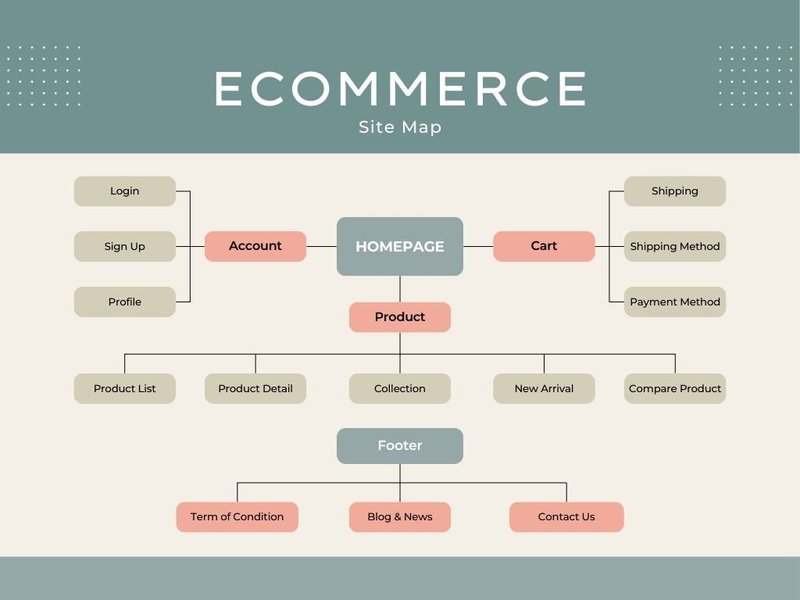
An example of a website sitemap, illustrating the hierarchy and flow of pages.
Benefits of a Comprehensive Outline
- Clarity for Stakeholders: Ensures everyone involved in the project—from writers to designers and developers—is on the same page regarding the website's goals, structure, and content.
- Streamlined Development: Helps developers create an organized, easy-to-navigate website that aligns with user needs.
- SEO Foundation: A well-structured sitemap helps search engines understand your site better, potentially lowering bounce rates and improving content visibility for relevant searches.
- Time and Cost Savings: By identifying potential issues and content gaps early, an outline minimizes costly revisions and delays during the development phase.
Steps to Create a Detailed Content Outline
Creating a content outline involves a systematic approach to organize the main topics, subtopics, and key points for each page.
Brainstorm and Gather Ideas:
Start by brainstorming all potential content ideas relevant to your defined purpose and audience. Group these ideas into logical categories and subcategories. This initial phase is about quantity, not perfection.
Draft the Top-Level Navigation:
Determine your main website pages (e.g., Home, About Us, Services, Products, Blog, Contact). These will form the primary navigation menu. Aim for simplicity and clarity.
Develop Page-Specific Outlines:
For each main page, create a detailed outline of the content it will contain. This includes:
- Page Purpose: What is the main goal of this specific page?
- Target Audience: Who is this page specifically for?
- Key Messages: What are the core takeaways or information you want to convey?
- Main Sections/Headings (H2): Break down the page into major divisions.
- Subtopics/Subheadings (H3, H4): Further break down each section into more specific points.
- Supporting Evidence/Examples: What data, statistics, or examples will support your points?
- Calls to Action (CTAs): What do you want users to do on this page (e.g., "Learn More," "Sign Up," "Buy Now")?
- Visual Elements: Where will images, videos, or infographics be placed?
- Internal and External Links: Plan where to link to other relevant pages on your site or authoritative external resources.
Map the User Journey:
Consider how users will navigate from one page to another. A well-planned user journey ensures a seamless and intuitive experience, guiding visitors towards your desired actions (e.g., a purchase, a sign-up). Brainstorm content and material that supports each step of the buyer journey.
Plan Visual Identity and Layout:
While not strictly content, the visual identity (colors, typography, image style) and rough layout of pages should be considered during outlining. This helps in visualizing how content will appear and function within the overall design.
Visualizing Your Website Structure
To further illustrate the content outline process, let's look at an example. Imagine a simple consulting services website. Its outline might look something like this:
| Page/Section | Purpose | Key Content Elements | Call to Action (CTA) |
|---|---|---|---|
| Homepage | Introduce services, establish credibility, guide visitors | Headline, brief service overview, client testimonials, "Why Choose Us" section, engaging visuals | "Explore Services," "Contact Us" |
| About Us | Share company story, mission, values, team bios | Our Story, Mission & Vision, Team Bios (with photos), Company Values | "Meet Our Team," "Contact Us" |
| Services | Detail specific consulting offerings | List of services, benefits of each, case studies/examples, FAQs related to services | "Request a Quote," "Learn More" (for specific services) |
| Blog/Resources | Provide valuable industry insights, establish thought leadership | Latest articles, categories, search function, subscription option | "Read More," "Subscribe to Newsletter" |
| Contact Us | Provide contact information and means of communication | Contact form, phone, email, location (map), office hours | "Send a Message," "Call Now" |
Phase 3: Writing Compelling Website Content
With a solid outline in place, the focus shifts to crafting the actual words that will populate your website. Effective web writing differs from traditional writing; it needs to be concise, scannable, and action-oriented.
Principles of Effective Web Writing
Web users typically scan pages rather than reading every word. Therefore, your content must be designed for quick comprehension and engagement.
Audience-Centric Approach
Always write with your target audience in mind. Address their needs, answer their questions, and provide solutions to their problems. Every sentence should resonate with their interests and desires.
Clarity and Conciseness
Get to the point quickly. Use simple, common language and avoid jargon where possible. Short sentences and paragraphs improve readability and retain user attention.
Scannability and Readability
Break up large blocks of text using:
- Meaningful Headings and Subheadings: Use H1, H2, H3, and H4 tags to create a clear content hierarchy, making it easy for users to skim and find relevant information.
- Bullet Points and Numbered Lists: Ideal for presenting information in an easy-to-digest format.
- Bold Text: Emphasize key phrases and keywords.
- Short Paragraphs: Keep paragraphs to 3-4 sentences to prevent text fatigue.
“Most users visit a web page for 10-15 seconds. In that brief time, 80 percent will skim the page for keywords they already have in mind. Therefore, before you create content, it’s important to understand your audience and anticipate what content and keywords they’re trying to find.”
Strong Calls to Action (CTAs)
Guide your visitors towards the next step. Every page should have a clear, compelling CTA that tells the user what you want them to do (e.g., "Download Now," "Schedule a Demo," "Shop Products").
Visual Integration
Text alone can be overwhelming. Strategically place relevant images, videos, and infographics to break up content, explain complex ideas, and enhance user engagement. Visuals grab attention and improve understanding.
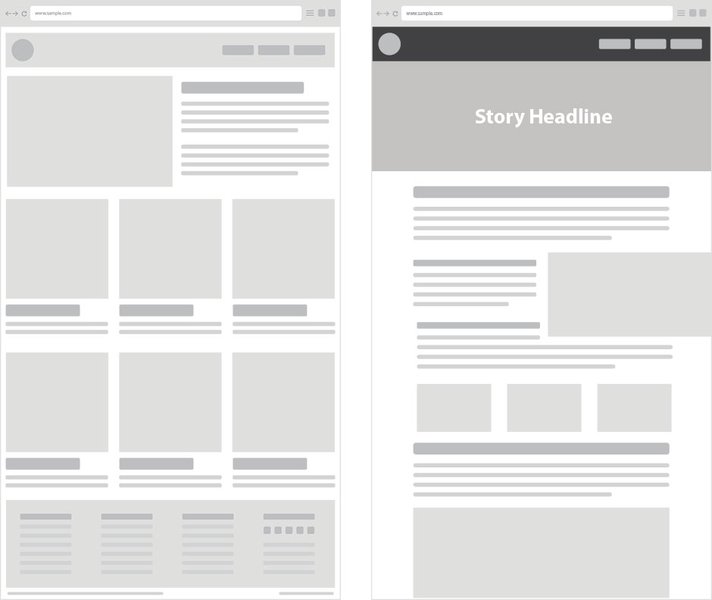
An example of how visual elements can be integrated into website content.
Optimizing Content for Search Engines (SEO)
Good content isn't just for human readers; it's also for search engines. SEO copywriting integrates keywords and best practices to improve your website's visibility in search results.
Keyword Research and Placement
Identify primary keywords for each page and integrate them naturally into your page titles, headings, and body content. Avoid keyword stuffing, which can harm your rankings.
Meta Tags Optimization
Write compelling title tags and meta descriptions for each page. These HTML elements appear in search results and influence click-through rates. Ensure they include your primary keywords.
E-E-A-T Principles
Google emphasizes Experience, Expertise, Authoritativeness, and Trustworthiness (E-E-A-T). Ensure your content demonstrates these qualities, particularly for YMYL (Your Money Your Life) topics. This involves citing sources, providing factual information, and showcasing real-world experience.
Internal and External Linking
Strategically link to other relevant pages within your website (internal links) to improve navigation and distribute "link equity." Also, link to authoritative external sources when appropriate to add credibility and value.
Content Tone and Voice
Maintain a consistent brand voice across all your website content. Whether it's formal, informal, witty, or authoritative, your tone should reflect your brand's personality and resonate with your target audience.
Leveraging AI and Tools in Content Creation
Modern content creation can be significantly enhanced by various tools and AI assistants, streamlining the process from outlining to drafting.
Content Planning and Organization Tools
Tools like Milanote, Trello, Asana, or even simple Google Docs with outline features can help organize your sitemap, content ideas, and writing progress. Collaborative platforms are especially useful for team projects, ensuring everyone is on the same page.
This video demonstrates how to organize website content using Google Docs' outline feature, a simple yet effective method for structuring your ideas.
AI Writing Assistants and Editing Software
AI writers can assist in generating content ideas, drafting sections, or even creating entire articles, significantly speeding up the initial writing process. However, human oversight is crucial to ensure accuracy, quality, and originality. Tools like ProWritingAid can help with grammar checks, stylistic improvements, and identifying vague wording or passive voice, ensuring your content is polished and professional.
Assessing Your Readiness: A Planning and Content Radar Chart
To help you visualize your progress and identify areas for improvement in the planning and content creation phases, here's a radar chart. It highlights key aspects that contribute to a well-prepared website before implementation.
This radar chart illustrates critical dimensions of website planning and content creation. "Your Current State" represents a hypothetical level of readiness, while "Optimal Preparedness" shows the ideal target for each area. By assessing your own project against these dimensions, you can identify strengths and weaknesses and prioritize areas needing further attention before moving to implementation. A higher score in each category indicates a more robust and effective pre-development strategy.
Frequently Asked Questions (FAQ)
What are web writing skills?
Why is a website outline important?
How does content writing for the web differ from traditional writing?
Can I use AI to write my website content?
Conclusion: A Strong Foundation for Digital Success
Getting started on your website's content and outline before diving into implementation is a strategic investment that pays dividends. By meticulously defining your purpose, understanding your audience, crafting a detailed outline, and creating audience-centric, SEO-optimized content, you lay a robust foundation for a website that not only looks good but also performs exceptionally well. This methodical approach minimizes roadblocks, enhances user experience, and maximizes your potential for online success.
Recommended Further Exploration
- How to conduct thorough target audience research for website content?
- What are the best practices for SEO optimization of website content?
- Which tools are most effective for website content planning and team collaboration?
- What are advanced web writing techniques for enhancing user engagement and conversion rates?

