
Unlock Exclusive Content: Adding a Membership Portal to Your Static Blog
Seamlessly integrate paid memberships, gated content, and personalized reading libraries into your fast, secure static website.
Adding dynamic features like a membership login, paid user management, and a personalized content portal to a static blog presents unique challenges. Static sites, built with HTML, CSS, and JavaScript, are known for their speed and security precisely because they lack server-side processing and databases. However, this doesn't mean you can't offer exclusive experiences to your audience. By leveraging specialized third-party services and smart integration strategies, you can successfully create a robust membership system without sacrificing the benefits of a static setup.
Highlights: Key Takeaways
- Static Sites Need External Tools: Implementing memberships requires using third-party platforms or services to handle authentication, payments, and user data, as static sites lack native backend capabilities.
- Dedicated Platforms Simplify Integration: Services like Memberstack or MemberSpace are specifically designed to add membership features to static sites with minimal code, managing the complex backend processes for you.
- Personalized Portals Enhance Value: A dedicated member portal allows paid users to manage their subscriptions, access exclusive gated content, and maintain a personalized reading library, creating a premium experience.
Understanding the Challenge: Static vs. Dynamic
Why Can't My Static Blog Handle Logins Natively?
Static websites consist of pre-built files served directly to the user's browser. They don't run server-side code (like PHP or Python) or connect directly to databases. Functions essential for memberships – like verifying user credentials, checking payment status against a database, restricting access based on roles, and storing user-specific data (like a reading list) – all require dynamic, server-side processing. Tools that generate static copies of dynamic sites (like Simply Static for WordPress) explicitly state that features requiring logins or server interaction won't function on the static version.
Therefore, adding a membership layer necessitates "bridging the gap" by integrating external services that provide the required dynamic functionality.
The Solution: Integrating Third-Party Membership Services
Choosing the Right Platform for Your Needs
Several approaches exist, ranging from no-code platforms to more developer-centric solutions. The best choice depends on your technical comfort level, budget, and desired features.
No-Code/Low-Code Membership Platforms
These platforms are often the easiest way to add membership features to a static site. They handle user authentication, payment processing (usually via Stripe integration), content gating, and member dashboards, requiring minimal code implementation (often just adding a script tag and specific HTML attributes).
- Memberstack: A popular choice specifically designed for static and Jamstack sites. It offers features for sign-up/login, gated content, recurring payments, and customizable member dashboards.
- MemberSpace: Similar to Memberstack, it allows you to add memberships and protect content on virtually any website platform, including static HTML sites.
- Others: Platforms like Softr (often paired with Airtable), SubHub, or Raklet also offer no-code solutions for building membership sites and portals.
Authentication Services & Custom Solutions
If you require more flexibility or have development resources, you might opt for dedicated authentication services combined with other tools:
- Auth0 / Firebase Authentication / Clerk: Powerful identity platforms providing secure login/signup functionality that can be integrated into static sites via JavaScript SDKs. These often require more setup than no-code platforms.
- Netlify Identity / Azure Static Web Apps Auth: Hosting platforms like Netlify and Azure offer built-in authentication solutions specifically for static sites hosted with them.
- Serverless Functions: Services like Netlify Functions, Vercel Edge Functions, or Cloudflare Workers allow you to run backend code on demand without managing servers. You can use these to verify user tokens, fetch gated content from secure storage (like Cloudflare Workers KV or Firebase Storage), or interact with databases (like Supabase or AWS DynamoDB).
- Headless CMS: Combining a headless CMS with payment integration (e.g., Contentful + Stripe) can manage gated content served via authenticated API calls.
Step-by-Step Implementation Guide
Bringing Your Membership Portal to Life
Regardless of the specific tools chosen, the general process involves these key steps:
1. Setup Authentication & Payment
Create Secure Login and Membership Tiers
- Sign up for and configure your chosen membership platform or authentication service.
- Integrate a payment processor (Stripe is commonly supported) to handle paid memberships.
- Define your membership plans (e.g., monthly/annual subscription tiers) with different access levels.
- Add signup and login forms/widgets to your static blog. Most platforms provide embeddable elements or clear instructions for HTML integration. Consider offering social login options (Google, GitHub via OAuth) for user convenience.
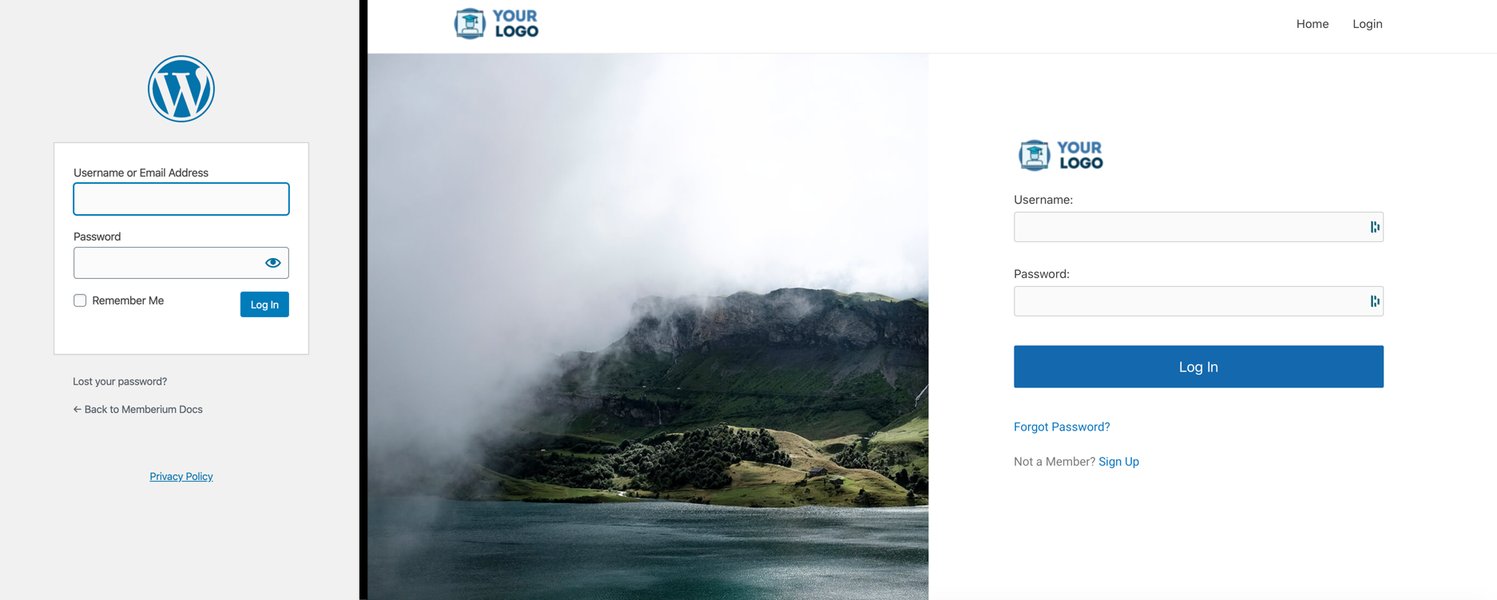
Example login form integrations.
2. Implement Content Gating
Protect Your Premium Content
- Identify the specific blog posts, pages, downloadable files, or sections you want to restrict to paid members.
- Use your chosen platform's mechanism for gating. This might involve:
- Adding specific HTML attributes to elements you want to hide (e.g.,
<div data-ms-content="paid-members">...</div>with Memberstack). - Configuring access rules within the platform's dashboard based on page URLs.
- Using client-side JavaScript to check the user's authentication status and membership level before revealing content. The script typically interacts with the membership platform's API or checks a token.
- For higher security or large files, fetching gated content via authenticated API calls to a serverless function or secure backend after verifying the user's session.
- Adding specific HTML attributes to elements you want to hide (e.g.,
- Consider showing content teasers or excerpts to non-members to encourage sign-ups.
3. Build the Member Portal & Reading Library
Create a Personalized Hub for Paid Users
- Designate a specific page on your site as the member portal or dashboard (e.g.,
/accountor/dashboard). - Use your membership platform's tools to build out the portal. Most platforms offer pre-built components or allow customization.
- Essential portal features include:
- Viewing current subscription status and managing billing details.
- Updating profile information (email, password).
- Accessing all gated content they are subscribed to. This forms the basis of the "reading library."
- Implementing the Reading Library: Within the portal, you can list links to all accessible gated articles, downloads, or resources. More advanced implementations might involve:
- Fetching a user-specific list of content via API.
- Allowing users to "save" or "bookmark" articles (this typically requires a database connection, potentially managed via your membership platform or a service like Supabase accessed via serverless functions).
- Displaying content directly within the portal interface.

An example layout for a member portal.
4. Deploy and Test
Ensure Everything Works Seamlessly
- Deploy your updated static blog files to your hosting provider (Netlify, Vercel, Cloudflare Pages, GitHub Pages are popular choices compatible with these methods).
- Thoroughly test the entire user flow: signup, payment, login, accessing gated content, accessing the portal, managing the subscription, and logout.
- Verify that non-members cannot access protected content through direct URLs or other means.
Comparing Membership Approaches
Visualizing Key Factors
Choosing the right approach depends on balancing factors like ease of use, cost, flexibility, and scalability. The radar chart below compares common approaches based on these criteria (ratings are qualitative estimations).
This chart helps visualize the trade-offs: no-code platforms excel in ease of use but might have less customization potential than a solution built with authentication services and serverless functions, which offers greater flexibility at the cost of increased complexity.
Visualizing the Membership System Components
A Mindmap Overview
The following mindmap illustrates the interconnected components required to add a membership system to your static blog using external services:
(e.g., Memberstack, MemberSpace)"] id2a1["Handles Backend Logic"] id2b["Authentication Service
(e.g., Auth0, Netlify Identity)"] id2b1["User Signup & Login"] id2b2["Session Management"] id2c["Payment Gateway
(e.g., Stripe, PayPal)"] id2c1["Subscription Handling"] id2c2["Payment Processing"] id2d["Content Gating Logic"] id2d1["Client-Side JS Checks"] id2d2["Serverless Functions (Optional)"] id2e["Member Portal/Dashboard"] id2e1["User Account Management"] id2e2["Access to Gated Content"] id2e3["Reading Library Interface"] id3["User Experience"] id3a["Login/Signup Forms"] id3b["Gated Content Indicators"] id3c["Personalized Portal Access"] id3d["Subscription Management"]
This map shows how the static blog interacts with external services to provide authentication, handle payments, control access to content, and offer a personalized portal for paid members.
Comparing Platform Options
Feature Breakdown of Popular Solutions
To help you choose, here's a comparison table highlighting key aspects of some recommended platforms or approaches:
| Feature | Memberstack | MemberSpace | Auth0 + Custom Backend (Serverless) |
|---|---|---|---|
| Target User | Designers, Developers, No-coders (Static/Jamstack focus) | Non-technical users, Agencies (Broad platform compatibility) | Developers |
| Ease of Use | High (Low-code/No-code) | Very High (No-code focus) | Low (Requires coding) |
| Pricing Model | Subscription (based on members/features) | Subscription (based on members/features) | Auth0 (Free tier + usage), Serverless (Usage-based, often generous free tiers) |
| Gating Method | HTML attributes, JS API | Platform UI configuration, JS API | Custom logic (JS, Serverless functions, API calls) |
| Portal Customization | Good (Customizable dashboard components) | Moderate (Pre-built portal focus) | Very High (Fully custom build) |
| Handles Payments | Yes (Stripe integration) | Yes (Stripe integration) | Requires separate integration (e.g., Stripe API) |
| Reading Library Feature | Built via portal customization (listing accessible content) | Built via portal customization (listing accessible content) | Requires custom development (potentially database integration) |
This table provides a snapshot comparison. Your specific needs regarding features, budget, and technical resources will guide your final decision.
Building an Effective Member Dashboard
Insights on Creating a Valuable Member Hub
The member dashboard or portal is the central hub for your paid users. Making it intuitive and valuable is key to retention. This video discusses the essentials of creating a great member dashboard, which directly applies to the portal you want to build for managing gated content and the reading library.
Key considerations from the video and general best practices include providing easy access to subscribed content (your reading library), clear management of subscription and billing details, and a user-friendly interface. Ensure the portal reflects your brand and provides a seamless experience consistent with the rest of your blog.
Frequently Asked Questions (FAQ)
Can I add memberships to my static site completely for free?
While some tools offer free tiers (e.g., Auth0, Netlify Identity, serverless function providers), fully functional membership systems handling payments and significant user numbers usually require paid plans from membership platforms (like Memberstack/MemberSpace) or incur usage costs for authentication/backend services. You might be able to build a very basic version using free tiers for limited users, but scaling or adding robust features often involves costs.
How secure are these third-party membership solutions?
Reputable membership platforms and authentication services (like Memberstack, MemberSpace, Auth0) prioritize security. They handle sensitive operations like password storage, authentication protocols (OAuth, JWT), and often payment processing via secure integrations (like Stripe). Using these services is generally more secure than attempting to build complex authentication and payment systems from scratch, especially on a static site architecture. Always ensure you follow their integration best practices and keep your site served over HTTPS.
What if my blog is currently on WordPress? Can I still use these methods?
If your blog is on WordPress, you typically use WordPress membership plugins (like MemberPress, Paid Memberships Pro). If you *convert* your WordPress site to a static site (using tools like Simply Static), the WordPress plugins will stop working. In that scenario, you would need to implement one of the static site membership solutions discussed here (Memberstack, MemberSpace, etc.) on the *static* version. Alternatively, you could keep WordPress as the backend for managing members/content and use a static site generator that pulls content from WordPress, potentially keeping membership parts dynamic (a hybrid approach), but this is more complex.
How does content gating affect SEO?
If content is completely hidden behind a login wall and inaccessible to search engine crawlers, it won't be indexed and won't contribute to your site's SEO. A common strategy is to show a portion of the content (a teaser or introduction) publicly, which crawlers can index, and then require login for the full version. Some platforms offer ways to provide structured data or limited content specifically for crawlers while gating the full content for users. Ensure your implementation doesn't violate Google's guidelines on cloaking (showing different content to users and crawlers).
Recommended Next Steps
- Compare Memberstack vs MemberSpace for static sites.
- How to integrate Stripe payments with a static website membership?
- What are the best practices for designing a user portal for a membership site?
- Explore using serverless functions to protect content on a static site.
References
 squarespace.com
Last updated May 5, 2025