
Unlock Seamless Serverless Power: Integrating Cloudflare Workers with Neon Postgres and Each Other
Discover concise code examples and best practices for building robust, scalable applications on the edge.
In today's fast-paced digital landscape, building high-performance, scalable, and cost-effective applications is paramount. Cloudflare Workers, running on Cloudflare's global edge network, offer a powerful serverless execution environment. When combined with Neon's serverless PostgreSQL and the ability for Workers to communicate with each other, you can create incredibly efficient and responsive applications. This guide provides concise code examples and insights into these integrations.
Key Highlights
- Effortless Database Connectivity: Learn how to connect Cloudflare Workers to Neon PostgreSQL using the
@neondatabase/serverlessdriver, optimized for serverless environments. - Inter-Worker Communication: Discover how to use service bindings to enable seamless communication and task delegation between different Cloudflare Workers.
- Streamlined Development: Utilize the Wrangler CLI for project setup, secret management, local development, and deployment of your integrated serverless solutions.
Integrating Cloudflare Workers with Neon Postgres enables powerful serverless architectures.
Setting Up Your Cloudflare Workers Project
Before diving into integrations, ensure your development environment is ready. The Cloudflare Wrangler CLI is essential for managing your Workers projects.
Initialize Your Project
If you don't have an existing project, create one using C3 (create-cloudflare-cli):
npx create-cloudflare@latest your-worker-project
cd your-worker-project
This command scaffolds a new Cloudflare Worker project, setting up the basic structure and configuration files, including wrangler.toml.
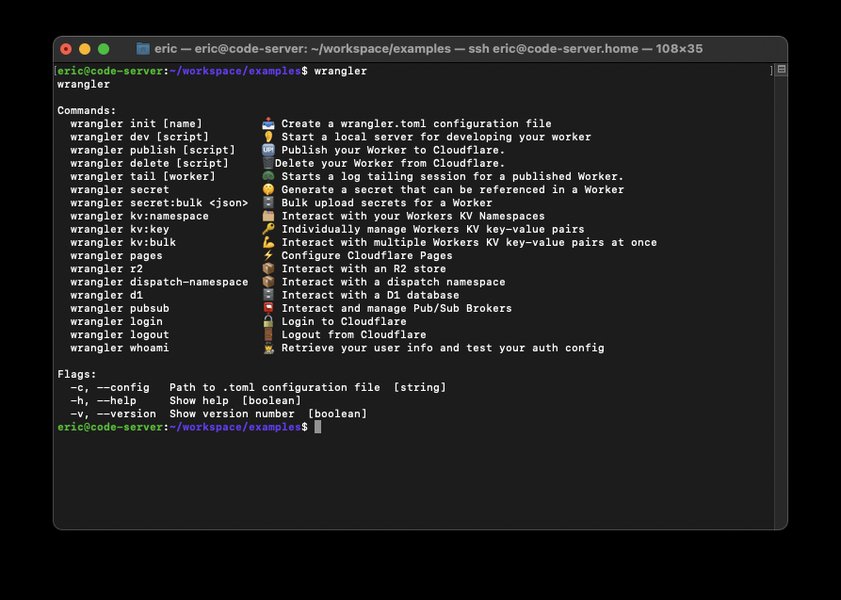
Wrangler CLI is your go-to tool for Cloudflare Workers development.
Integrating Cloudflare Workers with Neon PostgreSQL
Neon is a serverless PostgreSQL provider that offers a highly efficient way to manage databases for serverless applications. Its serverless driver (@neondatabase/serverless) is specifically designed for environments like Cloudflare Workers, using WebSockets for connections to overcome traditional TCP limitations.
Step 1: Install the Neon Serverless Driver
Add the Neon driver to your project dependencies:
npm install @neondatabase/serverlessStep 2: Secure Your Database Connection String
Your Neon database connection string is sensitive. Store it as a secret in your Cloudflare Worker using Wrangler:
npx wrangler secret put DATABASE_URLWrangler will prompt you to paste your connection string (e.g., postgres://user:[email protected]/main). For local development, create a .dev.vars file in your project root and add your connection string:
DATABASE_URL="postgres://user:[email protected]/main"Step 3: Code Example - Worker Querying Neon Postgres
Here’s a concise example of a Cloudflare Worker fetching data from a Neon PostgreSQL database. This worker connects to the database, executes a simple query, and returns the result.
src/index.ts (or .js)
import { Pool } from '@neondatabase/serverless';

export interface Env {
  DATABASE_URL: string;
}

export default {
  async fetch(request: Request, env: Env, ctx: ExecutionContext): Promise<Response> {
    const pool = new Pool({ connectionString: env.DATABASE_URL });

    try {
      const { rows } = await pool.query('SELECT NOW() as current_time;');
      // Important: Close the connection pool
      ctx.waitUntil(pool.end());

      return new Response(JSON.stringify({
        message: 'Successfully connected to Neon PostgreSQL!',
        currentTime: rows[0].current_time
      }), {
        headers: { 'Content-Type': 'application/json' },
      });
    } catch (err: any) {
      console.error('Error connecting to Neon PostgreSQL:', err);
      // Ensure pool is ended even on error, if initialized
      if (pool) ctx.waitUntil(pool.end());
      return new Response(JSON.stringify({
        error: 'Failed to connect to database',
        details: err.message
      }), {
        status: 500,
        headers: { 'Content-Type': 'application/json' },
      });
    }
  },
};
wrangler.toml (ensure compatibility date is recent)
name = "neon-db-worker"
main = "src/index.ts"
compatibility_date = "2025-05-21" # Or your project's date

# For secrets, they are managed via <code>wrangler secret put
# For local development, .dev.vars is used
# [vars]
# DATABASE_URL = "your_dev_database_url_if_not_using_.dev.vars"
This setup ensures your Worker can securely access your Neon database. The ctx.waitUntil(pool.end()) ensures the connection pool is closed gracefully after the response has been sent, preventing resource leaks.
Integrating Multiple Cloudflare Workers
Cloudflare Workers can communicate with each other using service bindings. This allows you to build modular applications where different Workers handle specific tasks. One Worker (e.g., a "main" Worker) can call another Worker (e.g., a "helper" Worker) as if it were an external service.
Step 1: Define Service Bindings in wrangler.toml
In the wrangler.toml file of the Worker that will be calling another Worker (the "main" Worker), define a service binding:
wrangler.toml (for the main Worker)
name = "main-api-worker"
main = "src/main-worker.ts"
compatibility_date = "2025-05-21"

[[services]]
binding = "HELPER_SERVICE" # This name will be used in the Worker's code (env.HELPER_SERVICE)
service = "helper-utility-worker" # The name of the other Worker deployed on Cloudflare
The service field must match the name of the target Worker as defined in its own wrangler.toml.
Step 2: Code Example - Main Worker Calling a Helper Worker
src/main-worker.ts (Main Worker)
export interface Env {
  HELPER_SERVICE: Fetcher; // Service binding for the helper worker
}

export default {
  async fetch(request: Request, env: Env, ctx: ExecutionContext): Promise<Response> {
    try {
      // Create a new request to send to the helper worker
      // You can pass along the original request or create a new one
      const helperRequest = new Request('https://placeholder-url/some-task', {
        method: 'POST',
        headers: request.headers, // Optionally pass headers
        body: JSON.stringify({ task: "process_data", details: "example" }),
      });

      const responseFromHelper = await env.HELPER_SERVICE.fetch(helperRequest);

      if (!responseFromHelper.ok) {
        return new Response('Error response from helper worker', { status: responseFromHelper.status });
      }

      const helperData = await responseFromHelper.json();

      return new Response(JSON.stringify({
        message: 'Main worker received data from helper worker',
        dataFromHelper: helperData,
      }), {
        headers: { 'Content-Type': 'application/json' },
      });
    } catch (error: any) {
      console.error('Error calling helper worker:', error);
      return new Response(JSON.stringify({ error: 'Failed to call helper worker', details: error.message }), {
        status: 500,
      });
    }
  },
};
src/helper-worker.ts (Helper Worker)
export default {
  async fetch(request: Request): Promise<Response> {
    // Example: Process incoming request
    const requestBody = await request.json().catch(() => ({}));
    const task = requestBody.task || 'unknown_task';

    // Perform some task based on the request
    const result = {
      status: 'success',
      message: <code>Helper worker processed task: ${task},
      timestamp: new Date().toISOString(),
    };

    return new Response(JSON.stringify(result), {
      headers: { 'Content-Type': 'application/json' },
    });
  },
};
Remember to deploy both Workers. The main-api-worker can then invoke helper-utility-worker using env.HELPER_SERVICE.fetch().
Combined Integration: Worker, Neon Postgres, and Another Worker
Now, let's combine these concepts. Imagine a scenario where a primary Worker receives a request, fetches some data from Neon PostgreSQL, and then passes this data to another Worker for further processing or logging.
Code Example - Combined Worker
src/combined-worker.ts
import { Pool } from '@neondatabase/serverless';

export interface Env {
  DATABASE_URL: string;
  PROCESSING_WORKER: Fetcher; // Service binding for the processing worker
}

export default {
  async fetch(request: Request, env: Env, ctx: ExecutionContext): Promise<Response> {
    const pool = new Pool({ connectionString: env.DATABASE_URL });
    let dbData;

    try {
      // Step 1: Query Neon Postgres
      const { rows } = await pool.query('SELECT user_id, user_name FROM users WHERE user_id = $1;', [123]); // Example query
      dbData = rows;
      ctx.waitUntil(pool.end()); // Ensure connection is closed

      if (!dbData || dbData.length === 0) {
        return new Response(JSON.stringify({ message: 'User not found' }), { status: 404 });
      }

      // Step 2: Forward or process data with another worker
      const processingRequest = new Request('https://placeholder-url/process', {
        method: 'POST',
        body: JSON.stringify({ userData: dbData[0] }),
        headers: { 'Content-Type': 'application/json' },
      });

      const processingResponse = await env.PROCESSING_WORKER.fetch(processingRequest);
      const processingResult = await processingResponse.json();

      // Step 3: Return combined response
      return new Response(JSON.stringify({
        originalUserData: dbData[0],
        processingStatus: processingResult
      }), {
        status: 200,
        headers: { 'Content-Type': 'application/json' }
      });

    } catch (error: any) {
      console.error('Operation failed:', error);
      if (pool) ctx.waitUntil(pool.end()); // Ensure pool is ended on error
      return new Response(JSON.stringify({ error: 'Combined operation failed', details: error.message }), { status: 500 });
    }
  },
};
wrangler.toml (for the combined Worker)
name = "combined-app-worker"
main = "src/combined-worker.ts"
compatibility_date = "2025-05-21"

# Secret for DATABASE_URL managed via <code>wrangler secret put

[[services]]
binding = "PROCESSING_WORKER"
service = "data-processor-worker" # Name of the worker that processes data
This combined worker demonstrates a more complex flow: retrieving data from a database and then dispatching it to another specialized worker, all orchestrated at the edge.
Visualizing the Architecture
Understanding the interplay between these components is crucial. The following mindmap illustrates a typical architecture involving a user request, a main Cloudflare Worker, Neon PostgreSQL, and a secondary Cloudflare Worker.
This mindmap shows how a request flows through the system, highlighting the main worker's role in coordinating database interactions and calls to other workers.
Comparative Analysis of Components
To better understand the strengths of each component in this serverless architecture, the radar chart below provides an opinionated comparison across several key aspects.
This chart highlights how Cloudflare Workers excel in edge performance and scalability. Neon Postgres provides excellent scalability and good security for database needs, while inter-worker communication facilitates modular and maintainable application design. Note that "Ease of Setup" and "Developer Experience" can be subjective but are generally positive for these technologies.
Deployment and Local Development
Deployment
Deploying your Workers is straightforward with Wrangler:
npx wrangler deployIf you have multiple workers (e.g., main-worker and helper-worker), you'll typically deploy each from its respective project directory. Ensure service bindings in wrangler.toml correctly reference the deployed names of other workers.
Local Development
For local development, especially when working with multiple Workers that communicate with each other, Wrangler provides a local development server:
npx wrangler devTo test multiple workers locally that use service bindings, you can run wrangler dev for each worker in separate terminal windows. Miniflare, the underlying simulator, supports these scenarios. Ensure your .dev.vars file is set up for local database connections if needed.
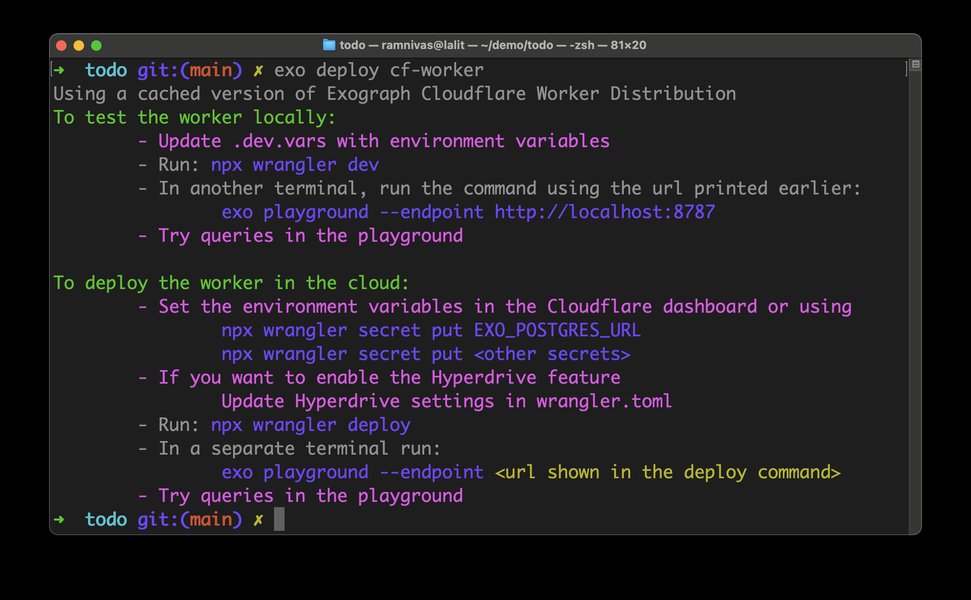
Conceptual diagram of deploying a worker to the Cloudflare edge network.
Key Commands and Configuration Summary
Here's a table summarizing some essential Wrangler CLI commands and wrangler.toml configurations for quick reference:
| Action | Wrangler Command / TOML Snippet | Description |
|---|---|---|
| Create New Worker | npx create-cloudflare@latest <name> |
Initializes a new Cloudflare Worker project. |
| Deploy Worker | npx wrangler deploy |
Deploys your worker to the Cloudflare network. |
| Local Development | npx wrangler dev |
Starts a local development server for your worker. |
| Set Secret | npx wrangler secret put <KEY> |
Securely stores an environment variable (e.g., database URL). |
| Define Environment Variable (local) | # .dev.vars file |
Sets environment variables for local development using wrangler dev. |
| Define Service Binding (TOML) | # wrangler.toml |
Enables one worker to call another worker. |
| Install Neon Driver | npm install @neondatabase/serverless |
Adds the Neon serverless driver to your project. |
Video Guide: Building a Serverless API with Cloudflare Workers and Neon
For a more in-depth visual guide on building serverless APIs using Cloudflare Workers, Drizzle ORM (which can be used with Neon), and Hono (a popular web framework for Workers), the following video provides excellent insights. It covers concepts similar to what we've discussed, focusing on database integration and API creation on the edge.
This video demonstrates practical application of Cloudflare Workers with a PostgreSQL compatible database (Neon), illustrating how to structure projects, manage environment variables, and build functional API endpoints.
Frequently Asked Questions (FAQ)
How do I secure my Neon PostgreSQL database credentials in Cloudflare Workers?
You should store your Neon database connection string as a secret using the Wrangler CLI: npx wrangler secret put DATABASE_URL. This encrypts the secret and makes it available to your Worker as an environment variable (e.g., env.DATABASE_URL) without exposing it in your code or wrangler.toml file. For local development, use a .dev.vars file, which should be added to your .gitignore.
What is the advantage of using Neon's serverless driver (@neondatabase/serverless) with Cloudflare Workers?
Neon's serverless driver is optimized for serverless environments like Cloudflare Workers. It uses WebSockets to manage database connections instead of traditional TCP, which can be problematic in some serverless runtimes due to connection limits or short-lived execution contexts. This approach ensures more reliable and efficient database connectivity from the edge.
Can I test inter-worker communication locally before deploying?
Yes, Wrangler's local development server (npx wrangler dev), powered by Miniflare, supports testing multiple Workers and their service bindings locally. You would typically run wrangler dev for each Worker in its respective project directory. The local environment will simulate the service bindings, allowing you to test the communication flow between your Workers.
What are service bindings in Cloudflare Workers, and why are they useful?
Service bindings allow one Cloudflare Worker to send requests to another Cloudflare Worker directly on Cloudflare's network, without the request having to go out to the public internet. This is useful for building modular applications by breaking down complex logic into smaller, independently deployable, and maintainable services. It improves performance and simplifies architecture for microservice-style applications on the edge.
Conclusion
Integrating Cloudflare Workers with Neon PostgreSQL and enabling communication between Workers provides a robust and highly scalable architecture for modern serverless applications. By leveraging Neon's serverless-friendly driver and Cloudflare's service bindings, developers can build complex, data-driven applications that run entirely on the edge, delivering exceptional performance and reliability. The concise code examples and setup instructions provided aim to kickstart your journey into this powerful ecosystem.
Recommended Further Exploration
- What are advanced error handling and logging strategies for Cloudflare Workers?
- How can I implement connection pooling effectively with Neon Postgres in Cloudflare Workers for high-traffic applications?
- What are the best practices for managing state and caching in distributed Cloudflare Worker applications?
- How do different data modeling techniques impact performance in serverless PostgreSQL databases like Neon?
References
Last updated May 21, 2025